Sigmatek / SQL4LASAL
Target: "Standard" / "UTF-16"
Requirements
All Sigmatek controls which support an open TCP/IP communication may be connected to SQL4automation.
The library has been tested with the SoftSPS Lars and a C-IPC.
The classes
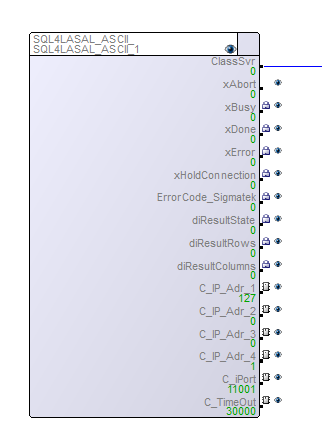
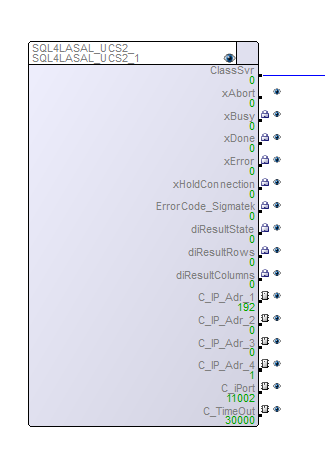
The sample project includes two classes. One class communicates with the SQL4automation Connector via UTF-8, the other via UTF-16. In case the UTF-8 class is used the “standard” target has to be selected in the Connector, for the UTF-16 the “UTF-16” target has to be selected.
Servers
The classes SQL4LASAL include the following servers:
xAbort              : DINT;  // Reset
xBusy               : DINT;  // Database query is running
xDone               : DINT;  // Database query completed
xError              : DINT;  // Database query ended with an error
xHoldConnection     : DINT;  // Keeps the socket connection open after a database query
ErrorCode_Sigmatek  : DINT;  // Sigmatek specific error code
diResultState       : DINT;  // Status database query / error number
diResultRows        : DINT;  // Number of received rows from the database query
diResultColumns     : DINT;  // Number of received columns from the database query
C_IP_Adr_1          : UDINT; // Configured IP address of the SQL4automation-Connectors position1
C_IP_Adr_2          : UDINT; // Configured IP address of the SQL4automation-Connectors position2
C_IP_Adr_3          : UDINT; // Configured IP address of the SQL4automation-Connectors position3
C_IP_Adr_4          : UDINT; // Configured IP address of the SQL4automation-Connectors position4
C_iPort             : UDINT; // Configured port number of the SQL4automation-Connectors
C_TimeOut           : UDINT; // Timeout
Methods
SendRequest
This method is used for the SQL request.
VAR_INPUT
    pRequest               : ^UINT;                        // Pointer request string
    pColumnsName           : ^UINT;                        // Pointer column name
    pTableValues           : ^UINT;                        // Pointer results table
    NumberOfRows           : UINT;                         // Number of received rows from the database query
    NumberOfColumns        : UINT;                         // Number of received columns from the database query
    SizeOfOneFieldInByte   : UINT;                         // String length in the table array
    pSQL4AutomationControl : ^SQL4AUTOMATION_CONTROL_TYPE; // Pointer return value status request
    HoldConnection         : BOOL;                         // Hold connection
END_VAR

VAR_OUTPUT
    result : INT; // Return value of the method
END_VAR
FormatString
This method may be used for the conversion of strings to SQL requests.
VAR_INPUT
    pDestination  : ^UINT; // Pointer to output string
    pSource       : ^UINT; // Pointer to input string
    Trim          : BOOL;  // Avoid space at the beginning and at the end
    MaxSizeInByte : UDINT; // Maximum number of characters
END_VAR

VAR_OUTPUT
    StrLng : UINT;
END_VAR
FormatDateTime
This method may be used for the conversion of DateTime types to SQL requests.
VAR_INPUT
    pDestination  : ^UINT;  // Pointer to output string
    pDate         : ^_DATE; // Pointer to input date
    pTime         : ^_TIME; // Pointer to input time
    MaxSizeInByte : UDINT;  // Maximum number characters
END_VAR
Sample project SQL4LASALSample
The sample project shows how the classes SQL4LASALASCII and SQL4LASALUCS2 are applied. The sample project is preconfigured in such a way that it runs on a SoftSPS Lars, SQL4automation Connector and Access database on the same PC. Three links have to be still created with the Config Tool.
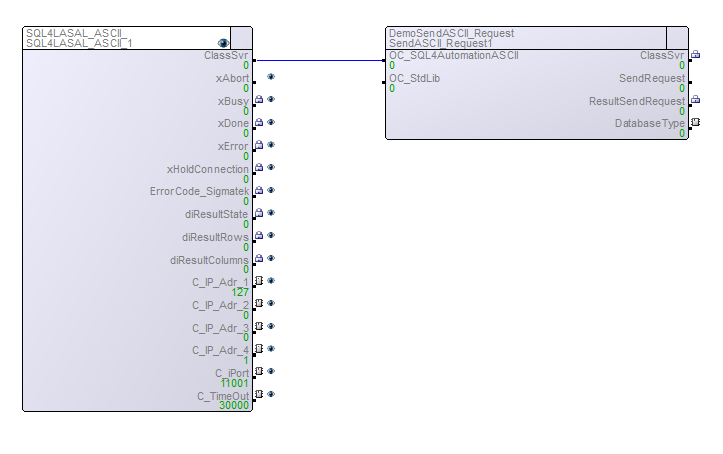
Link 1: Target Type: Standard, Connector IP: localhost, Port 11001, data source: ODBC connection to Access database. (Is used for the connection Net ASCII)
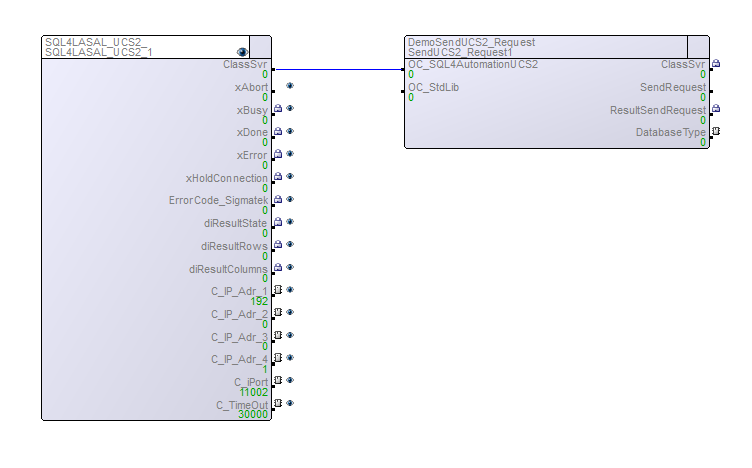
Link 2: Target Type: UTF-16, Connector IP: localhost, Port 11002, data source: ODBC connection to Access database. (Is used for NET UNICODE)
Link 3: Target Type: Standard, Connector IP: localhost, Port 11003, data source: ODBC connection to Access database. (Is used for NET Cyclic)
The connector has to be started and the connection to the sample database “S4A_Test_DB.mdb” has to be configured.
The configuration of the connection to the database is described in Setting up the connection to the test database.
NET ASCII
This example shows how a UTF-8 connection to the SQL4automation is established. The following options may be set: database type: 0=example database MS Access, 1=MySQL, 2=MS SQL server, SendRequest: -1= SELECT command, 0=create new table (only MySQL and MS SQL server), 1 = INSERT command.
NET UNICODE
This example shows how a UTF-16 connection to the SQL4automation is established. The following options may be set: database type: 0=example database MS Access, 1=MySQL, 2=MS SQL server, SendRequest: -1= SELECT command, 0=create new table (only MySQL and MS SQL Server), 1 = INSERT command.
NET Cyclic
This example shows how data can be written into the database cyclically and should also illustrate the performance of the Sigmatek controls in connection with SQL4automation. Options: diStart >0:INSERT commands are executed.
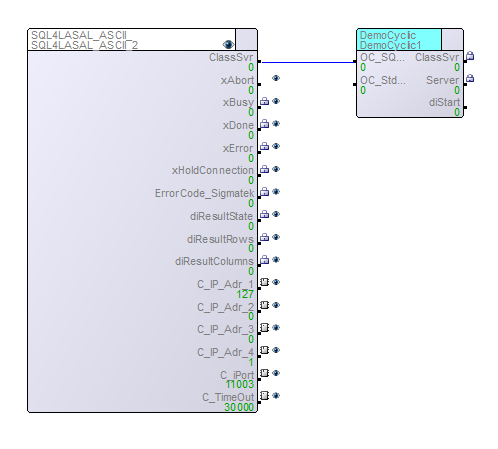
Adjustments Hardware SPS
In case a hardware SPS is used, the IP of the network card which is connected to the control has to be selected in the link settings under Connector IP. The same IP also has to be selected for the SQL4LASA_ASCII and SQL4LASAL_UCS2 instances under NET.