Siemens S7-1200/1500 V4 / TIA13
Target: "Siemens S7"
Requirements
The communication works on Siemens S7-1200 / 1500 control systems via the Profinet interface.
The following blocks are needed for the connection to the Connector:
• All blocks in the «Program blocks» folder 🡪 «SQL4Siemens»
• MOVE_BLK_VARIANT
• TRCV_C (only for S7-1200)
• TSEND_C
• All data types in the «PLC data types» folder 🡪 «SQL4Siemens»
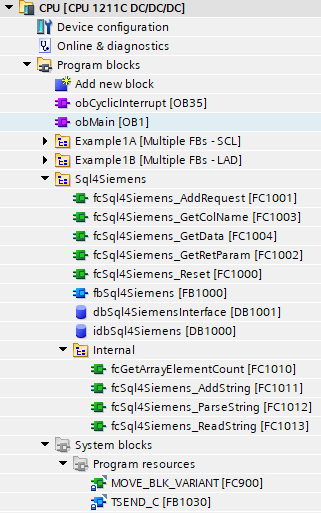
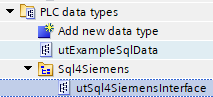
Keep in mind that the block «fbSql4Siemens» for the S7-1200 is different to the one for the S7-1500. The reason for this is that the data reception for the two control system generations had to be solved differently since the Siemens TRCV-blocks have different parameters.
Therefore, there is an individual sample project for each control system generation.
Calling fbSql4Siemens
The «fbSql4Siemens» block is called up cyclically. We therefore advise you to do this with a time-controlled OB (e.g. OB35, T=10ms). The following parameters are set:
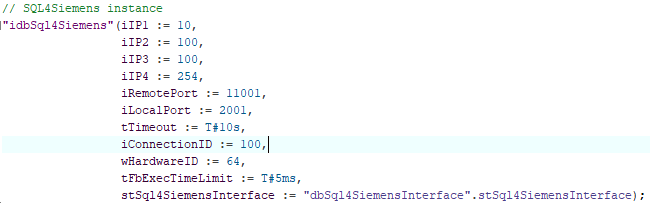
Parameter von fbSql4Siemens
iIP1                   : INT;                          // 1. Position of the configured IP address of the connector
iIP2                   : INT;                          // 2nd Position of the configured IP address of the connector
iIP3                   : INT;                          // 3rd Position of the configured IP address of the connector
iIP4                   : INT;                          // 4th Position of the configured IP address of the connector
iRemotePort            : INT;                          // Eingestellte Port-Nummer des Connectors
LocalPort              : INT;                          // Port, der lokal auf der Steuerung verwendet wird
tTimeout               : TIME;                         // Timeout (Standard: 10 Sekunden)
iConnectionID          : INT;                          // Eindeutige ID der Verbindung
wHardwareID            : BYTE;                         // ID der Ethernet-Schnittstelle (Details, siehe unten)
tFbExecTimeLimit       : TIME;                         // Maximal nutzbare Zeit pro Zyklus
stSql4SiemensInterface : utSqlSiemensInterface;        // Anfrage-/Antwort-Struktur
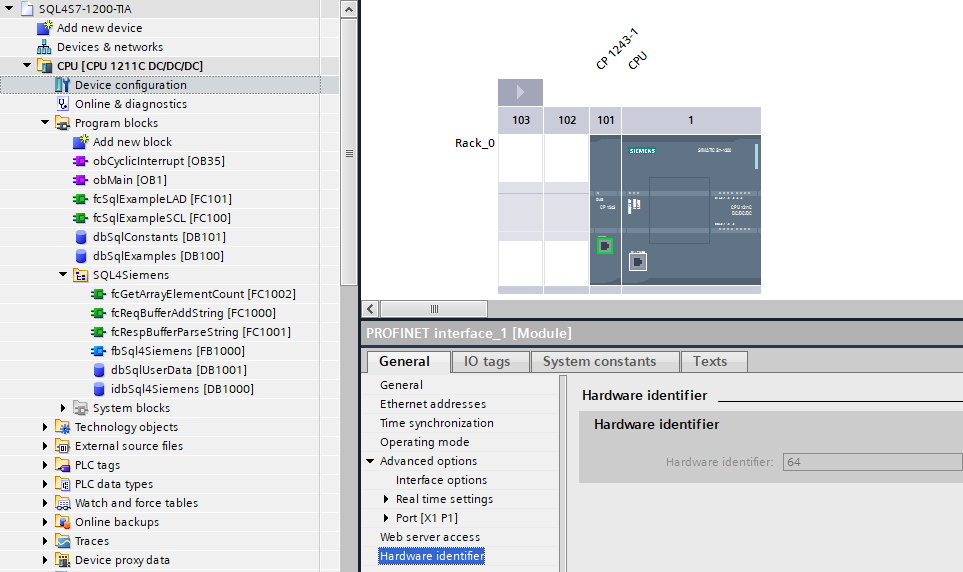
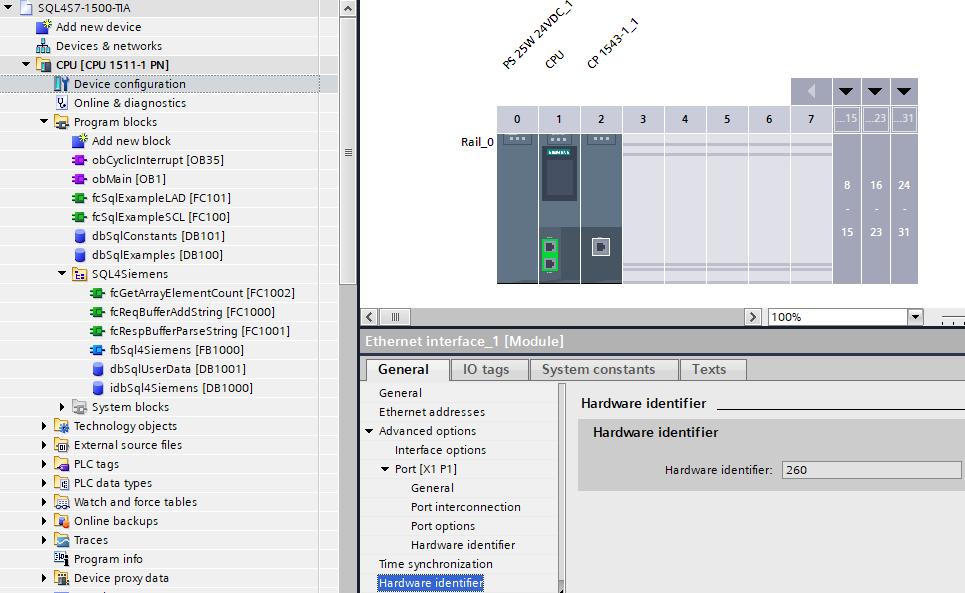
wHardwareID ermittlen: Die Hardware-ID ist in der Gerätekonfiguration ersichtlich. Beim Selektieren der gewünschten Schnittstelle werden die Details eingeblendet.
Beispiel einer 1200 OnBoard-Schnittstelle:
Beispiel einer 1500 CP-Schnittstelle:
Data modules
idbSql4Siemens – instance data module for the internal usage of the Sql4Siemens function block.
dbSqlUserData – user data such as request string array or response string table
Data types (UDT)
utSqlUserRequestST – contains the request string array and its corresponding size.

utSqlUserResponseST – contains the response string table and information concerning the number of columns, the number of records and string length.

utSqlRequestBuffer – data buffer for sending the SQL-requests. The size of the data structures is automatically determined in the «fbSql4Siemens» block.

utSqlResponseBuffer – data buffer for receiving the SQL-responses. The size of the data structures is automatically determined in the «fbSql4Siemens» block.

These data types can be adjusted according to the project. The array / data structure sizes are determined according to the amount of data to be read or written
Configuration of the Connector
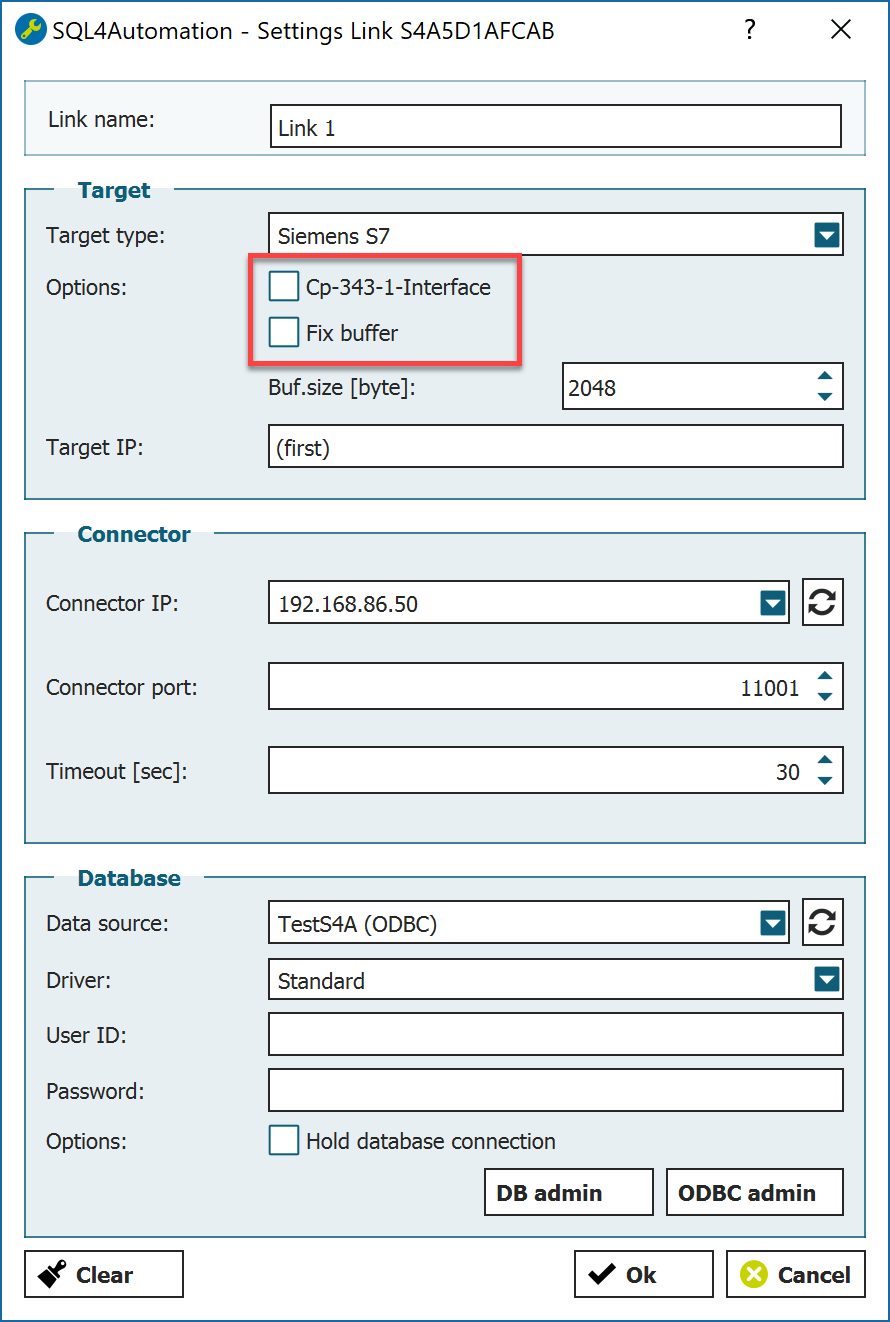
Further options need to be defined for the selected Siemens-Target in the Connector:
-
Receive buffer Size of the receive buffer in the utSqlResponseBuffer
-
CP 343-1 Interface Deactivate
-
Fix Buffer Deactivate
Ethernet interface settings
In order to establish a communication via the Ethernet interface on the CPU and the Connector, it has to be parameterised. The IP address of the Ethernet interface must be in the same network address range with the same subnet mask as the Connector.
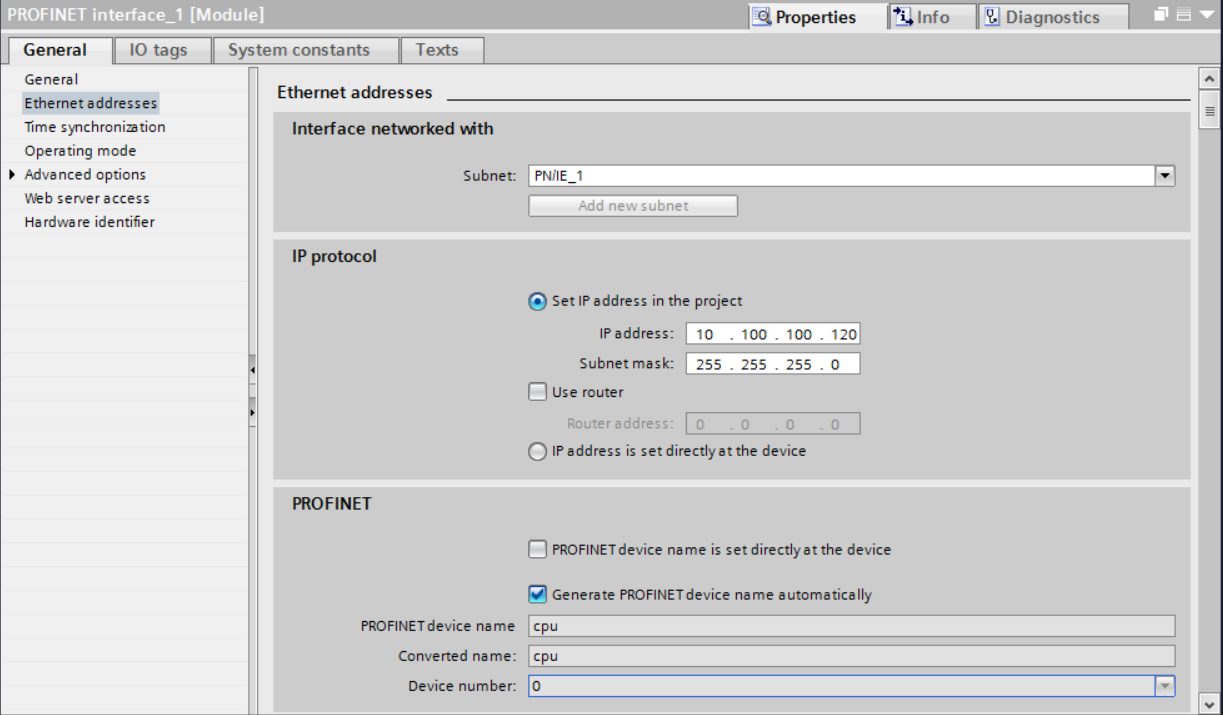
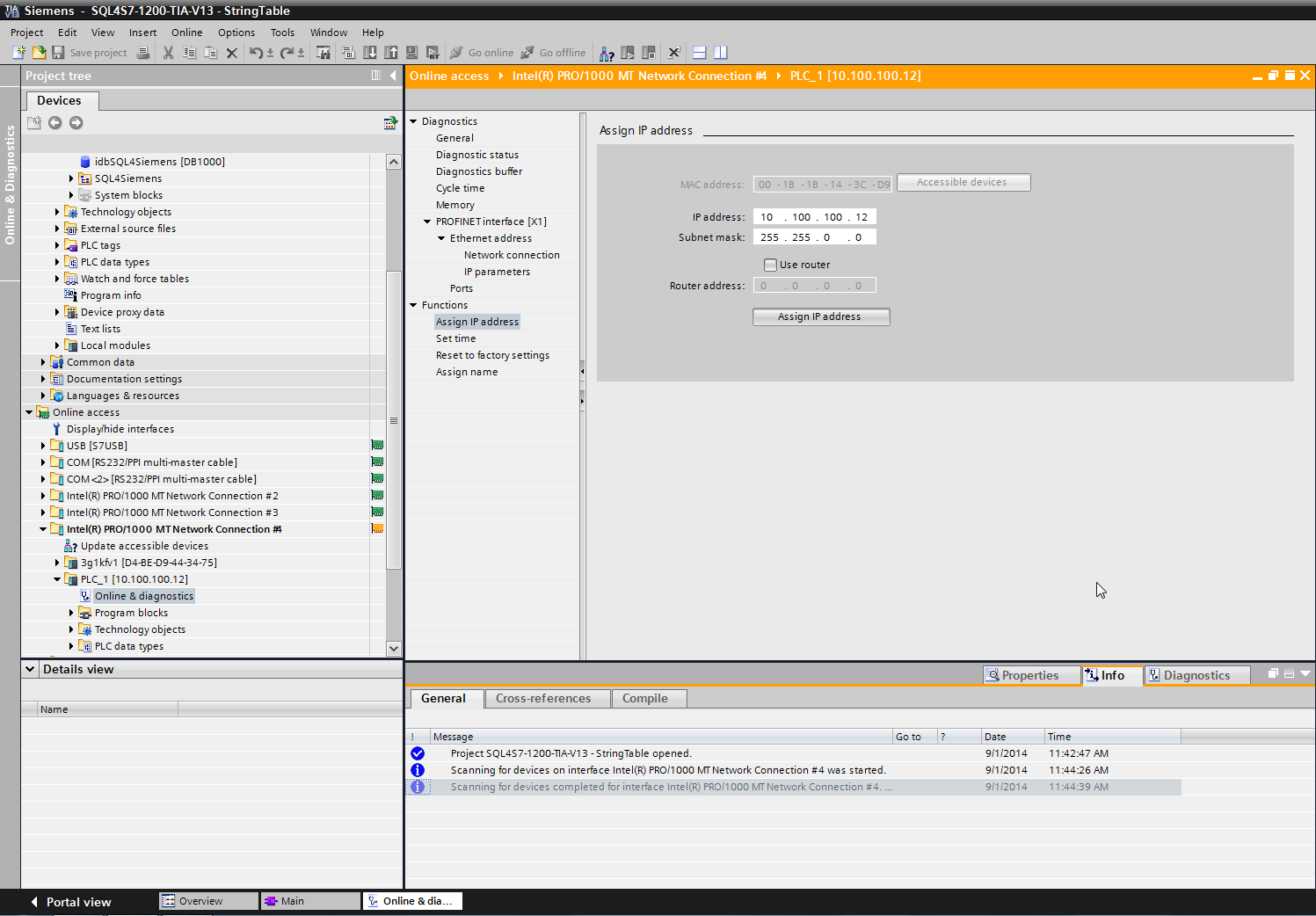
The different network cards can be found under “Online access”. Select the network card, which is connected to the control and scan the network via “Update accessible devices”. The control appears. A new IP address and a subnet mask can be assigned under “Functions”, “Assign IP address” and sent to the control via the button “Assign IP address”.
The sample project
The function blocks contained in the example project were programmed using both SCL and LAD. However, the functionality is the same in both cases. In our opinion, the SCL language is more compact and easier to read, so we will only discuss the SCL variant below.
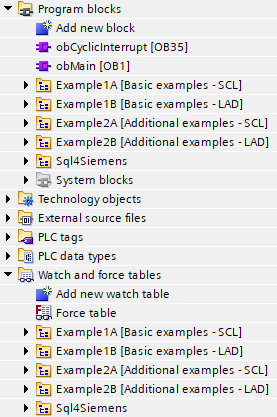
All function modules have in common that they have an execute interface and a reference to an Sql4SiemensInterface:
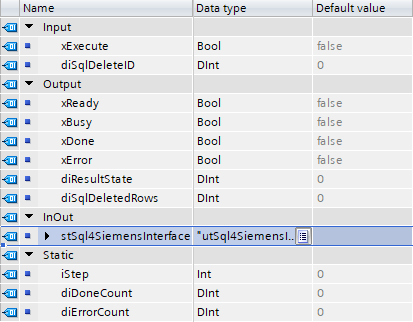
Communication with the database is initiated via the “xExecute” signal. The status is reported back via the “xReady,” “xBusy,” “xDone,” and “xError” signals.
The logic within the block is controlled by a small step chain (variable “iStep”).:
-
iStep = 0 (Inactive): There is no active communication with the database.
-
iStep = 1 (Create the request): In this step, the system waits until the interface is free. As soon as this is the case, the SQL query is created according to the customer application and the “xExecute” signal is set. The SQL4automation framework then sends the telegram to the database..
-
iStep = 2 (Parse the response): In this step, the system waits for a response from the connector. If data is returned, it can be evaluated if the execution is successful. In the event of an error or if no response is received from the connector, a corresponding error message is displayed.
-
iStep = 3 (Reset execute signal): In this step, the system waits for the “xExecute” signal to be reset, whereupon the step chain is returned to its default state “Inactive.”.
The communication principle is the same for all example modules. The PLC sends a request to the database and receives a response. The data flow is secondary—data can be read from the database (SELECT) or written to it (INSERT, UPDATE).
The exact syntax of the SQL command is determined on the one hand by the database model and on the other hand by the task to be performed.
Creating a request (query to the database):
-
Example of a SELECT command (fbExample1A_Select_SCL).

-
Example of an INSERT command (fbExample1A_Insert_SCL). The variable values are converted at runtime using Convert functions.

Parsing of response (Response from database):
-
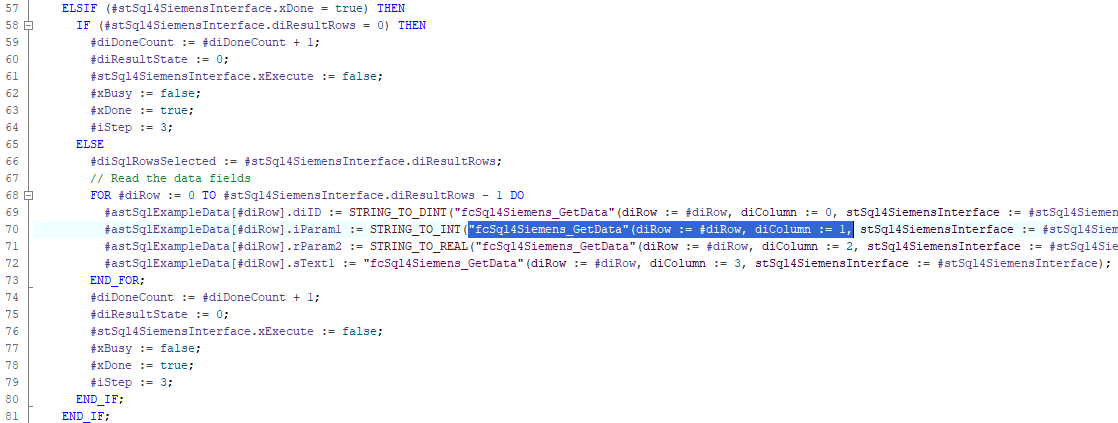
The response telegram is checked for correctness upon receipt. Important information is stored internally and is available to the user for reading the data.:
-
stSql4SiemensInterface.diResultState: 0: no error >0: Errorcode
-
stSql4SiemensInterface.diResultRows: Number of records in the response telegram
-
stSql4SiemensInterface.diResultColums: Number of data columns in the response telegram
-
-
The following functions are available for reading the data:
-
fcSql4Siemens_GetData: Returns the corresponding data field. The row index and column index are 0-based..
-
fcSql4Siemens_GetColName: Returns the column name based on the corresponding column index. The column index is 0-based. The column names can be used, for example, to check plausibility, i.e., whether the data is returned in the expected order.
-
-
Example (fbExample1A_Select_SCL)