KUKA / SQL4KUKA
Target: "KUKA"
SQL4KUKA consists of sql4kuka.xml, the configuration file for the Ethernet XML communication, sql4kuka.src / sql4kuka.dat, the library for connection to the SQL4automation Connector and the example.src / example.dat, the sample program.
Requirements
SQL4KUKA is possible from the KRC4 control system and up, and is established via the Ethernet KRL XML Interface, which is available from KUKA as an option.
Installing the Interface
In order to install the interface, the HMI must be minimized and the EKI Network Editor must be started. For minimizing the HMI, the user must be logged in as Expert. Via Robot – Setup – Service – Minimize HMI, the user gets to the Windows environment of the SMARTPAD.
Under Start - EKI-Network, the EKI Network Editor is started.
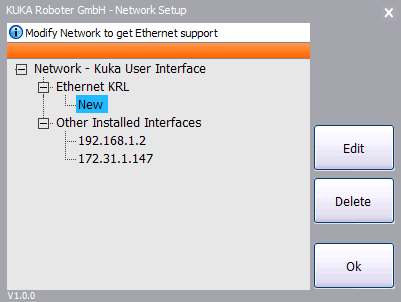
In the EKI Network Editor, the local IP of the TCP/IP connection is configured.
Highlight the entry New, and edit with Edit.
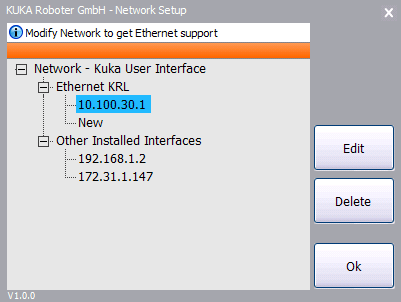
Enter the local IP, and confirm by clicking OK.
To apply the changes, the control system must be restarted with the option “Apply changes upon cold boot”.
In the sql4kuka.xml, the IP and the port of the Connector are configured:
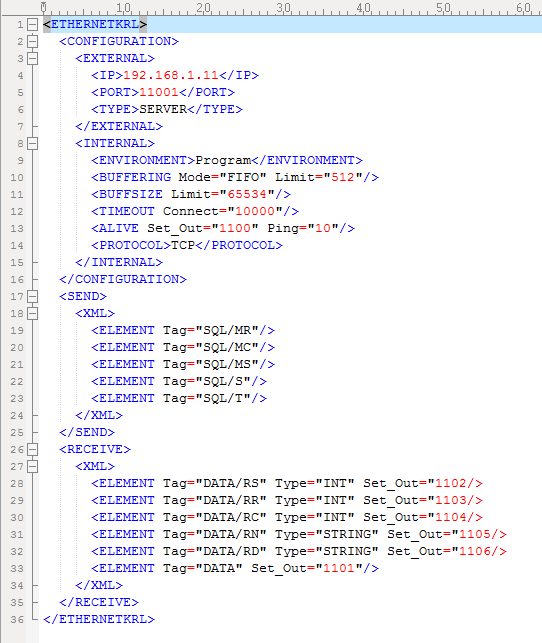
sql4kuka.xml
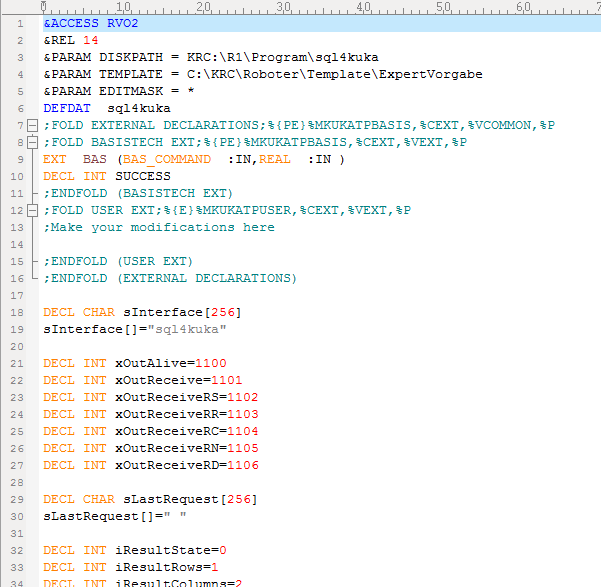
Sql4kuka.dat
For the communication with the library, 7 free digital output ports are required. These must correspond with each other in the sql4kuka.xml, and the sql4kuka.dat.
The file sql4kuka.xml must be located under \krc\roboter\config\user\common\EthernetKRL, example.src, example.dat, and the folder sql4kuka must be copied to directory \krc\roboter\krc\r1\program.
After a cold reboot, the sample can be tested.
Help Functions SQL4KUKA
The library sql4kuka.src offers many useful help functions for the copying of values and the compounding of strings.
Creating a new Request String
EXTFCT BOOL NewRequest(CHAR[]:OUT, CHAR[]:IN)
Adding a BOOL to the Request String
EXTFCT BOOL BOOL_To_Request(CHAR[]:OUT, BOOL:IN)
Adding an INT to the Request String
EXTFCT BOOL INT_To_Request(CHAR[]:OUT, INT:IN)
Adding a REAL to the Request String
EXTFCT BOOL REAL_To_Request(CHAR[]:OUT, REAL:IN)
Adding a CHAR to the Request String
EXTFCT BOOL CHAR_To_Request(CHAR[]:OUT, CHAR:IN)
Adding a STRING to the Request String
EXTFCT BOOL STRING_To_Request(CHAR[]:OUT, CHAR[]:IN)
Converting a Value from the Return Table into a BOOL
EXTFCT BOOL Table_To_BOOL(INT:IN, INT:IN, BOOL:OUT)
Converting a Value from the Return Table into an INT
EXTFCT BOOL Table_To_INT(INT:IN, INT:IN, INT:OUT)
Converting a Value from the Return Table into a REAL
EXTFCT BOOL Table_To_REAL(INT:IN, INT:IN, REAL:OUT)
Converting a Value from the Return Table into a CHAR
EXTFCT BOOL Table_To_CHAR(INT:IN, INT:IN, CHAR:OUT)
Converting a Value from the Return Table into a STRING
EXTFCT BOOL Table_To_STRING(INT:IN, INT:IN, CHAR[]:OUT)
\