CODESYS V3 / SQL4CODESYSV3
Target: "Standard" / "UTF-16"
Requirements
This target requires CODESYS 3.5.11.0 as a minimum. The function block fbSQL4Codesys uses the following libraries:
-
Memory V3.5.7.0
-
Network V3.5.7.0
-
Standard V3.5.9.0
-
SysMem 3.5.5.0
-
SysTypes2 Interfaces 3.5.4.0
The sample project can be executed on the Soft-PLC “CODESYS Control Win V3”, or on a hardware-PLC. However, it is required that the control system has a TCP/IP connection, and that it supports the above libraries.
Installing the library
The library «S4A_SQL4CodesysV3.compiled-library» is installed via the project archive «S4A_SQL4CODESYS_Sample.projectarchive».
Calling up fbSQL4CODESYS
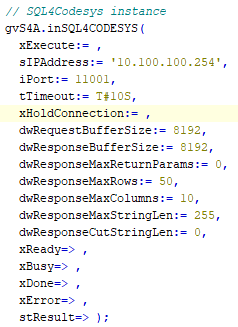
Parameters of fbSQL4CODESYS
Description of the interface signals:
xExecute                  : BOOL;        // Start Database request
sIPAddress                : STRING(15);  // Set IP-Address of the SQL4automation-Connector
iPort                     : INT;         // Set Port-Number of the SQL4automation-Connector
tTimeout                  : TIME;        // Timeout
xHoldConnection           : BOOL;        // Holds Socket connection open after Database request
dwRequestBufferSize       : DWORD;       // Size of the request databuffer
dwResponseBufferSize      : DWORD;       // Size of the response databuffer
dwResponseMaxReturnParams : DWORD;       // Maximum number of return parameters
                                          // (Connector version >= 4.0, default 0)
dwResponseMaxRows         : DWORD;       // Maximum number of rows in the database query response
dwResponseMaxColumns      : DWORD;       // Maximum number of columns in the database query response
dwResponseMaxStringLen    : DWORD;       // Maximum string length in the database query response
dwResponseCutStringLen    : DWORD;       // Strings in the response are truncated to the appropriate length
                                          // (0=inactive)
xReady                    : BOOL;        // Ready for Database request
xBusy                     : BOOL;        // Database request in process
xDone                     : BOOL;        // Database request completed
xError                    : BOOL;        // Database request resulted in an Error
stResult.diResultState    : DINT;        // Status Database request / Error number
stResult.dwResultRows     : DWORD;       // Num. returned Rows from the Database request
stResult.dwResultColumns  : DWORD;       // Num. returned Columns from the Database request
Error Codes Return-Value
The variable “diResultState” describes the error.
| Error Number | Error Description |
|---|---|
| 1 | Unknown SQL Command |
| 2 | Request returns more datasets than defined by diMaxRows, modify request or increase diMaxRows |
| 3 | Request returns more columns than defined by diMaxColumns, modify request or increase diMaxColumns |
| 5 | Request returns minimal one value that is bigger than defined by MaxStringLength, modify request or increase MaxStringLength |
| 10 | Internal Connector error |
| 11 | Internal Connector error, cannot open database |
| 21 | No IP-address defined/ sIPAddress=’’ |
| 22 | No port number defined / iPort=0 |
| 23 | Request string is empty |
| 24 | Number MaxRows not defined / dwResponseMaxRows=0 |
| 25 | Number MaxColumns not defined / dwResponseMaxColumns=0 |
| 41 | No connection to SQL4automation-Connector established. Turn off Firewall. |
| 51 | Request string is greater than the send buffer. (diSendDataBuffer) |
| 99 | Timeout |
| >100 | Error numbers of the ODBC database connection (some known error numbers are attached) |
| 40002 | General error during SQL request, request string is invalid |
The sample project
The sample project can be obtained from the download area of SQL4automation (http://www.SQL4automation.com) or via the CODESYS store (https://store.codesys.com).
The library «S4A_SQL4CodesysV3.compiled-library» is installed when the project archive is opened.
The example can be tested very easily on a «CODESYS Control Win V3» controller.
The sample program should be started prior to making adaptations to the own application.
This makes finding possible error sources easier.
Adapt the IP address and the remote port to your system while opening the function block «fbSQL4CODESYS» in the program «prgUncritical».
The Connector must be running and the connection to the sample database «S4A_Test_DB.mdb» must be
configured.
The configuration of the connection to the database is described in Setting up the connection to the test database.
The sample programs «basic examples» show the 4 basic SQL commands (SELECT, INSERT, UPDATE, DELETE) as week as the handling of the SQL data.
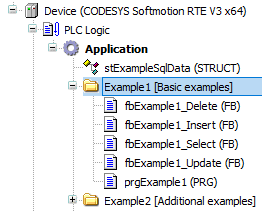
All function blocks have in common that they have an execute interface and a reference to a Sql4Codesys instance:
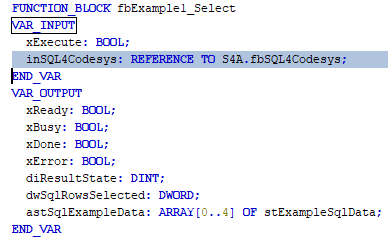
The "xExecute" signal triggers the communication with the database. The status is returned via the signals "xReady", "xBusy", "xDone" and "xError".
The logic within the block is controlled by a small step sequence (variable «iStep»):
-
iStep = 0 (Inactive): No communication to the database is active
-
iStep = 1 (Create the request): This step waits until the interface is free. As soon as this is the case, the SQL query is created according to the customer application and the signal «xExecute» is set. The SQL4automation framework sends the telegram to the database.
-
iStep = 2 (Parse the response): This step waits for a response from the connector. If data is returned, it can be evaluated on successful completion. In the event of an error or if no response from the connector arrives, a corresponding error message is output.
-
iStep = 3 (Reset execute signal): In this step, the system waits for the "xExecute" signal to be reset, whereupon the sequencer is returned to the "inactive" initial state.
The communication principle is the same for all example blocks. The PLC sends a request to the database and receives a response. The data flow is secondary - data can be read from the database (SELECT) or written (INSERT, UPDATE). The exact syntax of the SQL command is determined on the one hand by the database model and, on the other hand, by the task to be executed.
Creating a request (request to the database):
-
Example of a SELECT command (fbExample1_Select).
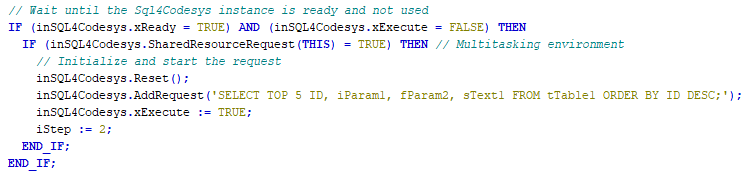
-
Example of an INSERT command (fbExample1_Insert). The variable values are converted with run-time convert functions.
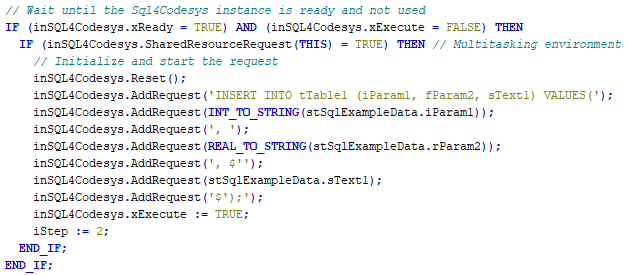
Parsing the Response (Response from the Database):
-
The response telegram is checked for correctness on receipt. Important information is stored internally and the user has to read out the data:
-
inSQL4Codesys.stResult.diResultState: 0: no error > 0: error code
-
inSQL4Codesys.stResult.dwResultRows: Number of data records in the response telegram
-
inSQL4Codesys.stResult.dwResultColums: Number of data columns in the response telegram
-
-
To read the data, the following methods are available:
-
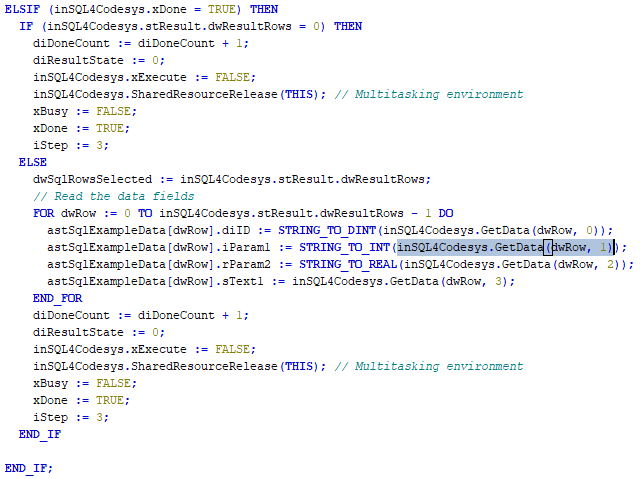
inSQL4Codesys.GetData (): Returns the corresponding data field. The row index and the column index are 0 based.
-
inSQL4Codesys.GetColumnName (): Returns the column name based on the corresponding column index. The column index is 0 based. For example, the column names can be used to validate whether the data is returned in the expected order.
-
-
Example (fbExample1_Select)
The ConnectionObserver
The ConnectionObserver is part of the sample application and can be used optionally if required.
With the standard application (without ConnectionObserver), the connection to the database is opened before each request and closed again immediately after each request. In the case of short-term high data volumes, this is not particularly efficient and it would be better not to close an existing connection. In the event of technical problems (e.g., connection interruptions), this approach has the disadvantage of making the solution more prone to failure.
The ConnectionObserver provides a tool for closing connections that are kept open as needed or keeping them open without causing system-related error messages.
When ConnectionObserver is activated, it sets the parameter “xHoldConnection” to TRUE for any request from the control. This means that the connection is no longer closed after execution.
If ConnectionObserver detects during monitoring that a connection has been kept open and unused for the duration of “tTimeout,” it takes action according to its configuration:
- Parameter «xCloseConnection» = TRUE
A “dummy select query” is sent to the database. At the same time, the “xHoldConnection” parameter is set to FALSE. This causes the connection to be closed after the query.
- Parameter «xCloseConnection» = FALSE
A “dummy select query” is sent to the database. Since the “xHoldConnection” parameter is not changed, the connection remains open. Sending new data does not trigger a timeout on the connection and therefore no system error messages are generated. Because the connection is kept open, the ConnectionObserver repeats its action when the timeout is reached again. However, if the application transfers user data, it remains passive and does not take action.