B&R / SQL4BR
Target: "Standard"
Requirements
-
B&R Automation Studio V3.0.80.25 or higher
-
Automation Runtime V3.00 or higher
Implementing the Library into the B&R Automation Studio
To implement the library into the B6R Automation Studio, it must be copied into the Library directory of Automation Studio. Per default, this directory is located under: C:\Programme\BrAutomation\AS\Library
Integrating the SQL4BR Library into the Application Program
After a new project has been created, the SQL4BR library must be added to the project. The libraries AsTCP, asstring and standard are automatically integrated.
Global Variables
VAR CONSTANT
    diUBoundRequestArray  : DINT := 5;   (* UpperBoundary Request-String-Array, must be attributed the same value as diUBoundRequestArray of the Library *)
    diRequestStringLength : DINT := 256; (* String-Length Request-String-Array, must be attributed the same value as diRequestStringLength of the Library *)
END_VAR

VAR
    saRequest : ARRAY[1..diUBoundRequestArray] OF STRING[diRequestStringLength]; (* Request String Array *)
END_VAR
Instance / Interface
The following Variables can be configured in the file SQL4BR.var:
VAR CONSTANT
    diMaxRows             : DINT := 50;  (* max Number Datasets, from Table-Array *)
    diMaxColumns          : DINT := 15;  (* max Number Columns, from Table-Array *)
    diStringLength        : DINT := 256; (* String-Length in the Table-Array *)
    diUBoundRequestArray  : DINT := 5;   (* UpperBoundary Request-String-Array *)
    diRequestStringLength : DINT := 256; (* String-Length Request-String-Array *)
    diReadDataBuffer      : DINT := 1024; (* Databuffer for Reading the Data *)
    diWriteDataBuffer     : DINT := 1024; (* Databuffer for Writing the Data *)
END_VAR
The SQL4BR contains the following input and output variables:
VAR_INPUT
    xExecute        : BOOL;                                                    (* Executing the SQL Request *)
    xAbort          : BOOL;                                                    (* Reset *)
    sIPAddressPLC   : STRING[15];                                              (* IP address of the PLC *)
    sIPAddressCon   : STRING[15];                                              (* IP address of the Connector *)
    iPort           : INT;                                                     (* Port Number of the SQL4automation-Connectors *)
    xHoldConnection : BOOL;                                                    (* Hold connection to the Connector *)
    timTimeOut      : TIME;                                                    (* Timeout in Seconds, Default 30s *)
    saRequest       : ARRAY[1..diUBoundRequestArray] OF STRING[diRequestStringLength]; (* SQL Request String-Array *)
END_VAR

VAR_OUTPUT
    xReady          : BOOL;                                                    (* Ready for SQL Request *)
    xBusy           : BOOL;                                                    (* SQL Request in process *)
    xDone           : BOOL;                                                    (* SQL Request completed *)
    xError          : BOOL;                                                    (* SQL Request resulted in an Error *)
    diResultState   : DINT;                                                    (* Status of result / Error number *)
    diResultRows    : DINT;                                                    (* Number Result-Datasets *)
    diResultColumns : DINT;                                                    (* Number Result-Columns *)
    saColumnsName   : ARRAY[1..diMaxColumns] OF STRING[diStringLength];        (* Column names *)
    saTableValues   : ARRAY[1..diMaxRows,1..diMaxColumns] OF STRING[diStringLength]; (* Data-Array *)
    diCycle         : DINT;                                                    (* Cycle-Time *)
END_VAR
Creating an Instance
Creating an instance of the SQL4BR library and local variables.
VAR
    SQL4automation  : SQL4BR;
    xExecute        : BOOL;
    xAbort          : BOOL;
    sIPAddressPLC   : STRING[15] := '127.0.0.1';
    sIPAddressCON   : STRING[15] := '127.0.0.1';
    iPort           : INT := 11001;
    xHoldConnection : BOOL := FALSE;
    timTimeOut      : TIME := T#30s;
    xReady          : BOOL;
    xBusy           : BOOL;
    xDone           : BOOL;
    xError          : BOOL;
    diResultState   : DINT;
    diResultRows    : DINT;
    diResultColumns : DINT;
    diCycle         : DINT;
    sAnswerSample   : STRING[diRequestStringLength];
END_VAR
Error Codes Return-Value
The variable “diResultState” describes the error.
| Error Number | Error Description |
|---|---|
| 1 | Unknown SQL Command |
| 2 | Request returns more datasets than defined by MaxRows, modify request or increase MaxRows |
| 3 | Request returns more columns than defined by MaxColumns, modify request or increase MaxColumns |
| 5 | Request returns minimal one value that is bigger than defined by MaxStringLength, modify request or increase MaxStringLength |
| 10 | Internal Connector error |
| 11 | Internal Connector error, cannot open database |
| 21 | No IP address PLC and/oder Connector defined |
| 22 | No port number defined |
| 23 | Request string is empty |
| 24 | Number MaxRows not defined |
| 25 | Number MaxColumns not defined |
| 26 | Size MaxStringLength not defined |
| 27 | Number MaxBytes not defined |
| 28 | Too much data was written to the send data buffer |
| 41 | Error during opening the Control system port |
| 42 | No connection to SQL4automation-Connector established. Turn off Firewall. |
| 51 | Error during sending of request |
| 71 | Connection to the SQL4automation-Connector cannot be closed |
| 99 | Timeout |
| >100 | Error numbers of the ODBC database connection (some known error numbers are attached) |
| 40002 | General error during SQL request, request string is invalid |
Sample Project SQL4BRSample
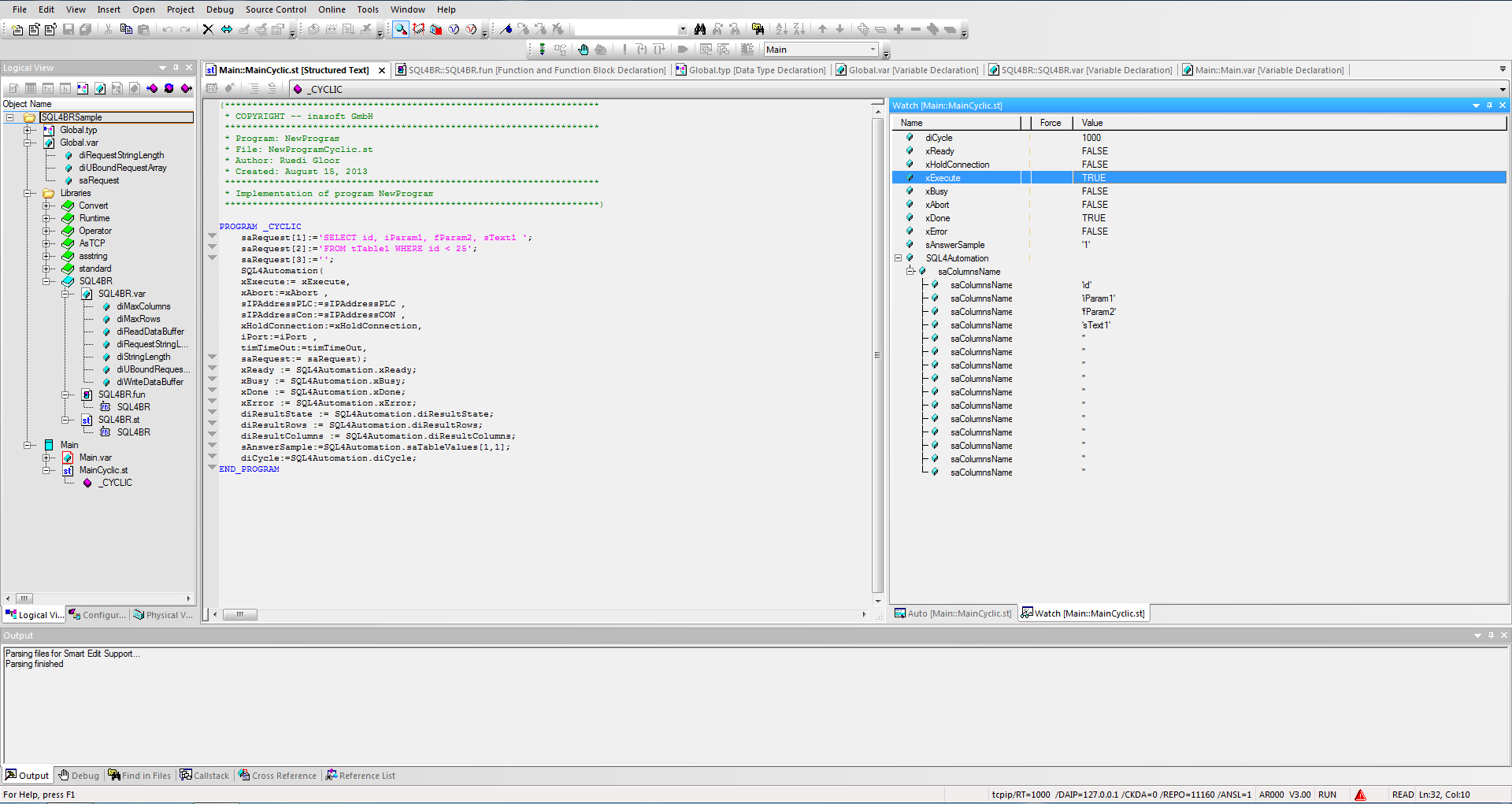
The SQL4BR Library has already been integrated into the sample project SQL4BRSample. The project can be tested on the Soft PLC AR000 which is contained in B&R Automation Studio. The connector must be started, and the connection to the sample library “S4A_Test_DB.mdb” must be configured.
The configuration of the connection to the database is described in Setting up the connection to the test database.
By forcing xExecute, the program can be tested. In the case of an error, the connection can be reset by forcing xAbort.