Allen Bradley / Rockwell / SQL4RSLogix
Target: "Standard"
Requirements
The Add-On “SQL4automation” uses an Ethernet/IP socket connection to the Connector. For this reason, the control system must support Ethernet/IP sockets. The following Ethernet communication modules support Ethernet/IP sockets: 1756-EWEB, 1756-EN2Txx, 1768-EWEB (CompactLogix). Also, control systems can be used which feature an integrated Ethernet/IP interface on the CPU.
The sample projects are devised for the controller 1756-L63 ControlLogix5563, and for a 1769-L18ER-BB1B CompactLogix5318ERM-BB1B. However, these sample projects can be easily adapted to other controller types by simply changing the controller. For a ControlLogix, use the ControlLogix example, for a CompactLogix, use the CompactLogix example.
If you already have an existing project, you can carry out the steps described in the following sections. Otherwise, you can immediately open the finished project “8.15.9 Sample Project”.
Importing Add-On and Tags
The Add-On “SQL4automation” can be imported using the import function “Import Add-On Instruction…” (right mouse button: Controller Organizer - Add-On Instructions) (AddOn_SQL4automation_v3.x.x.x.L5X). As an additional function, a REAL-TO-STRING function is included.
Additionally, the missing tags can be added via menu “Tool – Import – Tags and Comments…” (Sample_S4A_CxxxxxxLogix_xxxxxxx-Controller-Tags and Sample_S4A_CxxxxxLogix_xxxxxxx-MainProgram-Tags).
Add-On (Function Block)
This Add-On enables the connection of the SQL4Automation Connector to a database
Data Types
Some data types can be adjusted for project-specific purposes. Depending on the size of the data to be read or written, the Array sizes or Data Type sizes are configured here.
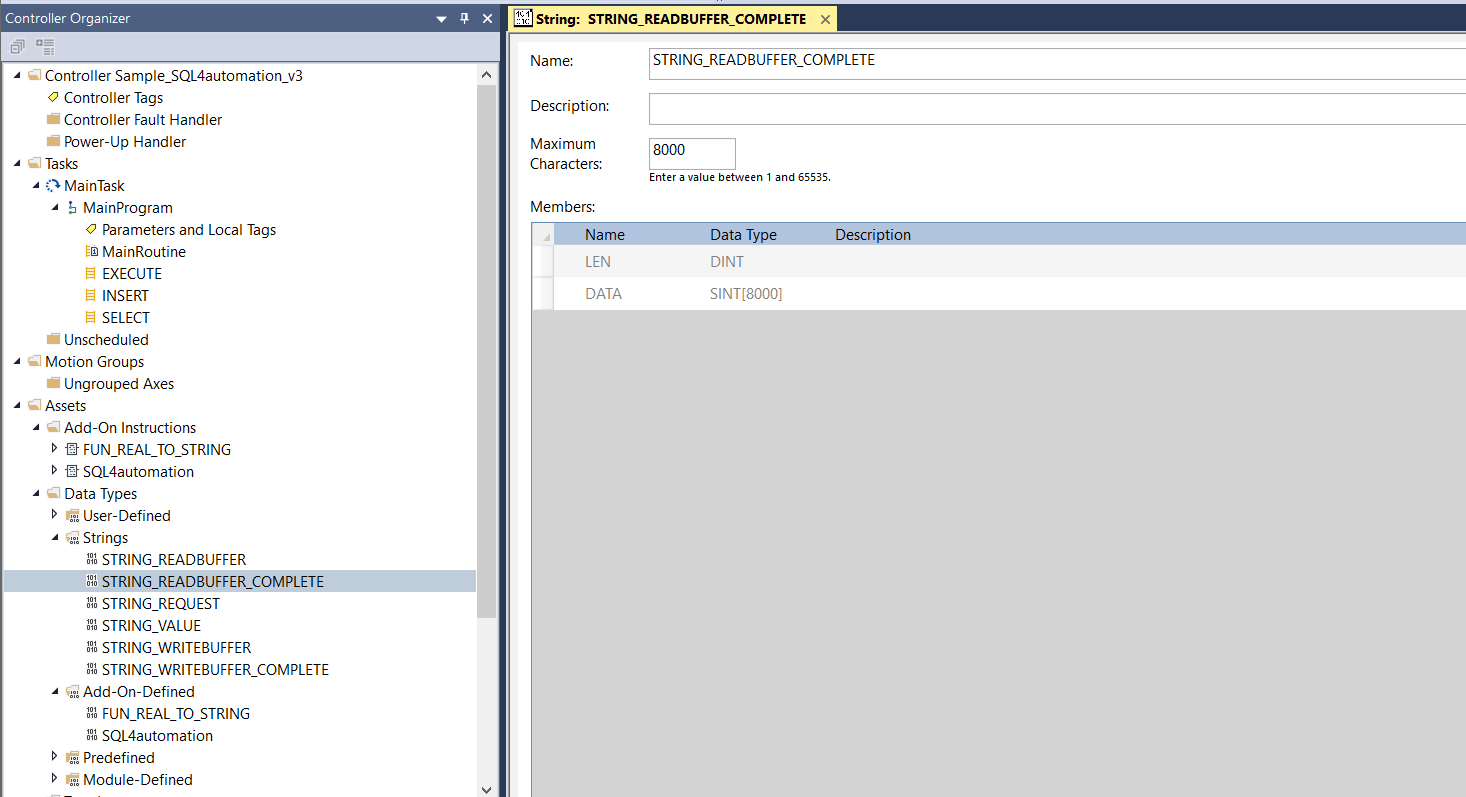
STRING – Data Types
STRING_READBUFFER           Maximum Characters: 484  // The maximum TCP Read-Buffer is dependent on the Control system type.
STRING_WRITEBUFFER          Maximum Characters: 462  // The maximum TCP Write-Buffer is dependent on the Control system type.
STRING_READBUFFER_COMPLETE  Maximum Characters: 5000 // The maximum size of the data to read (SQL data).
STRING_WRITEBUFFER_COMPLETE Maximum Characters: 1000 // The maximum size of the data to write (SQL query)
STRING_REQUEST               Maximum Characters: 100 // The maximum String-Length in the Request-Array (per Index)
STRING_VALUE                 Maximum Characters: 20  // The maximum String-Length in the TableValue-Array (per Value)
Attention CompactLogix control systems can only communicate with Unconnected connections, whereas ControlLogix control systems can also establish Connected connections, i.e. Standard connections. The table shows the buffer sizes (STRING_READBUFFER, STRING_WRITEBUFFER) of the different connection types.

Large Connection Size are supported only by 1756-EN2xx ControlLogix modules in RSLogix 5000 software, version 20 or later.
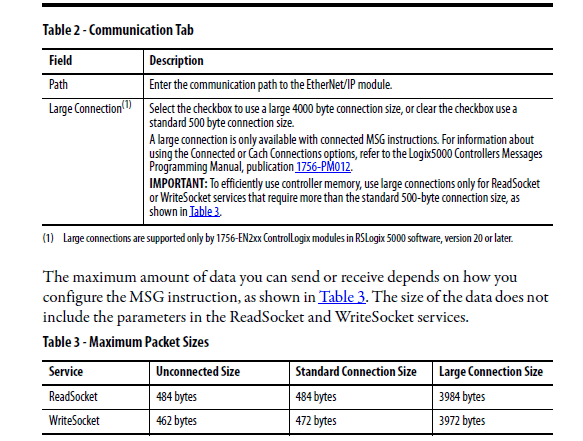
From Add-On V2 release (AddOn_SQL4automation_v2.0.0.0.L5X) the partial reading and writing is supported. This also enables the transmission of large amounts of data, even if the TCP buffers are less than to read or write the data.
The String-Data Types must be adjusted in the Controller Organizer under Data Types – Configure Strings.
USER DEFINED – Data Types
REQUEST   STRING_REQUEST[10] // The Array-Size of the Request-Array (Index)
COLUMN    STRING_VALUE[25]   // The Array-Size of the TableValue-Array (Number of Columns)
VALUE     COLUMN[50]         // The Array-Size of the TableValue-Array (Number of Rows)
PARAMETER STRING_VALUE[5]    // The Array-Size of the Return Parameter-Array (Index) (Number of return parameter)
Note: By adjusting the size of the Data Types REQUEST, COLUMN, VALUE and PARAMETER, the required memory size can be adjusted to the respective application.
The User-Defined-Data Types must be configured in the Controller Organizer under Data Types – User-
Defined.
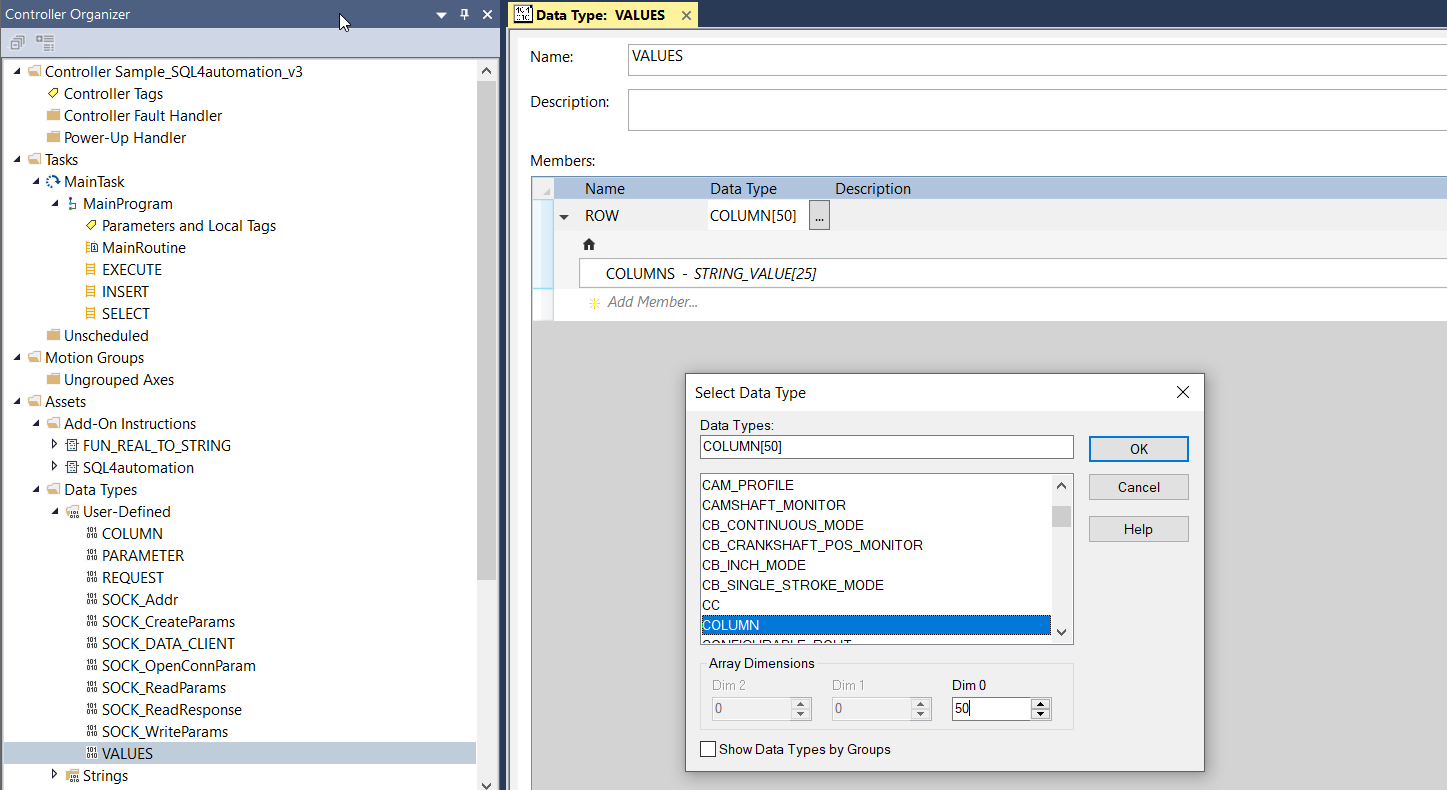
Besides the Data Types REQUEST, COLUMN, VALUE and PARAMETER, the following Data Types are required for the Socket communication: SOCK_Addr, SOCK:CreateParams, SOCK_DATA_CLIENT, SOCK_OpenConnParam, SOCK_ReadParams, SOCK_ReadResponse, SOCK_WriteParams. However, these must not be adjusted.
Tags
Controller-Tags
For the Socket communication and to call the Function Blocks, the following Controller-Tags are required.
Client_DATA     SOCK_DATA_CLIENT // Manages the Socket-Data
Connect_MSG     MESSAGE          // MESSAGE Function: Connect Socket
Create_MSG      MESSAGE          // MESSAGE Function: Create Socket
Delete_All_MSG  MESSAGE          // MESSAGE Function: Delete all Sockets
Delete_MSG      MESSAGE          // MESSAGE Function: Delete Socket
Read_MSG        MESSAGE          // MESSAGE Function: Read from Socket
Write_MSG       MESSAGE          // MESSAGE Function: Write to Socket
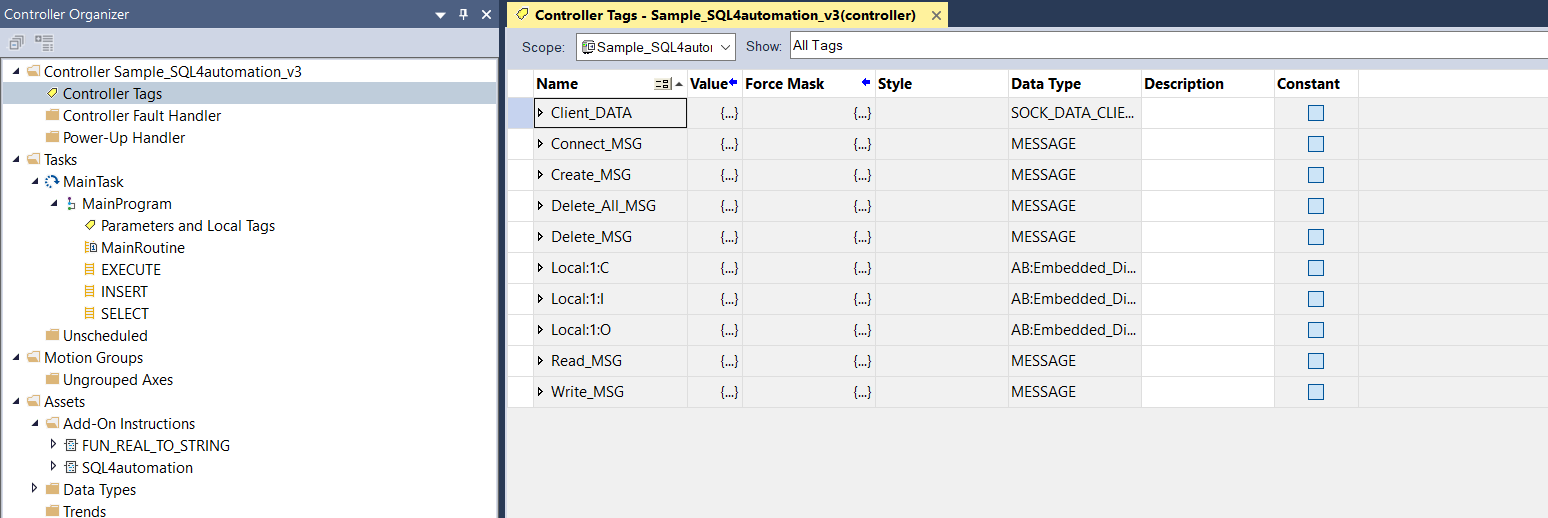
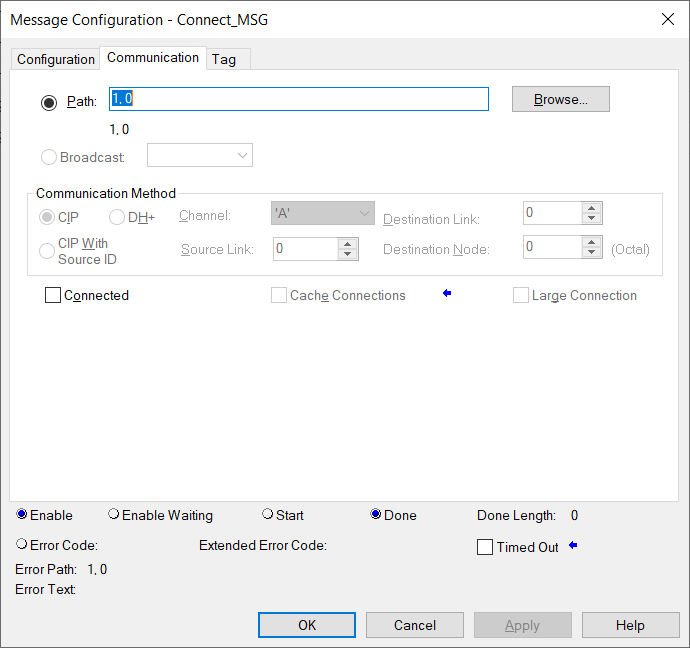
Note: The MESSAGE function applies to several Socket functions Depending on the type of hardware used, the options Connected, Cache Connection or Large Connection must be configured differently. For instance, CompactLogix control systems can only be used in conjunction with Unconnected connections, and ControlLogix control systems only with Connected connections.
Program-Tags
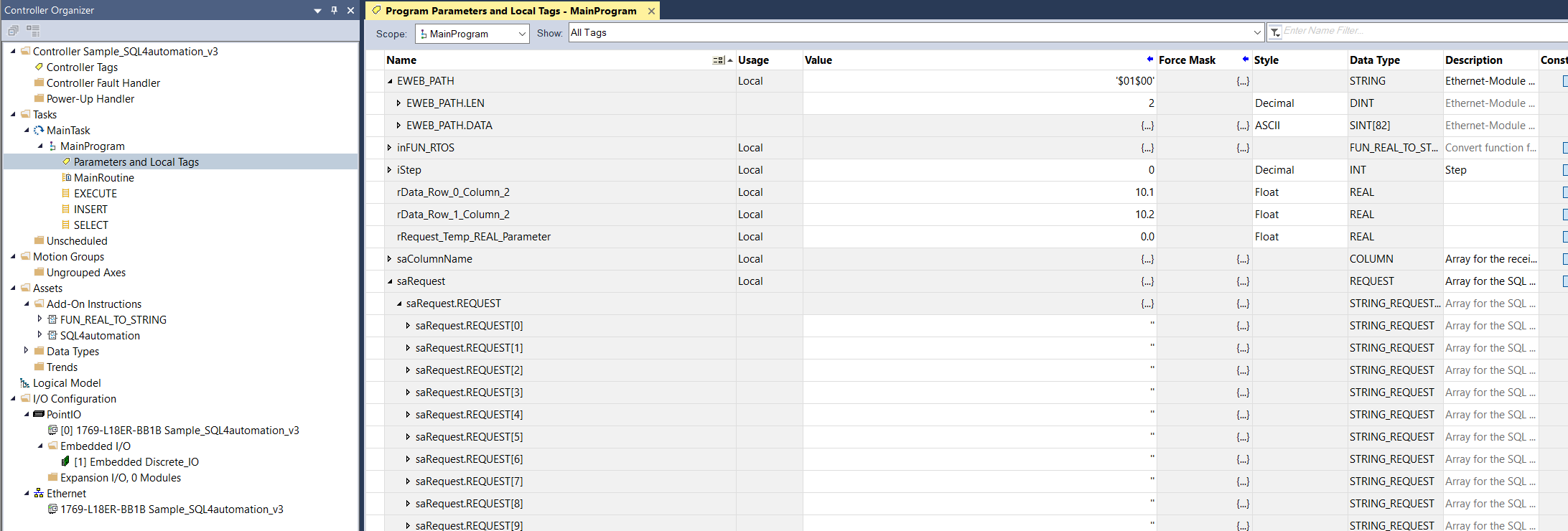
For the Function Block call, the following Program-Tags are required.
saRequest    REQUEST // Request-Array
saTableValue VALUES  // TableValue-Array

EWEB_PATH    STRING  // Ethernet-Module Slot. E.g. Backplane 1, Slot 3 = '$01$03'

sDestination STRING         // Dest. of the Connector. E.g. '192.168.1.202 ?port=11001'
SQL4RSLogix  SQL4automation // Instance of the Function Block
Parameters SQL4automation Function Block
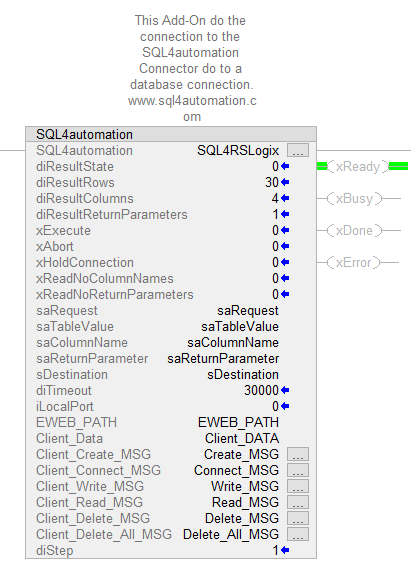
The instance of the SQL4automation Function Block requires the following input and output parameters.
SQL4RSLogix SQL4automation // Instance of the SQL4automation Function Block
// INOUT-Parameter
saRequest          REQUEST          // Request-Array
saTableValue       VALUES           // TableValue-Array
saColumnName       COLUMN           // Column names
saReturnParameter  PARAMETER        // Return parameter
sDestination       STRING           // Dest. of the Connector. E.g. '192.168.1.202 ?port=11001'
EWEB_PATH          STRING           // Ethernet-Modul Slot. E.g. Backplane 1, Slot 3 = '$01$03'
Client_DATA        SOCK_DATA_CLIENT // Manages the Socket-Data
Connect_MSG        MESSAGE          // MESSAGE Function: Connect Socket
Create_MSG         MESSAGE          // MESSAGE Function: Create Socket
Delete_All_MSG     MESSAGE          // MESSAGE Function: Delete all Sockets
Delete_MSG         MESSAGE          // MESSAGE Function: Delete Socket
Read_MSG           MESSAGE          // MESSAGE Function: Read from Socket
Write_MSG          MESSAGE          // MESSAGE Function: Write to Socket

// INPUT-Parameter
xExecute                : BOOL; // Start Database request
xAbort                  : BOOL; // Reset
xHoldConnection         : BOOL; // Holds the Socket connection open after a Database request
xReadNoColumnNames      : BOOL; // Reads no column names
xReadNoReturnParameters : BOOL; // Reads no return parameters. (SQL4automation Connector < V4 -> TRUE)
iLocalPort              : INT;  // Port number of the Control system. 0=default
diTimeout               : DINT; // Timeout of a request [ms]

// OUTPUT-Parameter
xReady           : BOOL; // Ready for Database request
xBusy            : BOOL; // Database request in process
xDone            : BOOL; // Database request completed
xError           : BOOL; // Database request resulted in an Error
diResultState    : DINT; // Status Database request / Error number
diResultRows     : DINT; // Number of returned rows from the Database request
diResultColumns  : DINT; // Number of returned columns from the Database request
diStep           : DINT; // Internal Step
Handshake
The handshake is conducted in accordance with the handshake of the StandardProtocol. The StandardProtocol is described under Standard Protocol.
Error Codes Return-Value
The variable “diResultState” describes the error.
| Error Number | Error Description |
|---|---|
| 1 | Unknown SQL Command |
| 2 | Request returns more datasets than defined by gc_diMaxRows, modify request or increase gc_diMaxRows |
| 3 | Request returns more columns than defined by gc_diMaxColumns, modify request or increase gc_diMaxColumns |
| 4 | Request returns more data than the defined buffer size. Modify request or increase STRING_READBUFFER_COMPLETE. |
| 5 | Request returns minimal one value that is bigger than defined by MaxStringLength, modify request or increase MaxStringLength |
| 10 | Internal Connector error |
| 11 | Internal Connector error, cannot open database |
| 22 | No target address defined for Connector / sDestination=’’ |
| 28 | Request string is empty / saRequest.REQUEST[0]='' |
| 40 | Error during creation of socket. No connection to SQL4automation-Connector established. Turn off Firewall. |
| 41 | Error during connection to the SQL4automation-Connector. Turn off Firewall. |
| 50 | Sending the complete request string has failed. Please check your connection or the TCP buffer of your system. |
| 51 | Request string is greater than the send buffer. Increase send buffer STRING_WRITEBUFFER_COMPLETE. |
| 61 | Error during data reading from the SQL4automation-Connector. Possible cause, too much data. |
| 62 | Error during data reading from the SQL4automation-Connector. Increase STRING_READBUFFER_COMPLETE. Please update the SQL4automation Connector (from V3.4.1.0 -> new error number: 4) |
| 71 | Error during closing the connection to the SQL4automation-Connector |
| 99 | Timeout |
| >100 | Error numbers of the ODBC database connection (some known error numbers are attached) / syntax error |
| 40002 | General error during SQL request, request string is invalid |
Sample Project
As a sample project, a project was created which is completely executable. There are four variations. One example is for a ControlLogix, the other one for a CompactLogix control system. Both versions are available in the programming language Ladder and Stuctured Text.
The sample projects are devised for the controller 1756-L63 ControlLogix5563 and for a 1769-L18ER-BB1B CompactLogix5318ERM-BB1B. However, these sample projects can be easily adapted to other controller types by simply changing the controller. For a ControlLogix, use the ControlLogix example, for a CompactLogix, use the CompactLogix example.
The four sample projects are named:
Sample_S4A_CompactLogix_Ladder.ACD Sample_S4A_CompactLogix_ST.ACD
Sample_S4A_ControlLogix_Ladder.ACD Sample_S4A_ControlLogix_ST.ACD
Note: When executing the database request, the test license has to be activated by the „S4A Config“ tool and a Link must be configured (with port number e.g. 11001) to the test database “S4A_Test_DB.mdb” or “SQLite_Test_DB.db” from the "Sample_Database" directory. If a stored procedure is to be executed, an MS SQL Server database must be available. With the SQL script „MSSQL_TestDB_script.sql“ the table incl. data and stored procedure can be created. How to configure the connection to the test database is described under Setting up the connection to the test database.
There is an example for a SELECT, INSERT and an EXECUTE (stored procedure) query.
The call of the corresponding subprogram is controlled by xQuery_SELECT, xQuery_INSERT and xQuery_EXECUTE.
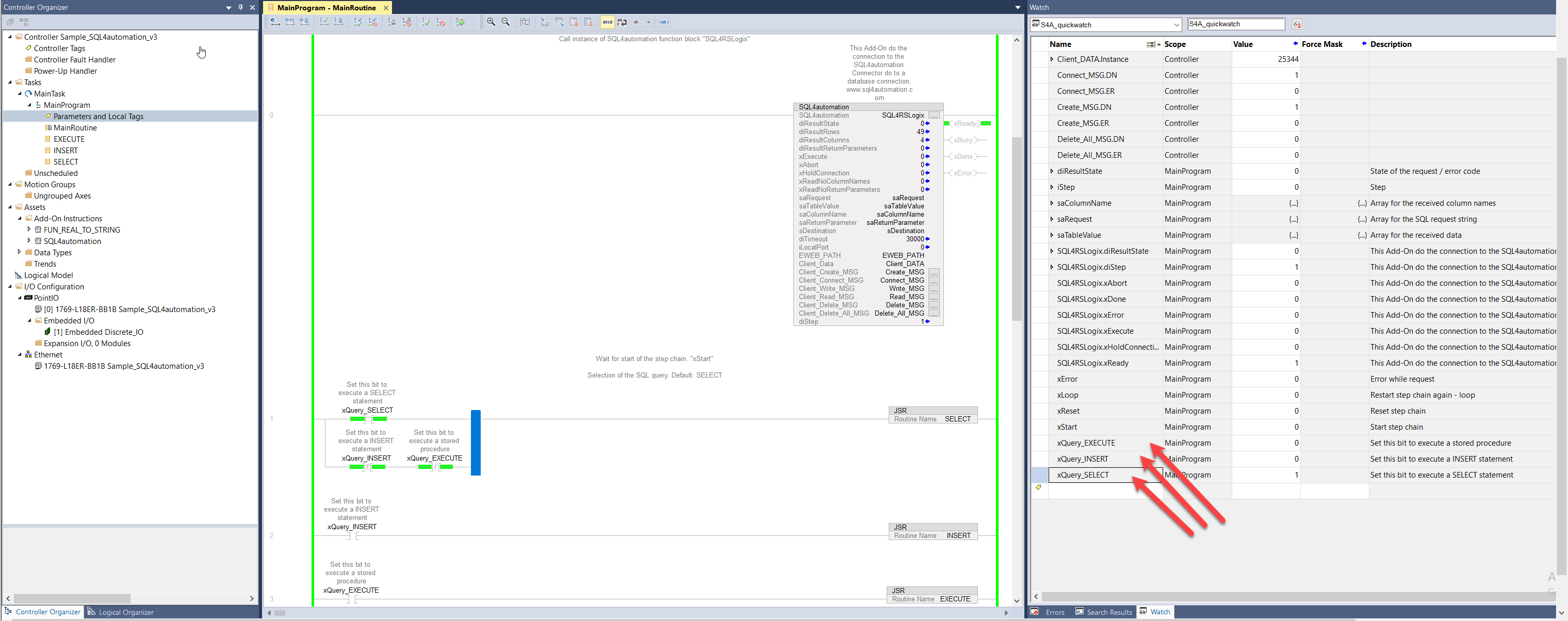
A step chain is programmed in the corresponding subroutine. The SQL command is also assembled there. The SQL command is passed to the function block as STRING. Therefore, INTEGER or REAL variables must be converted into STRING variables if they are to be included in the SQL command. For the REAL-STRING conversion there is a special function that can be used. This is called FUN_REAL_TO_STRING and can be found under the add-ons.
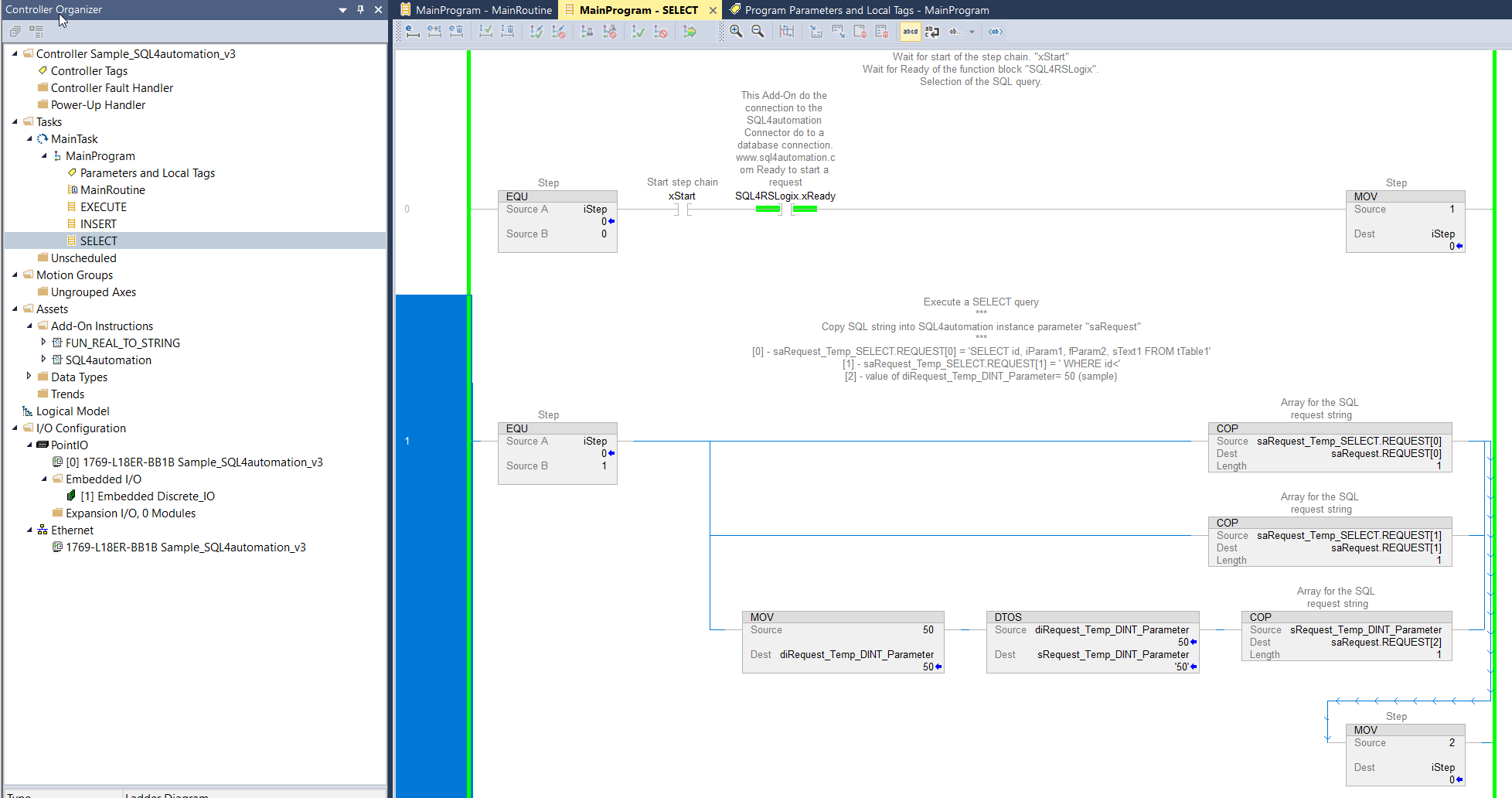
By setting the variable xStart to 1, an automated execution of a database request can be performed. Reset xStart to 0 after the the request is done.
By setting the variable xLoop also to 1, the database query is carried out continuously.
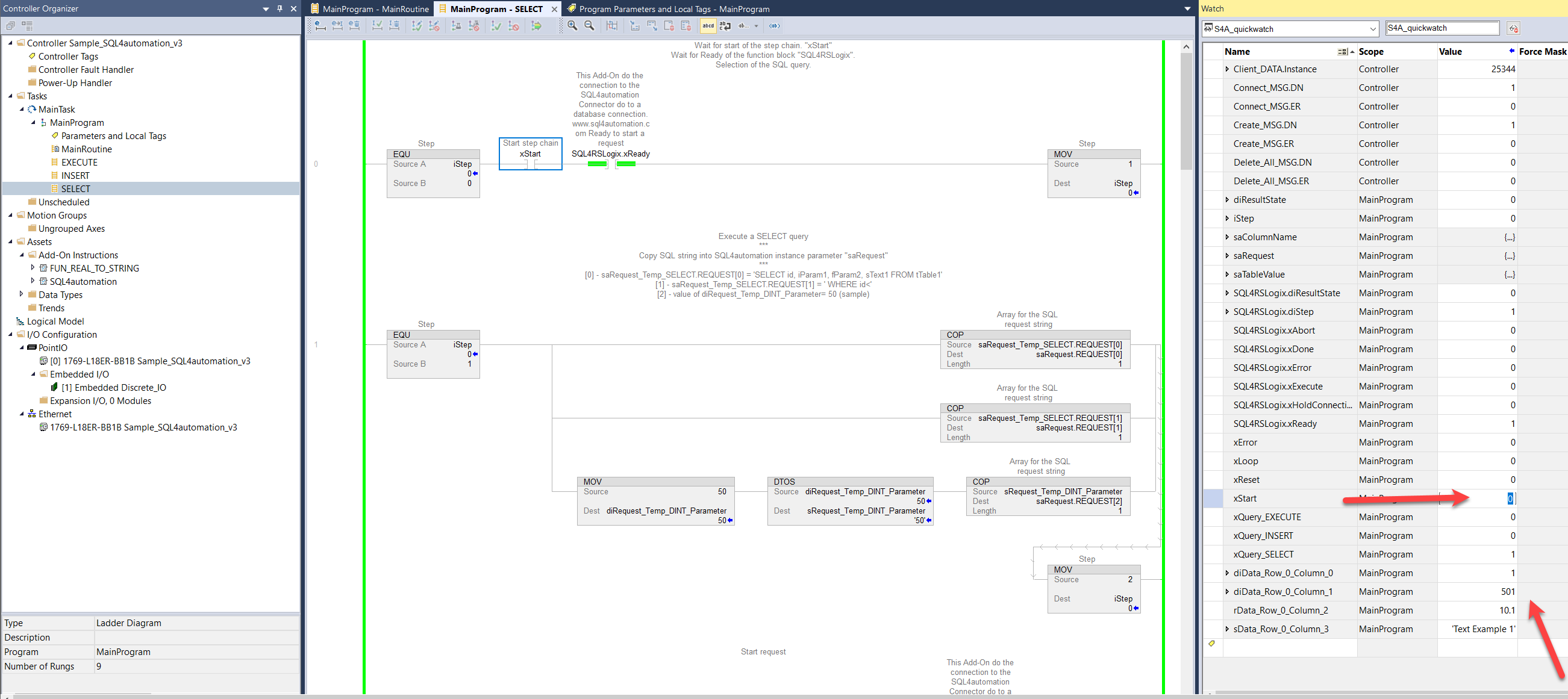
If the query is successful, the read data is displayed.
All queries are logged in the "S4A Debugger" tool.
\