TLP — Target-Link-Protocol — Standard Protocol
In case there is no library available yet for your control system, you can emulate the protocol between control system and Connector by referring to the following documentation. Please contact us first in this case, as we are continuously developing libraries for additional control systems.
Standard Protocol
With each SQL request to the database, the Connector is provided with information prior to execution.
Request to the Connector
| Attribute | Data Type | Description | Default |
|---|---|---|---|
| MRP | Nullterminierter String | Max Return Parameter | |
| <MRP Value> | Nullterminierter String | Minimum 1 | Nicht optional |
| MR | Null-terminated String | Max Rows | |
| <MR Value> | Null-terminated String | Minimum 1 | Not optional |
| MC | Null-terminated String | Max Columns | |
| <MC Value> | Null-terminated String | Minimum 1 | Not optional |
| MS | Null-terminated String | Max String | |
| <MS Value> | Null-terminated String | Minimum 1 | Not optional |
| MB | Null-terminated String | Max Buffer | |
| <MB Value> | Null-terminated String | Maximum amount of data in bytes which the control system can read | Not active |
| CT | Null-terminated String | Connector Timeout | |
| <CT Value> | Null-terminated String | 0 = no Timeout, Connection remains open, >0 = Timeout in seconds | Not active |
| CN | Null-terminated String | Column Names | |
| <CN Value> | Null-terminated String | 0 = no Column names, 1 = Column names (default 1) | 1 |
| CS | Null-terminated String | Cut String | |
| <CS Value> | Null-terminated String | String of each value is shortened to length CS | Not active |
| S | Null-terminated String | String (SQL Request) | |
| <S Value> | Null-terminated String | Minimum 1 character | Not optional |
| T | Null-terminated String | Transmit Request |
<MRP><NUL><MRP Value><NUL> | Maximum number of return parameters which can be stored in the control system |
<MR><NUL><MR Value><NUL> | Maximum number of datasets which can be stored in the control system |
<MC><NUL><MC Value><NUL> | Maximum number of columns which can be stored in the control system |
<MS><NUL><MS Value><NUL> | Length of the string variable in the control system |
<MB><NUL><MB Value><NUL> | Maximum amount of data in bytes which the control system can read (optional) |
<CT><NUL><CT Value><NUL> | Timeout Connector (optional) |
<CN><NUL><CN Value><NUL> | A database request also returns the column names in addition to the data, or not. (optional) |
<CS><NUL><CS Value><NUL> | A database request also returns data if the size of the database value exceeds the defined maximum string length (MS). The value will be cut off after the CS value, and the error is ignored. (optional) |
<S><NUL><S Value><NUL> | SQL request string |
<S><NUL><S Value><NUL> | If the SQL request string is too large for the control system, it can be sent to the connector in a dissected form. (optional) |
<T><NUL> | Start command to send the SQL request string to the database |
Examples:
MRPNUL15NULMRNUL80NULMCNUL40NULMSNUL255NULSNULSELECT id, iParam1, fParam2, sText1 FROM tTable1NULTNUL
MRPNUL15NULMRNUL80NULMCNUL40NULMSNUL255NULCS NUL80NULCNNUL0NUL
SNULSELECT id, iParam1, fParam2, sText1 FROM tTable1NUL
SNULWHERE id < 4NUL
TNUL
Response from the Connector
| Attribute | Data Type | Description |
|---|---|---|
| RS | Null-terminated String | Return State |
| <RS Value> | Null-terminated String | |
| RP | Nullterminierter String | Return Parameter |
| <RP Value> | Nullterminierter String | |
| RR | Null-terminated String | Result Rows |
| < RR Value> | Null-terminated String | |
| RC | Null-terminated String | Result Columns |
| < RC Value> | Null-terminated String | |
| RN | Null-terminated String | Result Column names |
| < RN Values> | Null-terminated String | |
| RD | Null-terminated String | Result Data |
| < RD Values> | Null-terminated String |
<RS><NUL><RS Value><NUL> | RS Value = 0: Okay, data will follow. RS Value > 0: Error code, no data will follow. |
If RS Value = 0:
<RP><NUL><RP Value><NUL> | RP Value = Number of return parameters |
<RR><NUL><RR Value><NUL> | RR Value = Number of datasets |
<RC><NUL><RC Value><NUL> | RC Value = Number of columns |
Only if RP Value > 0 return parameter will follow (RPD)
RPDNUL
123NUL321NULabcNUL
If RC Value > 0 data will follow, else RR Value contains the number of the processed datasets (Update, Delete…)
<RN><NUL> | Followed by all column names |
<RD><NUL> | Followed by all data |
Column names (RN) are enumerated as:
For iC = 1 to RC
    <RN Value[iC]><NUL>
Next iC
Data values (RD) are enumerated as:
For iR = 1 to RR
    For iC = 1 to RC
        <RD Value[iR, iC]><NUL>
    Next iC
Next iR
Example:
RSNUL0NULRPNUL3NULRRNUL3NULRCNUL4NUL
RPDNUL
123NUL321NULabcNUL
RNNUL
idNULiParam1NULfParam2NULsText1NUL
RDNUL
1NUL501NUL10.1NULText Example 1NUL
2NUL502NUL10.2NULText Example 2NUL
3NUL503NUL10.3NULText Example 3NUL
Error Codes Return-Value
| Error Number | Error Description |
|---|---|
| 0 | No error, request data to follow |
| 1 | Unknown SQL Command |
| 2 | Request returns more datasets than defined by MaxRows, modify request or increase MaxRows |
| 3 | Request returns more columns than defined by MaxColumns, modify request or increase MaxColumns |
| 4 | Request returns more data than defined by buffer size (only with target type Siemens) Modify request or increase Buf. Size in the Connector and in the application. |
| 5 | Request returns minimal one value that is bigger than defined by MaxStringLength, modify request or increase MaxStringLength |
| 10 | Internal Connector error |
| 11 | Internal Connector error, cannot open database |
| 23 | Request string is empty |
| 24 | Number MaxRows not defined |
| 25 | Number MaxColumns not defined |
| 29 | Size MaxStringLength not defined |
| >100 | Error numbers of the ODBC database connection (some known error numbers are attached) |
| 40002 | General error during SQL request, request string is invalid |
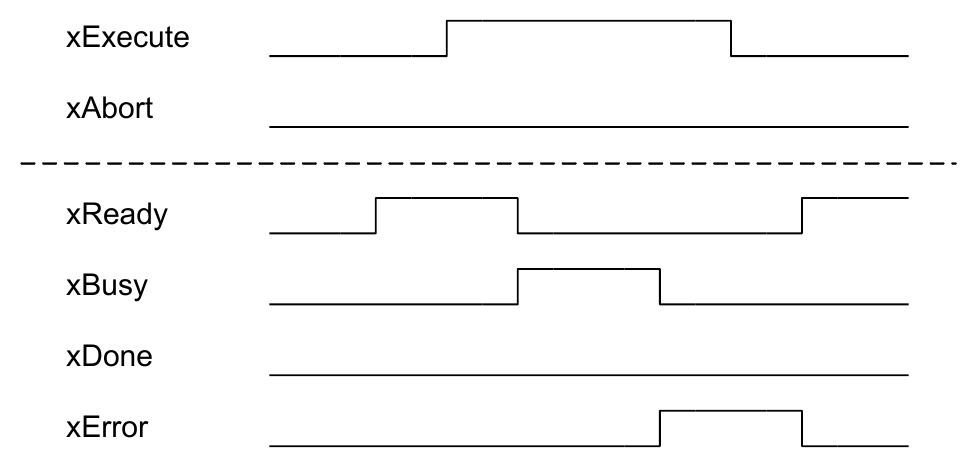
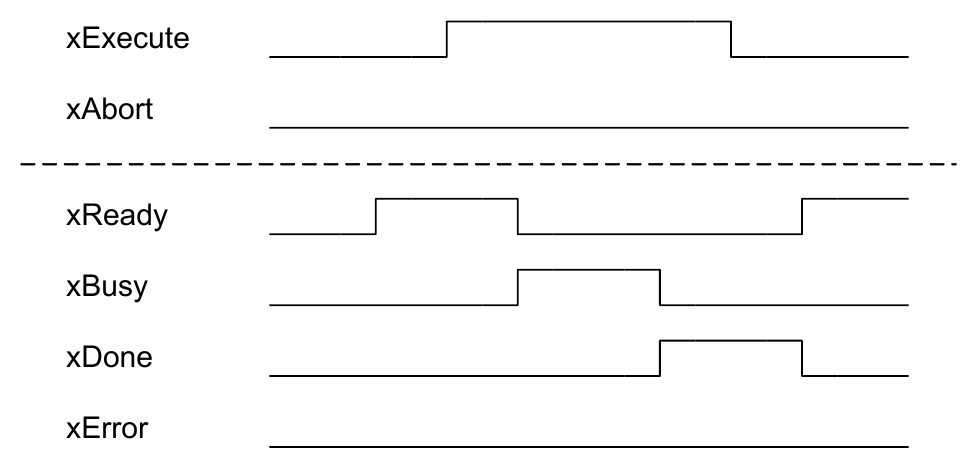
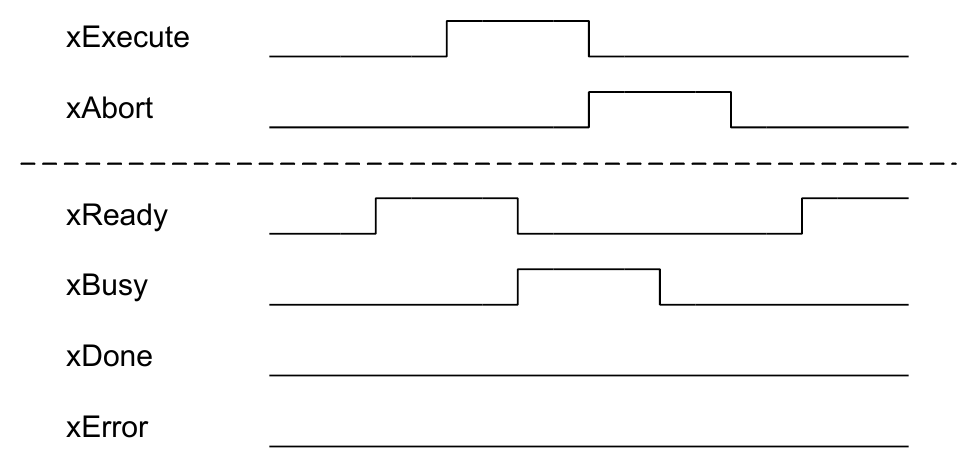
Handshake
Error-free Request
Abortion during Request
Error during Request