Configuration
The configuration tool is opened by clicking the "Set" button of the respective link.
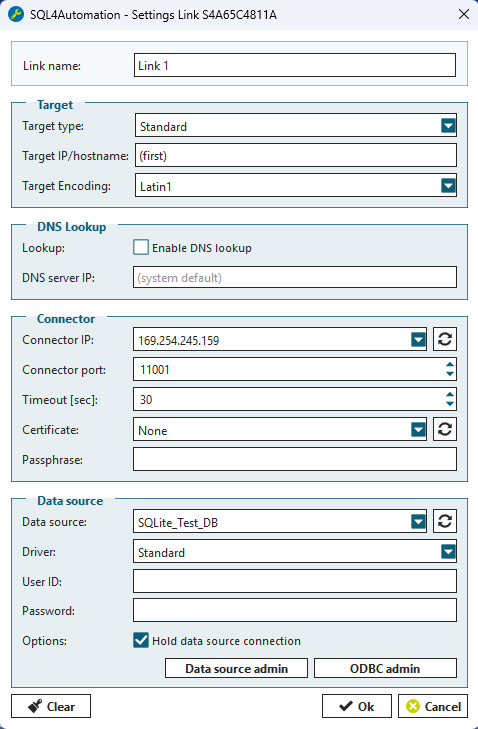
For each link, the following settings are saved:
Link name
Description of the link
Target
Target type — Type of control system. For most control systems, the setting "Standard" is used. For Stäubli, Siemens, KUKA and UTF-16 control systems, the respective settings must be used.
Target IP — Only the authorized controller is permitted to connect to a link. The controller is identified by its IP address. If the field is left empty, the connector stores the IP of the first controller that connects to the link. From that point on, only this controller can communicate through this link.
With an Ultimate license, the hostname is checked in addition to the target IP. This allows the PLC's IP to be assigned dynamically. If the IP changes, the connector queries the DNS server for the current IP of the hostname. If it matches the sender IP of the request, the request is allowed; otherwise, it is blocked.
Target Encoding — Character encoding of the controller. Normally Latin1.
DNS Lookup
With the Ultimate license, DNS lookup can be enabled. This causes the hostname to be checked in addition to the target IP. The PLC's IP can therefore be assigned dynamically without requiring any adjustment on the connector.
Lookup — Enables or disables the DNS lookup
DNS server ip — Defines the IP address of the DNS server. If this field is left empty, the first available DNS server is used.
Connector
Connector IP — IP address or host name under which the link is available
Connector Port — Port number to the link
Timeout — Timeout in seconds. If a query has not been executed completely after this time period, and the connection is not closed by the control system, the query is reversed, the connection to the control system is terminated and the port is automatically reopened.
Certificate — Certificates for secure TLS connections. None means an unencrypted connection.
Passphrase — Password for encrypted private keys
Database
Datasource — Data source name from the ODBC Data Source Administrator
Driver — Standard or SQLAPI++ Driver. Normally you can use the Standard driver. For executing SQLCLR stored procedures, use the SQLAPI++ driver.
User Id — User name for connection establishment to the SQL server
Password — Password for the user name
Creating a DSN is described under Chapter Data Sources.
UID and PWD are assigned and administered in the SQL server.
[ODBC Admin…] starts the ODBC Data Source Administrator
By clicking [OK], all changes are applied and the link is restarted.
(Additional information about ODBC configuration can be found below in the section ODBC data sources)