Eigene Zertifikate mit OpenSSL erstellen
Um Zertifikate selbst zu erstellen, gibt es verschiedene Möglichkeiten. Wir verwenden hier als Beispiel OpenSSL.
OpenSSL unter Windows installieren
OpenSSL für Windows kann hier heruntergeladen werden: https://slproweb.com/products/Win32OpenSSL.html.
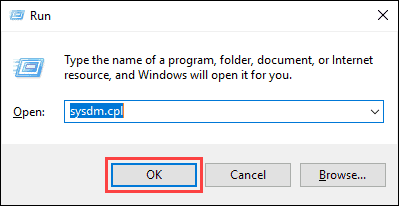
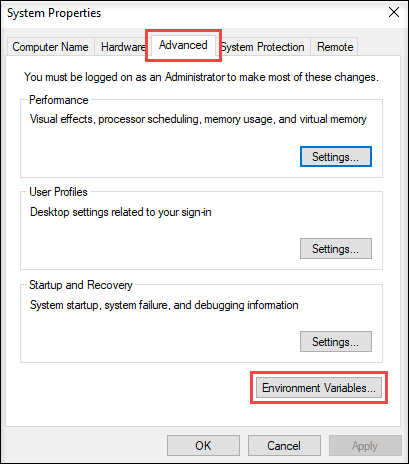
Nach der Installation können direkt über die „OpenSSL Command Prompt“ Zertifikate erstellt werden. Möchte man OpenSSL im normalen Windows Terminal oder in der Windows PowerShell verwenden, müssen zwei Einträge in den Umgebungsvariablen gesetzt werden:
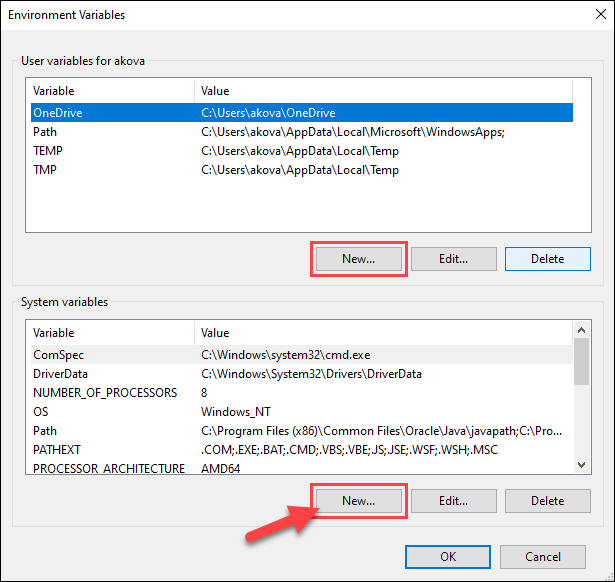
Eine neue Systemvariable erstellen:
Variable name: OPENSSL_CONF
Variable value: Zielort/Ordner + \bin\openssl.cfg
(z. B. C:\Program Files\OpenSSL-Win64\bin\openssl.cfg)
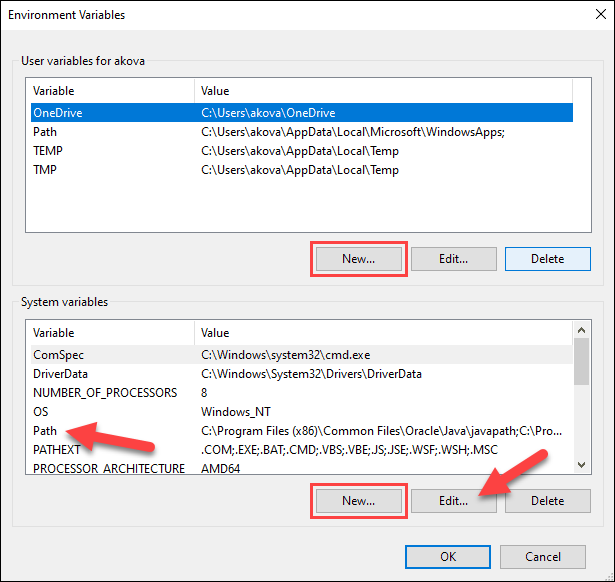
Die Pfad-Variable bearbeiten und einen neuen Eintrag mit dem OpenSSL-Pfad hinzufügen:

Im Windows Terminal die Installation von OpenSSL überprüfen:

OpenSSL unter Linux (Debian-Derivate) installieren
OpenSSL unter Linux wird vom Paketmanager bereitgestellt. Mit sudo apt install openssl wird die OpenSSL-Version installiert, die sich im Paketmanager befindet.
Mit den folgenden Befehlen kann die neuste Version heruntergeladen und installiert werden:
Auf der Download-Seite die letzte Version ausfindig machen: https://openssl-library.org/source/.
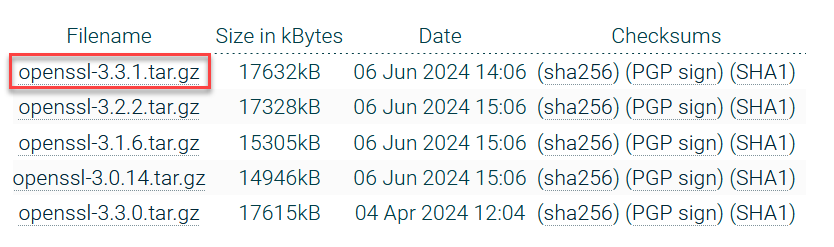
Datei herunterladen: wget https://www.openssl.org/source/openssl-3.3.1.tar.gz
Bei einem Zertifikatfehler kann dieser mit wget --no-check-certificate <url> umgangen werden.
Package entpacken: tar -zxvf openssl-3.3.1.tar.gz
In den Ordner wechseln: cd openssl-3.3.1
Build essentials installieren: sudo apt install build-essential
OpenSSL erstellen:
./Configure
make
sudo make install
Eigene Zertifikate erstellen
Um eigene Zertifikate zu erstellen, wechseln Sie zuerst in den Ordner, in dem die Zertifikate erstellt werden sollen.
In den folgenden Befehlen werden verschiedene Attribute an die Zertifikate übergeben. Die Attribute bedeuten Folgendes:
- C = Country
- ST = State or Province
- L = Locality
- O = Organization Name
- OU = Organizational Unit Name
- CN = Common Name
Ein CA-Zertifikat und der dazugehörige Key können mit den folgenden Befehlen erstellt werden:
openssl genrsa -out rootCA.key 2048
openssl req -x509 -new -nodes -key rootCA.key -sha256 -days 1825 -out rootCA.pem -subj "/C=CH/ST=Bern/L=Lyssach/CN=SQL4automation/O=Inasoft"
Dadurch werden ein Zertifikat rootCA.pem und ein dazugehöriger Private Key rootCA.key erstellt.
Ein Private Key und ein Zertifikat für eine Verbindung über localhost, das 1825 Tage gültig ist und mit dem rootCA signiert ist:
openssl genrsa -out server_localhost.key 2048
openssl req -new -key server_localhost.key -out server_localhost.csr -subj "/C=CH/ST=Bern/L=Lyssach/CN=127.0.0.1/O=Inasoft"
openssl x509 -req -in server_localhost.csr -CA rootCA.pem -CAkey rootCA.key -CAcreateserial -out server_localhost.crt -days 1825 -sha256
Ein Private Key, der durch ein Passwort geschützt ist, und ein Zertifikat für eine Verbindung über localhost, das 1825 Tage gültig ist und mit dem rootCA signiert ist:
openssl genrsa -aes256 -passout stdin -out client_localhost_pass.key 2048
openssl req -new -key client_localhost_pass.key -out client_localhost_pass.csr -subj "/C=CH/ST=Bern/L=Lyssach/CN=127.0.0.1/O=Inasoft"
openssl x509 -req -in client_localhost_pass.csr -CA rootCA.pem -CAkey rootCA.key -CAcreateserial -out client_localhost_pass.crt -days 1825 -sha256
Die Zertifikate müssen an folgende Orte kopiert werden:
- Inhalt des CA-Zertifikats in die Datei known_hosts unter ...\certs\CA\
- Alle Zertifikate inklusive Private Keys für den Connector müssen in den Ordner ...\certs\S4AConnector kopiert werden.
- Alle Zertifikate inklusive Private Keys für das QueryTool müssen in den Ordner ...\certs\S4AQueryTool kopiert werden.
Alle Zertifikate für SPS und Robotersteuerungen müssen in den Zertifikat-Manager der Steuerungen geladen werden.