Sigmatek / SQL4LASAL
Target: "Standard" / "UTF-16"
Voraussetzungen
Es können alle Sigmateksteuerungen, die eine offene TCP/IP Kommunikation unterstützen, an SQL4automation angebunden werden.
Die Bibliothek wurde getestet mit der SoftSPS Lars und einem C-IPC.
Die Klassen
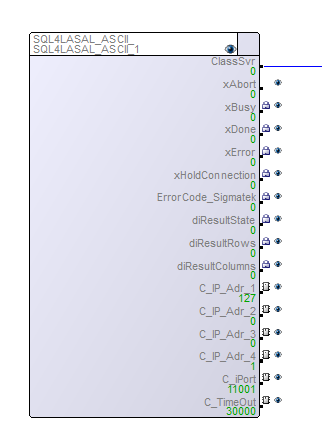
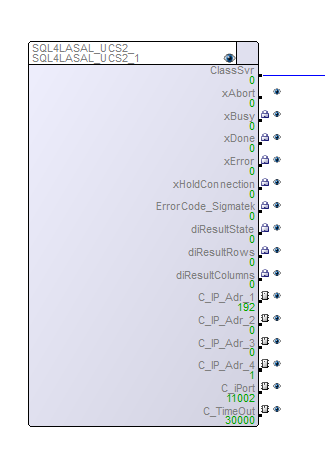
Das Beispiel-Projekt enthält zwei Klassen. Mit der einen Klasse wird mit dem SQL4automation Connector über UTF-8, mit der anderen über UTF-16 kommuniziert. Falls die UTF-8 Klasse eingesetzt wird, muss im Connector die „Standard“, bei der UTF-16 die „UTF-16“ Target gewählt werden.
Servers
Die Klassen SQL4LASAL enthalten die folgenden Server:
xAbort                      :DINT           // Reset
xBusy                       :DINT           // Datenbankabfrage läuft
xDone                       :DINT           // Datenbankabfrage abgeschlossen
xError                      :DINT           // Datenbankabfrage endete mit einem Fehler
xHoldConnection             :DINT           // Behält nach einer Datenbankabfrage die Socketverbindung offen
ErrorCode_Sigmatek          :DINT           // Sigmatek spezifischer Error Code.
diResultState               :DINT           // Status Datenbankabfrage / Fehlernummer
diResultRows                :DINT           // Anz. erhaltene Zeilen aus der Datenbankabfrage
diResultColumns             :DINT           // Anz. erhaltene Spalten aus der Datenbankabfrage
C_IP_Adr_1                  :UDINT          // Eingestellte IP-Adresse des SQL4automation-Connectors Stelle1
C_IP_Adr_2                  :UDINT          // Eingestellte IP-Adresse des SQL4automation-Connectors Stelle2
C_IP_Adr_3                  :UDINT          // Eingestellte IP-Adresse des SQL4automation-Connectors Stelle3
C_IP_Adr_4                  :UDINT          // Eingestellte IP-Adresse des SQL4automation-Connectors Stelle4
C_iPort                     :UDINT          // Eingestellte Port-Nummer des SQL4automation-Connectors
C_TimeOut                   :UDINT          // Timeout
Methoden
SendRequest
Diese Methode wird zur SQL Anfrage verwendet.
VAR_INPUT
        pRequest                 : ^UINT;                                // Pointer Request String
        pColumnsName             : ^UINT;                                // Pointer Spaltennamen
        pTableValues             : ^UINT;                                // Pointer Ergebnistabelle
        NumberOfRows             : UINT;                                 // Anz. erhaltene Zeilen aus der Datenbankabfrage
        NumberOfColumns          : UINT;                                 // Anz. erhaltene Spalten aus der Datenbankabfrage
        SizeOfOneFieldInByte     : UINT;                                 // Stringlänge in der Table-Array
        pSQL4AutomationControl   : ^SQL4AUTOMATION_CONTROL_TYPE;         // Pointer Rückgabewert Status Abfrage
        HoldConnection           : BOOL;                                 // Hold connection
END_VAR
VAR_OUTPUT
        result                   : INT;                                  //Rückgabewert der Methode
END_VAR
FormatString
Diese Methode kann für die Umwandlung von Strings in SQL Anfragen verwendet werden.
VAR_INPUT
        pDestination             : ^UINT;       // Pointer auf Outputstring
        pSource                  : ^UINT;       // Pointer auf Inputstring
        Trim                     : BOOL;        // Leerzeichen am Anfang und am Schluss abschneiden
        MaxSizeInByte            : UDINT;       // Maximale Anzahl Zeichen
END_VAR
VAR_OUTPUT
        StrLng                   : UINT;
END_VAR
FormatDateTime
Diese Methode kann für die Umwandlung von DateTime Typen in SQL Anfragen verwendet werden.
VAR_INPUT
        pDestination           : ^UINT;      // Pointer auf Outputstring
        pDate                  : ^_DATE;     // Pointer auf Input Datum
        pTime                  : ^_TIME;     // Pointer auf Input Zeit
        MaxSizeInByte          : UDINT;      // Maximale Anzahl Zeichen
END_VAR
Beispielprojekt SQL4LASALSample
Das Beispielprojekt zeigt, wie die Klassen SQL4LASALASCII und SQL4LASALUCS2 eingesetzt werden. Das Beispielprojekt ist so vorkonfiguriert, dass es auf einer SoftSPS Lars, SQL4automation Connector und Access Datenbank auf demselben PC läuft. Mit dem Config Tool müssen noch drei Links erstellt werden.
Link 1: Target Type: Standard, Connector IP: localhost, Port 11001, Datasource: ODBC Verbindung auf Access Datenbank. (Wird für Verbindung Net ASCII verwendet)
Link 2: Target Type: UTF-16, Connector IP: localhost, Port 11002, Datasource: ODBC Verbindung auf Access Datenbank. (Wird für NET UNICODE verwendet)
Link 3: Target Type: Standard, Connector IP: localhost, Port 11003, Datasource: ODBC Verbindung auf Access Datenbank. (Wird für NET Cyclic verwendet)
Der Connector muss gestartet und die Verbindung zur Beispiel-Datenbank „S4A_Test_DB.mdb“ konfiguriert sein.
Wie die Verbindung zur Testdatenbank konfiguriert wird, ist unter Einrichten der Verbindung an die Testdatenbank beschrieben.
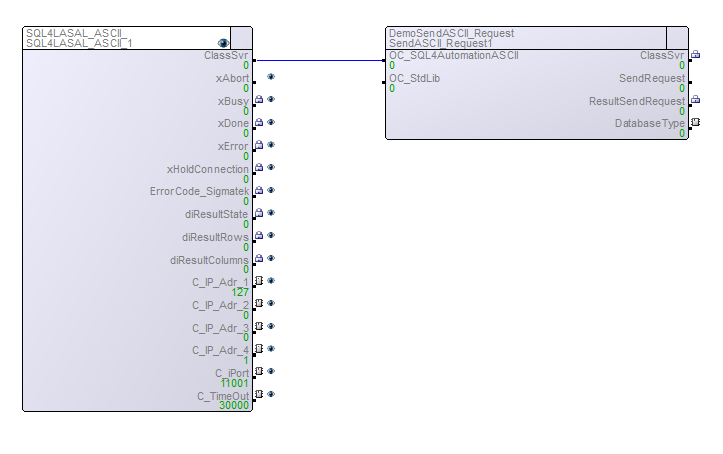
NET ASCII
Dieses Beispiel zeigt, wie eine UTF-8 Verbindung zu SQL4automation hergestellt wird. Folgende Optionen können eingestellt werden: DatabaseType: 0=Beispiel Datenbank MS Access, 1=MySQL, 2=MS SQL Server, SendRequest: -1= SELECT Befehl, 0=Neue Tabelle erstellen (nur MySQL und MS SQL Server), 1 = INSERT Befehl.
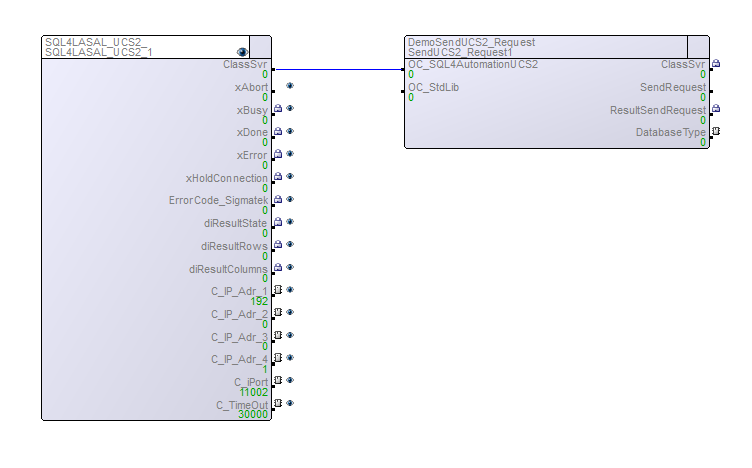
NET UNICODE
Dieses Beispiel zeigt, wie eine UTF-16 Verbindung zu SQL4automation hergestellt wird. Folgende Optionen können eingestellt werden: DatabaseType: 0=Beispiel Datenbank MS Access, 1=MySQL, 2=MS SQL Server, SendRequest: -1= SELECT Befehl, 0=Neue Tabelle erstellen (nur MySQL und MS SQL Server), 1 = INSERT Befehl.
NET Cyclic
Dieses Beispiel zeigt, wie zyklisch Daten in die Datenbank geschrieben werden und soll auch die Performance der Sigmatek Steuerungen in Verbindung mit SQL4automation aufzeigen. Optionen: diStart >0: INSERT Befehle werden ausgeführt.
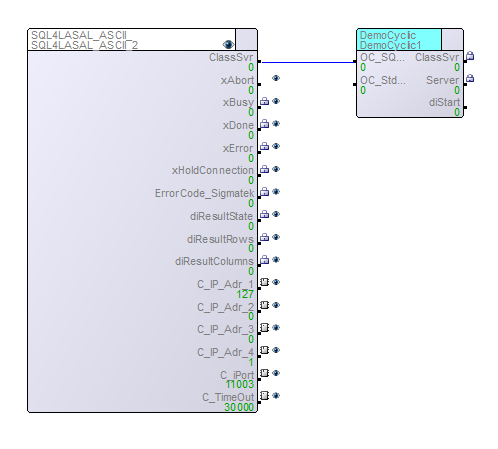
Anpassungen Hardware SPS
Falls eine Hardware SPS verwendet wird, muss in den Linkeinstellungen unter Connector IP die IP der Netzwerkkarte ausgewählt werden, die mit der Steuerung verbunden ist. Dieselbe IP muss auch bei den SQL4LASA_ASCII und SQL4LASAL_UCS2 Instanzen unter NET eingestellt werden.