Siemens S7-1200/1500 V4 / TIA13
Target: "Siemens S7"
Voraussetzungen
Die Kommunikation erfolgt auf den Siemens S7-1200 / 1500 Steuerungen über die Profinet-Schnittstelle.
Folgende Bausteine werden für die Anbindung an den Connector benötigt:
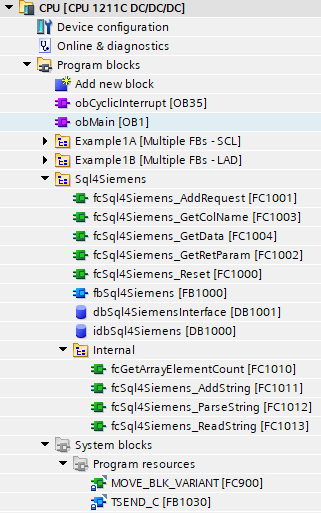
• Alle Bausteine im Ordner «Program blocks» 🡪 «SQL4Siemens»
• MOVE_BLK_VARIANT
• TSEND_C
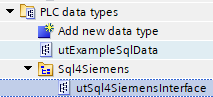
• Alle Datentypen im Ordner «PLC data type» 🡪 «SQL4Siemens»
Beachten Sie, dass diese Bausteine erst ab der Firmware-Version 4.0 eingesetzt werden können. Bei älteren Firmwareständen gab es Unterschiede bei den Schnittstellen der Siemens-Kommunikationsbausteinen und für beide Steuerungsfamilien musste eine individuelle Lösung umgesetzt werden. Glücklicherweise ist dies nicht mehr der Fall und die SQL4automation-Bausteine können zwischen beiden Steuerungsfamilien ausgetauscht werden.
Aufruf fbSql4Siemens
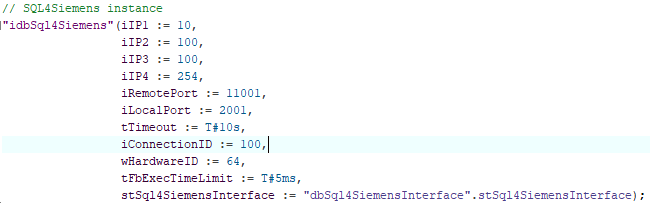
Der Baustein «fbSql4Siemens» wird zyklisch aufgerufen. Wir empfehlen, dies über einen zeitgesteuerten OB (z.B. OB35, T=10ms) zu tun. Folgende Parameter werden belegt:
Parameter von fbSql4Siemens
iIP1                     : INT;                        // 1. Stelle der eingestellten IP-Adresse des Connectors
iIP2                     : INT;                        // 2. Stelle der eingestellten IP-Adresse des Connectors
iIP3                     : INT;                        // 3. Stelle der eingestellten IP-Adresse des Connectors
iIP4                     : INT;                        // 4. Stelle der eingestellten IP-Adresse des Connectors
iRemotePort              : INT;                        // Eingestellte Port-Nummer des Connectors
LocalPort                : INT;                        // Port, der lokal auf der Steuerung verwendet wird
tTimeout                 : TIME;                       // Timeout (Standard: 10 Sekunden)
iConnectionID            : INT;                        // Eindeutige ID der Verbindung
wHardwareID              : BYTE;                       // ID der Ethernet-Schnittstelle (Details, siehe unten)
tFbExecTimeLimit         : TIME;                       // Maximal nutzbare Zeit pro Zyklus
stSql4SiemensInterface   : utSqlSiemensInterface       // Anfrage-/Antwort-Struktur
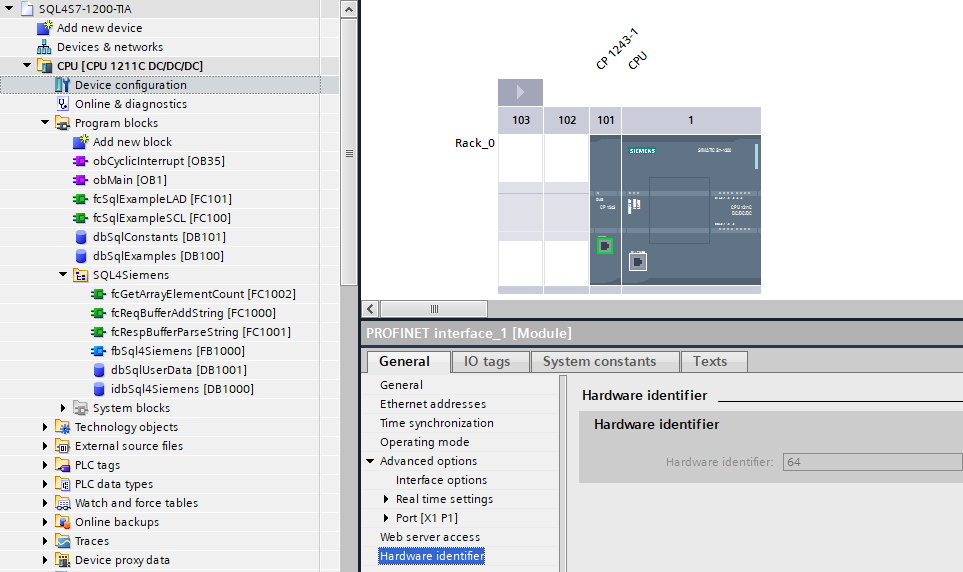
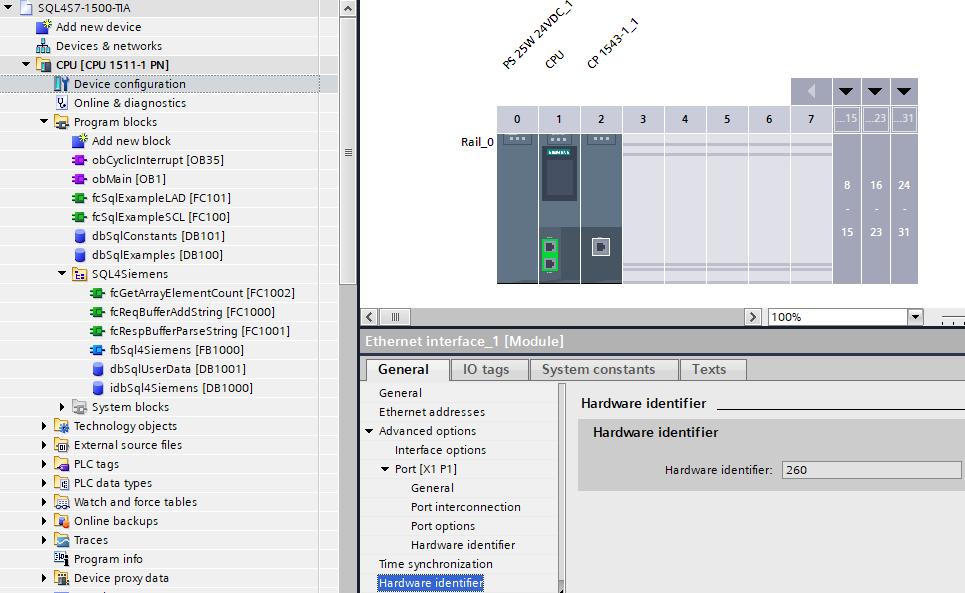
wHardwareID ermitteln: Die Hardware-ID ist in der Gerätekonfiguration ersichtlich. Beim Selektieren der gewünschten Schnittstelle werden die Details eingeblendet.
Beispiel einer 1200 OnBoard-Schnittstelle:
Beispiel einer 1500 CP-Schnittstelle:
Datenbausteine
idbSql4Siemens – Instanz-Datenbaustein zur internen Verwendung des Funktionsblocks Sql4Siemens.
dbSql4SiemensInterface – Benutzerdaten wie Request- und Response-Buffer.
Datentypen (UDT)
utSql4SiemensInterface – Benutzerdaten wie Request- und Response-Buffer.
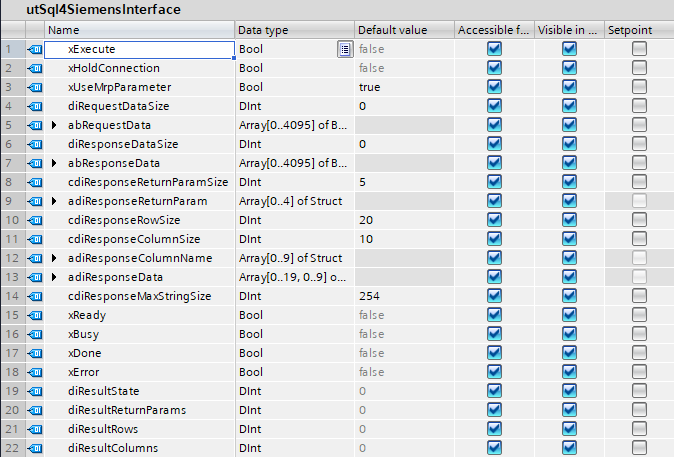
Folgende Parameter können angepasst werden:
-
abRequestData: Größe des Sendedaten-Buffers
-
abResponseData: Größe des Antwortdaten-Buffers
-
cdiResponseReturnParamSize: Anzahl der Return-Parameter.
-
adiResponseParam: Die Größe des Arrays muss dem Parameter «cdiResponseReturnParamSize» entsprechen
-
cdiResponseRowSize: Anzahl Zeilen der Antwort-Tabelle
-
cdiResponseColumSize: Anzahl Spalten der Antwort-Tabelle
-
adiResponseColumnName: Die Größe des Arrays muss dem Parameter «cdiResponseColumSize» entsprechen
-
adiResponseData: Die Größe des Arrays muss den Parametern «cdiResponseRowSize» und «cdiResponseColumSize» entsprechen
-
cdiResponseMaxStringSize: Maximale Anzahl Zeichen der Antwort-Datenfelder
-
xHoldConnection: In den meisten Anwendungen steht dieser Parameter auf FALSE und die Verbindung wird nach jeder Abfrage geschlossen.
-
xUseMrpParameter: Dieser Parameter steht standardmäßig auf TRUE und gibt an, dass die Telegramme sog. «ReturnParameter» unterstützen. Falls das Target über einem Connector mit Version kleiner 4.0.0.0 kommunizieren soll, muss der Parameter auf FALSE gesetzt werden.
Alle übrigen Parameter werden aus der Anwendung gesetzt und werden im Beispiel-Programm beschrieben.
Konfiguration des Connectors
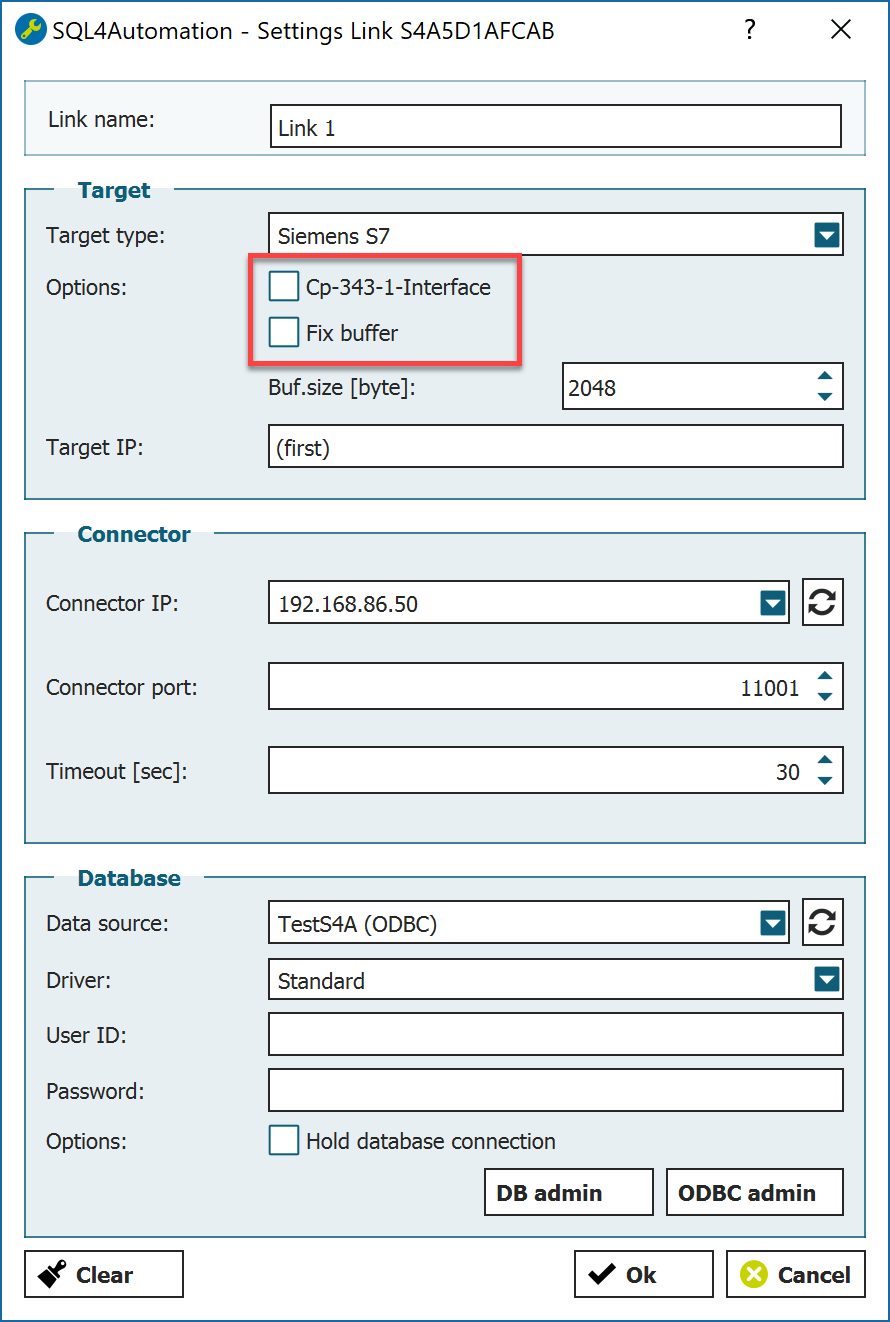
Bei dem angewählten Siemens-Target im Connector müssen weitere Optionen definiert werden:
-
Empfangspuffer Größe des Empfangspuffers im utSqlResponseBuffer
-
CP 343-1 Interface Deaktivieren
-
Fix Buffer Deaktivieren
Einstellungen Ethernet-Schnittstelle
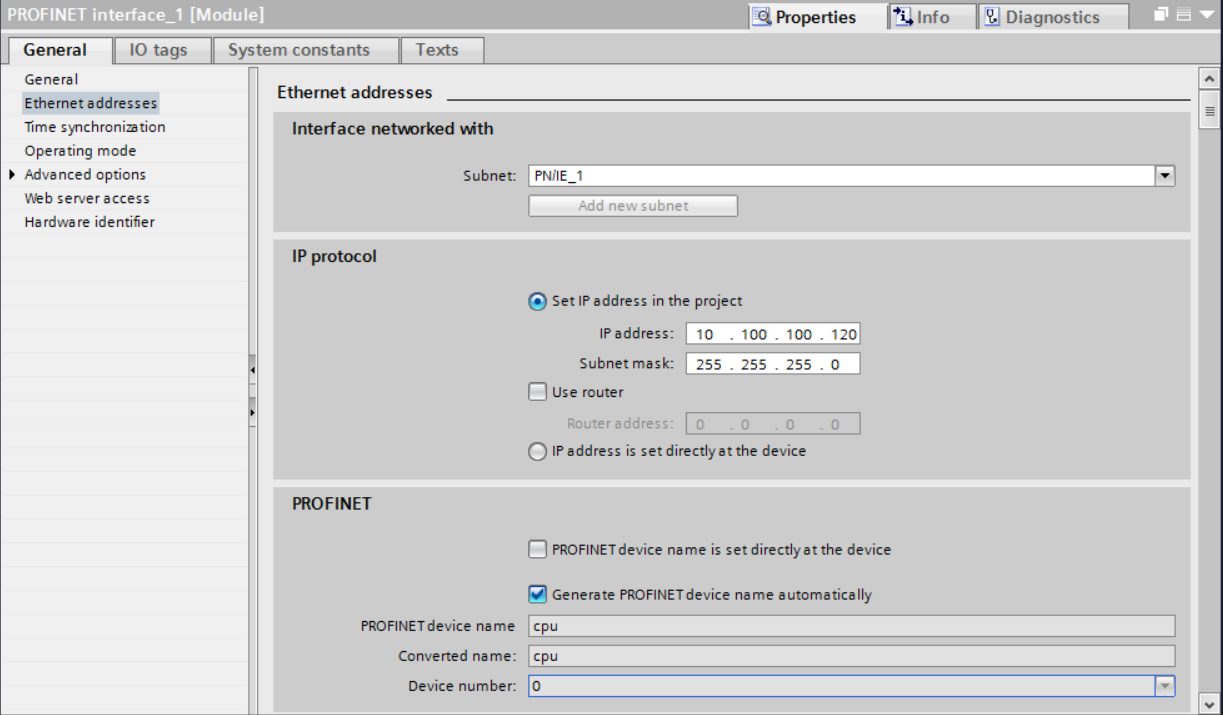
Um eine Kommunikation über die Ethernet-Schnittstelle auf der CPU und dem Connector herzustellen, muss diese parametriert werden. Die IP-Adresse der Ethernet-Schnittstelle muss im gleichen Netzwerkadressbereich mit gleicher Subnet-Maske sein, wie die des Connectors.
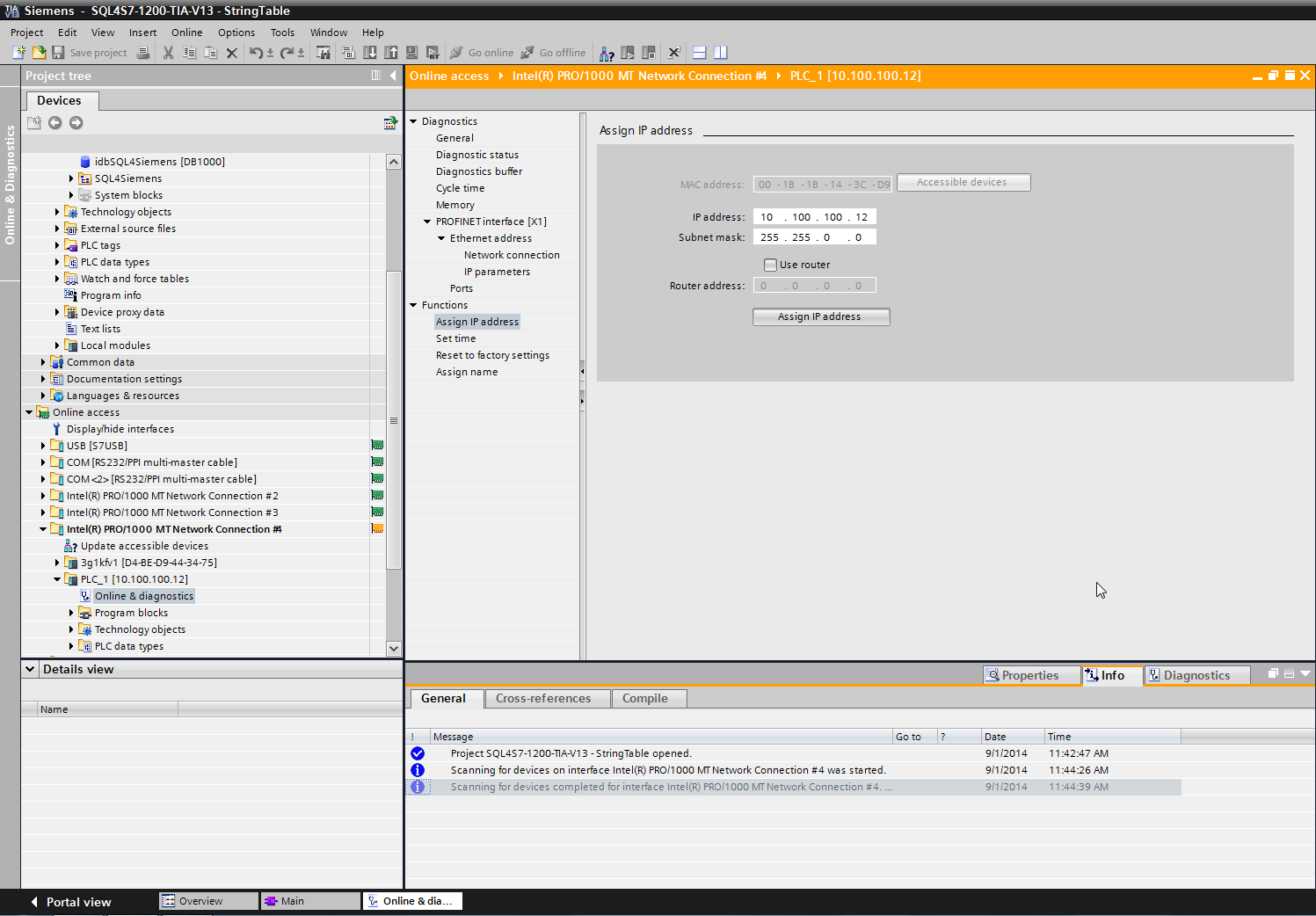
Unter „Online access“ befinden sich die verschiedenen Netzwerkkarten. Wählen Sie die Netzwerkkarte aus, mit welcher die Steuerung verbunden ist und scannen Sie das Netzwerk mit „update accessible devices“. Die Steuerung erscheint. Unter „Functions“, „Assign IP address“ kann eine neue IP Adresse und Subnetmaske vergeben und mit dem Button „Assign IP address“ an die Steuerung geschickt werden.
Das Beispielprojekt
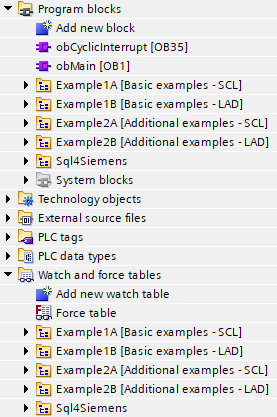
Die im Beispielprojekt enthaltenen Funktionsbausteine wurden sowohl mit SCL als auch mit LAD programmiert. Die Funktionsweise ist aber jeweils die gleiche. Die SCL-Sprache ist aus unserer Sicht kompakter und besser lesbar und wir gehen nachfolgend nur noch auf die SCL-Variante ein.
Alle Funktionsbausteine haben gemeinsam, dass diese eine Execute-Schnittstelle sowie eine Referenz auf ein Sql4SiemensInterface haben:
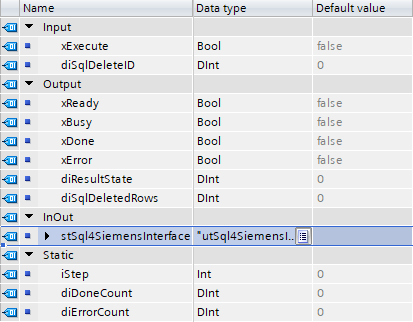
Über das Signal «xExecute» wird die Kommunikation zur Datenbank angestoßen. Der Status wird über die Signale «xReady», «xBusy», «xDone» und «xError» zurückgemeldet.
Die Logik innerhalb des Bausteins wird über eine kleine Schrittkette (Variable «iStep») gesteuert:
-
iStep = 0 (Inactive): Es ist keine Kommunikation zur Datenbank aktiv
-
iStep = 1 (Create the request): In diesem Schritt wird gewartet, bis die Schnittstelle frei ist. Sobald dies der Fall ist wird das SQL-Query entsprechend der Kunden-Applikation erstellt und das Signal «xExecute» gesetzt. Damit schickt das SQL4automation-Framework das Telegramm zur Datenbank.
-
iStep = 2 (Parse the response): In diesem Schritt wird auf eine Antwort vom Connector gewartet. Falls Daten zurückgeschickt werden, können diese bei einer erfolgreichen Ausführung ausgewertet werden. Im Fehlerfall oder wenn keine Antwort vom Connector eintrifft wird eine entsprechende Fehlermeldung ausgegeben.
-
iStep = 3 (Reset execute signal): In diesem Schritt wird gewartet, dass das Signal «xExecute» zurückgesetzt wird, worauf die Schrittkette wieder in den Grundzustand «Inactive» versetzt wird.
Das Kommunikations-Prinzip ist bei allen Beispiel-Bausteinen das gleiche. Die SPS schickt eine Anfrage (Request) zur Datenbank und erhält darauf eine Rückmeldung (Response). Der Datenfluss ist dabei sekundär - es können Daten von der Datenbank gelesen (SELECT) oder auch geschrieben werden (INSERT, UPDATE).
Die genaue Syntax vom SQL-Befehl wird einerseits vom Datenbank-Modell bestimmt und andererseits von der Aufgabe, welche ausgeführt werden soll.
Erstellen eines Request (Anfrage an die Datenbank):
-
Beispiel eines SELECT-Befehls (fbExample1A_Select_SCL).

-
Beispiel eines INSERT-Befehls (fbExample1A_Insert_SCL). Die Variablenwerte werden mit Convert-Funktionen zur Laufzeit gewandelt.

Parsen der Response (Antwort von der Datenbank):
-
Das Antwort-Telegramm wird beim Empfang auf Korrektheit geprüft. Wichtige Informationen werden intern gespeichert und stehen dem Anwender zum Auslesen der Daten zur Verfügung:
-
stSql4SiemensInterface.diResultState: 0: kein Fehler >0: Fehlercode
-
stSql4SiemensInterface.diResultRows: Anzahl Datensätze im Response-Telegramm
-
stSql4SiemensInterface.diResultColums: Anzahl Datenspalten im Response-Telegramm
-
-
Um die Daten auszulesen stehen folgende Funktionen zur Verfügung:
-
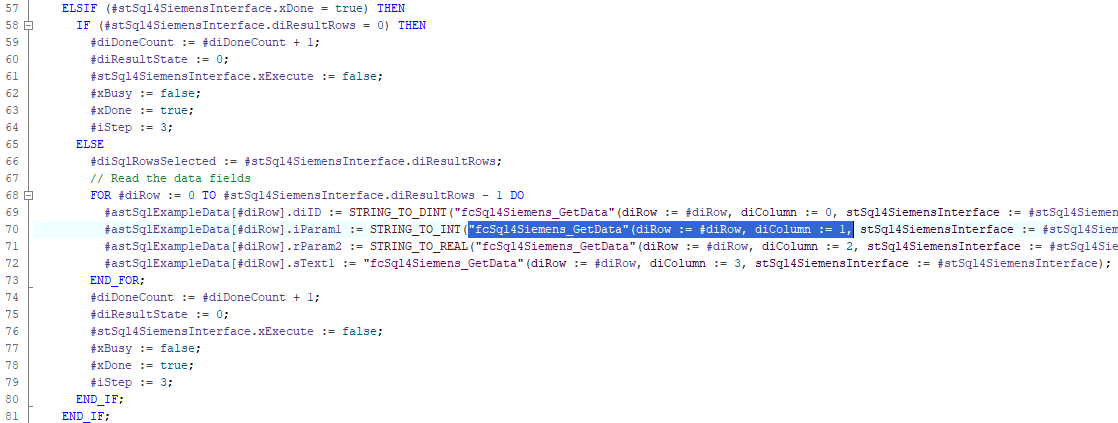
fcSql4Siemens_GetData: Gibt das entsprechende Datenfeld zurück. Der Zeilen-Index und der Spalten-Index sind 0 basiert.
-
fcSql4Siemens_GetColName: Gibt den Spalten-Namen anhand des entsprechenden Spalten-Index zurück. Der Spalten-Index ist 0 basiert. Die Spalten-Namen können beispielsweise zur Plausibilitätsprüfung benutzt werden, ob die Daten in der erwarteten Reihenfolge zurückgegeben werden.
-
-
Beispiel (fbExample1A_Select_SCL)