KUKA / SQL4KUKA
Target: "KUKA"
SQL4KUKA besteht aus sql4kuka.xml, der Konfigurationsdatei für die Ethernet XML-Kommunikation, sql4kuka.src / sql4kuka.dat, der Bibliothek für die Verbindung an den SQL4automation Connector und der example.src / example.dat, dem Beispielprogramm.
Voraussetzungen
SQL4KUKA ist ab der Steuerung KRC4 möglich und erfolgt über die Ethernet KRL XML Schnittstelle, die optional bei KUKA erhältlich ist.
Schnittstelle einrichten
Um die Schnittstelle einzurichten, muss das HMI minimiert und der EKI Network Editor gestartet werden. Um das HMI zu minimieren, muss man als Experte angemeldet sein. Durch Roboter – Inbetriebnahme – Service - HMI minimieren, gelangt man in die Windows Umgebung des SMARTPADs.
Unter Start - EKI-Network wird der EKI Network Editor gestartet.
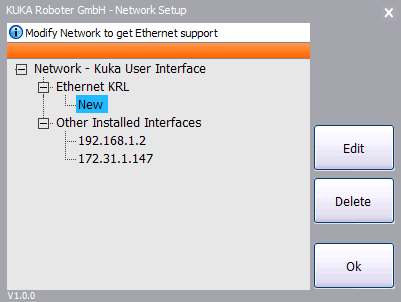
Im EKI Network Editor wird die lokale IP der TCP/IP Verbindung eingestellt.
Den Eintrag New markieren und mit Edit bearbeiten.
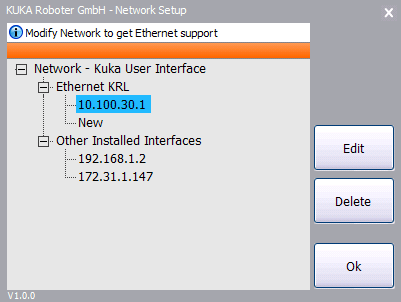
Die lokale IP eintragen und mit OK bestätigen.
Um die Änderungen zu übernehmen, muss die Steuerung mit der Option „Änderungen bei Kaltstart übernehmen“ neu gestartet werden.
In der sql4kuka.xml werden IP und Port des Connectors eingestellt:
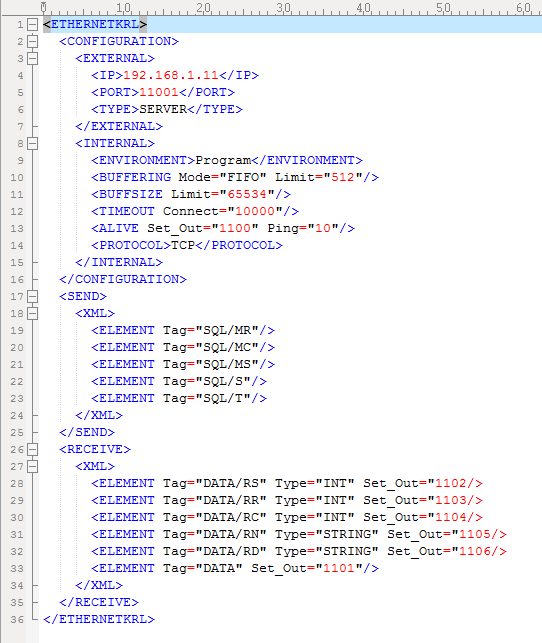
sql4kuka.xml
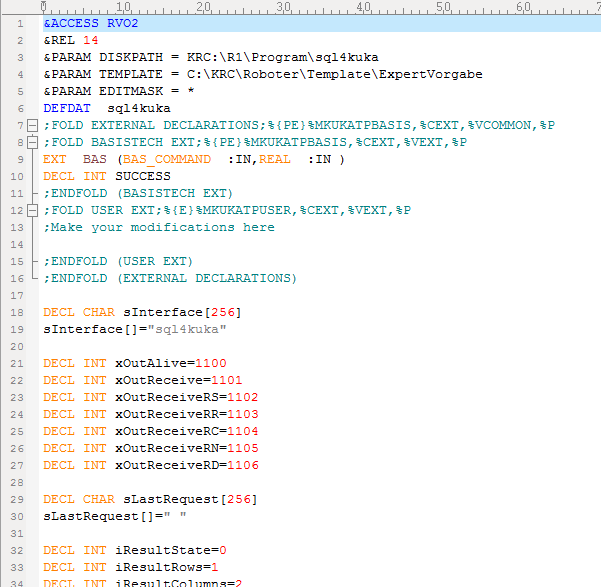
Sql4kuka.dat
Für die Kommunikation mit der Bibliothek werden 7 unbenutzte digitale Ausgänge benötigt. Diese müssen zwischen sql4kuka.xml und sql4kuka.dat übereinstimmen.
Die Datei sql4kuka.xml muss sich unter \krc\roboter\config\user\common\EthernetKRL, example.src, example.dat befinden, und der Ordner sql4kuka wird in das Verzeichnis \krc\roboter\krc\r1\program kopiert.
Nach einem Kaltstart kann das Beispiel getestet werden.
Hilfsfunktionen SQL4KUKA
Die Bibliothek sql4kuka.src stellt zahlreiche Hilfsfunktionen zum Umkopieren von Werten und Zusammensetzen von Strings zur Verfügung.
Einen neuen Abgfragestring erstellen
EXTFCT BOOL NewRequest(CHAR[]:OUT, CHAR[]:IN)
Dem Abfragestring einen BOOL hinzufügen
EXTFCT BOOL BOOL_To_Request(CHAR[]:OUT, BOOL:IN)
Dem Abfragestring einen INT hinzufügen
EXTFCT BOOL INT_To_Request(CHAR[]:OUT, INT:IN)
Dem Abfragestring einen REAL hinzufügen
EXTFCT BOOL REAL_To_Request(CHAR[]:OUT, REAL:IN)
Dem Abfragestring einen CHAR hinzufügen
EXTFCT BOOL CHAR_To_Request(CHAR[]:OUT, CHAR:IN)
Dem Abfragestring einen STRING hinzufügen
EXTFCT BOOL STRING_To_Request(CHAR[]:OUT, CHAR[]:IN)
Einen Wert der Rückgabetabelle in einen BOOL umwandeln
EXTFCT BOOL Table_To_BOOL(INT:IN, INT:IN, BOOL:OUT)
Einen Wert der Rückgabetabelle in einen INT umwandeln
EXTFCT BOOL Table_To_INT(INT:IN, INT:IN, INT:OUT)
Einen Wert der Rückgabetabelle in einen REAL umwandeln
EXTFCT BOOL Table_To_REAL(INT:IN, INT:IN, REAL:OUT)
Einen Wert der Rückgabetabelle in einen CHAR umwandeln
EXTFCT BOOL Table_To_CHAR(INT:IN, INT:IN, CHAR:OUT)
Einen Wert der Rückgabetabelle in einen STRING umwandeln
EXTFCT BOOL Table_To_STRING(INT:IN, INT:IN, CHAR[]:OUT)