FANUC / SQL4FANUC
Target: "Standard"
Voraussetzungen
Folgende Software-Optionen sind auf der Steuerung freizuschalten:
-
R632 KAREL
-
R648 User Socket Msg
Schnittstelle einrichten (Client-Tag)
- Menu – Setup – Host Comm
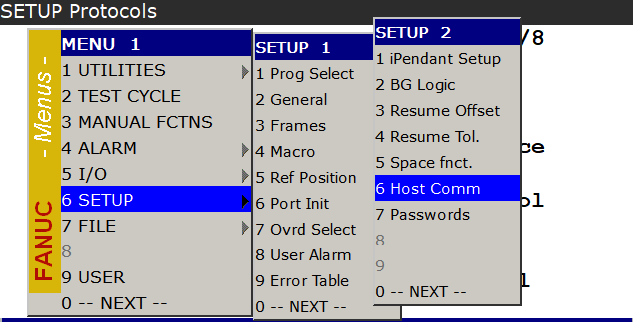
- [F4] Show – Clients
![[F4] Show – Clients](/img/manual/image238.png)
- Freien Client suchen – [F3] Detail
![Freien Client suchen – [F3] Detail](/img/manual/image239.png)
![Freien Client suchen – [F3] Detail](/img/manual/image240.png)
- Comment – Client benennen
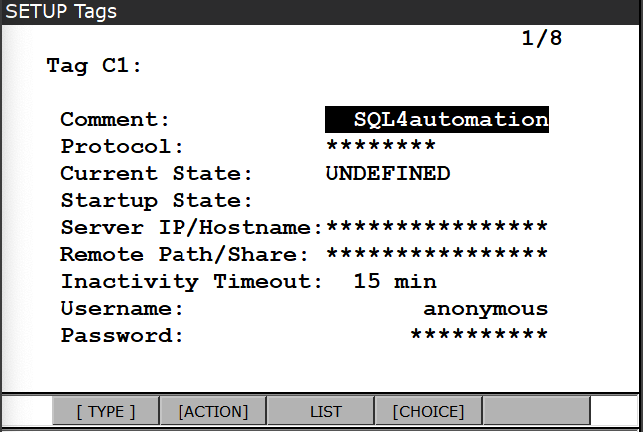
- Protocol – [F4] Choice – SM
![Protocol – [F4] Choice – SM](/img/manual/image242.png)
- Startup State – [F4] Choice – Define
![Startup State – [F4] Choice – Define](/img/manual/image243.png)
- Server IP/Hostname eintragen
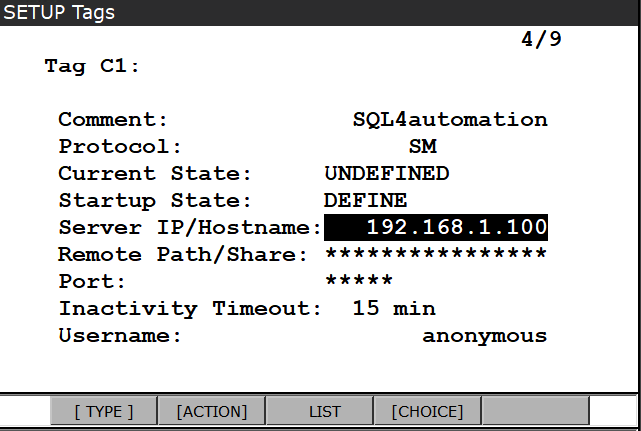
- [F2] Action – Define
![[F2] Action – Define](/img/manual/image245.png)
![[F2] Action – Define](/img/manual/image246.png)
- Menu – Next – System – Variables
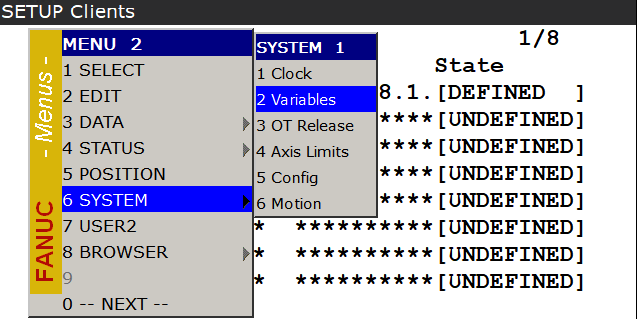
- $HOSTC_CFG suchen – Detail
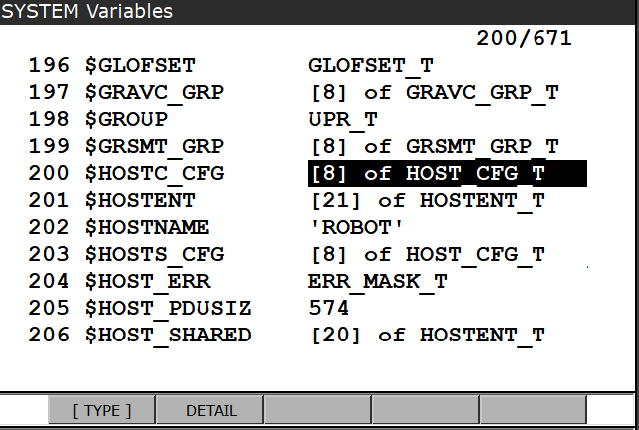
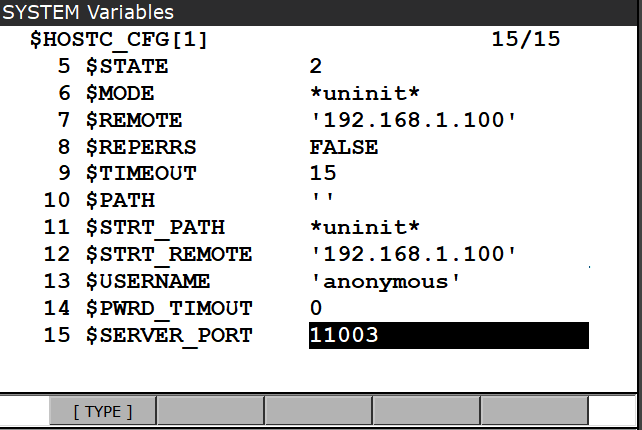
- Tag-Index (Tag C1 -> [1]) wählen – Detail
![Tag-Index (Tag C1 -> [1]) wählen – Detail](/img/manual/image249.png)
![Tag-Index (Tag C1 -> [1]) wählen – Detail](/img/manual/image250.png)
- $SERVER_PORT suchen und Port-Nummer eintragen
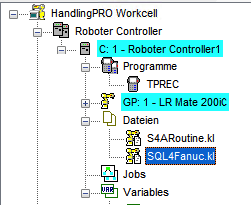
KAREL Dateien ins Projekt einfügen
-
SQL4Fanuc.kl Beispiel-Programm für eine Datenbank-Abfrage
-
S4ARoutine.kl enthält alle Routinen für eine Datenbank-Abfrage
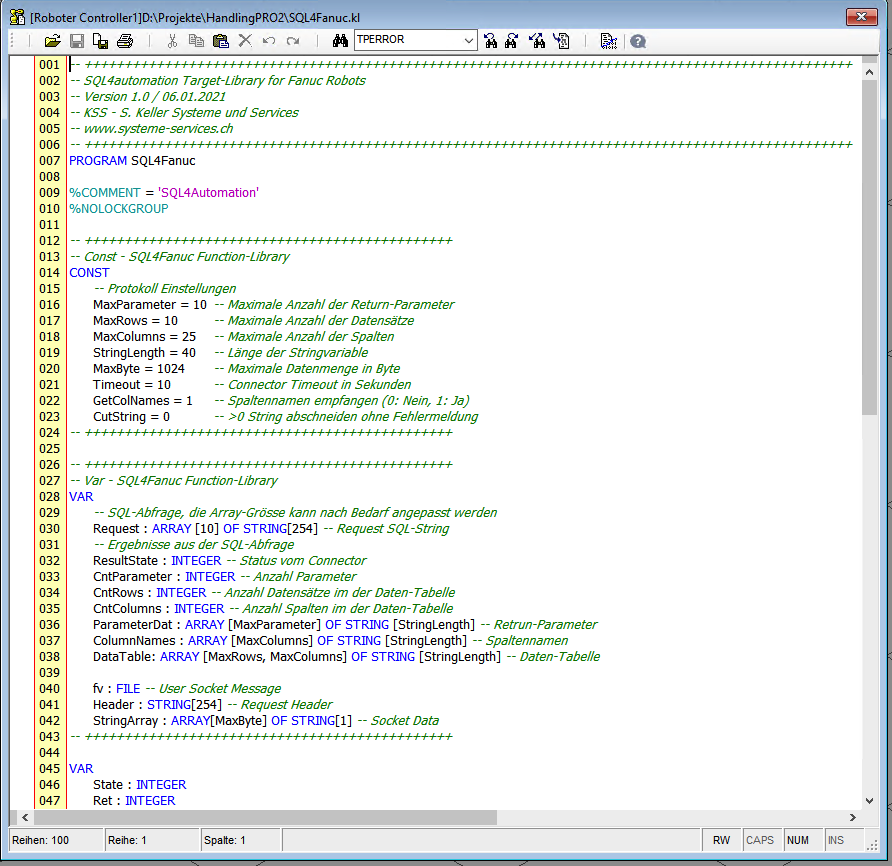
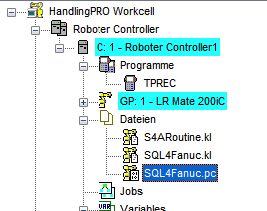
- SQL4Fanuc öffnen und Übersetzen (Build)
- SQL4Fanuc.pc wurde erstellt
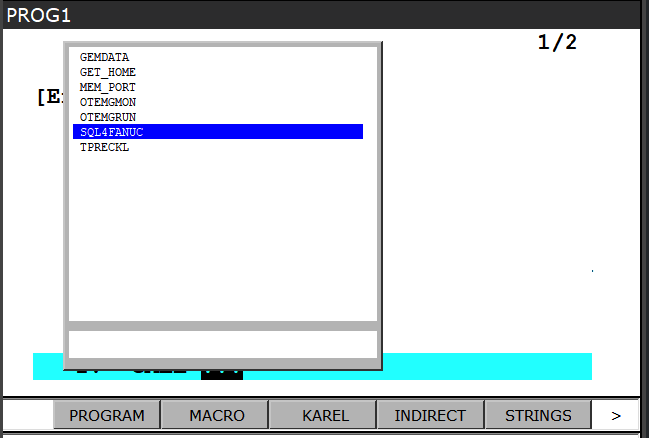
SQL4FANUC in TP-Programm aufrufen
- Neues TP-Programm erstellen und Aufruf einfügen INST – CALL – CALL program - KAREL

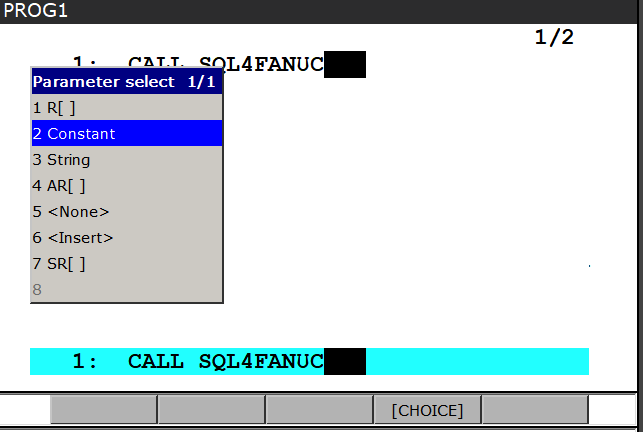
- Parameter eintragen – Choice – Constant
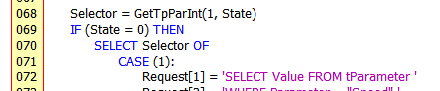
- Der übergebene Parameter wird im Karel-Programm ausgelesen (Selector) und
ruft damit die gewünschte SQL-Abfrage auf

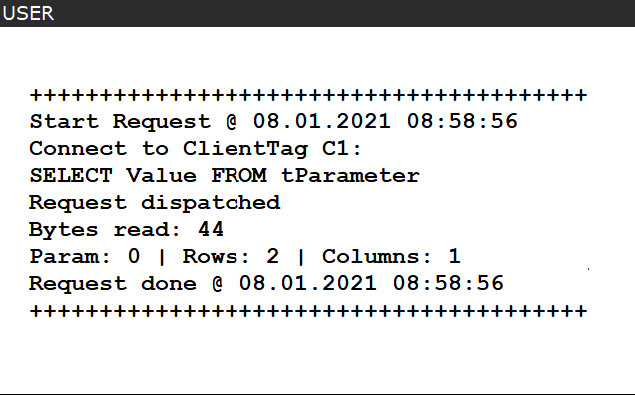
- Im Debug-Mode werden auf der User-Seite Infos zur SQL-Abfrage ausgegeben.
Datenbank Abfrage im Karel-Programm einfügen
Im Karel-Programm sind Konstanten und Variablen vorbereitet. Die sollen nicht geändert werden, da diese auch in den S4ARoutinen verwendet werden.
- Die Konstanten enthalten Einstellungen zum Protokoll
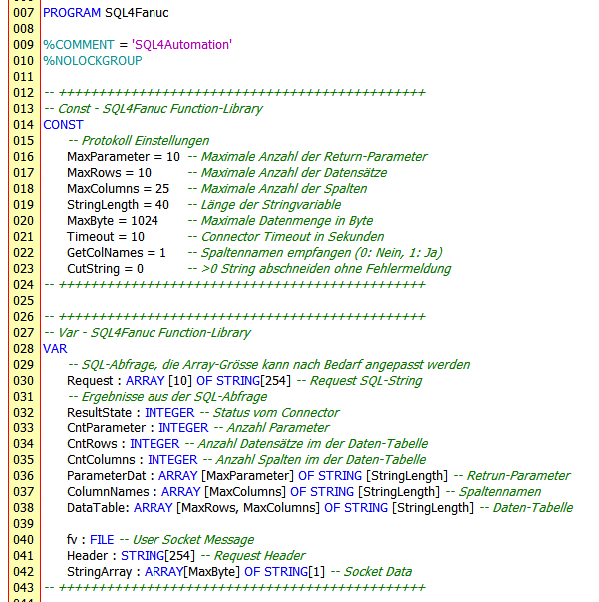
Weitere Einstellungen entnehmen Sie aus dem SQL4automation-Handbuch.
-
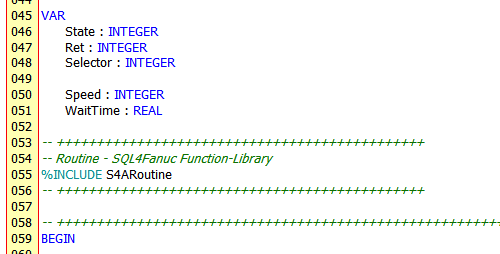
Weitere Variablen können dem Projekt nach Bedarf hinzugefügt werden.
-
Nach den Variablen wird die SQL4Fanuc-Target-Library (S4ARoutine) eingefügt.
SQL Abfrage
Aufbau
- Eine SQL-Abfrage wird im String-Array Request eingetragen

Die Array-Größe kann nach Bedarf angepasst werden
- Das Array hilft u.a. um Abfragen, die größer als 254 Zeichen sind, aufzubauen.

Ausführung
- Eine Datenbank-Abfrage wird mit der Funktion SqlRequest() ausgeführt
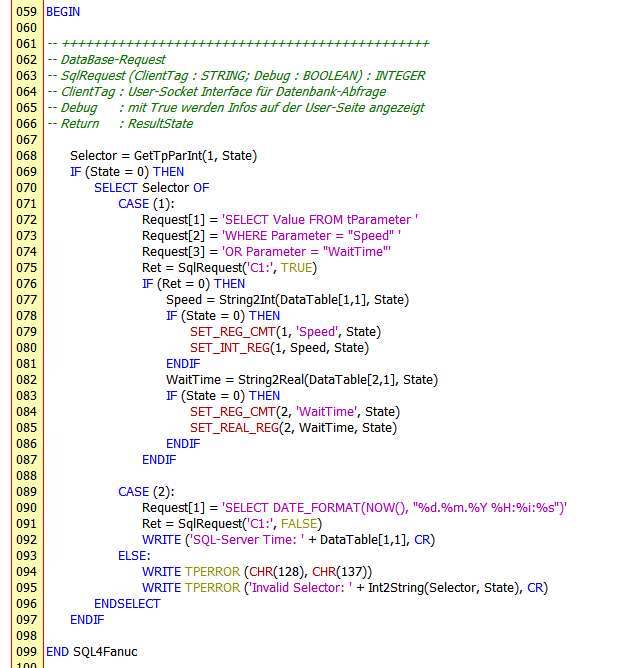
Beim Aufruf der Funktion folgen 2 Parameter:
-
ClientTag z.B. ‘C1:’ entspricht dem konfigurierten Client-Tag 1
-
Debug mit True werden Information auf der User-Seite angezeigt
Die Funktion liefert einen Return-Wert:
-
0 Abfrage wurde erfolgreich ausgeführt
-
-1 Timeout bei der Abfrage
-
-2 UMS-File konnte nicht angelegt werden (Fanuc-Fehler)
-
-3 Es konnte keine Verbindung zum Connector aufgebaut werden
-
>0 Fehlermeldung des Connector
Auswertung
- Bei Return 0 sind die Daten der Abfrage in der Tabelle DataTable[Rows][Columns] als String-Werte abgelegt
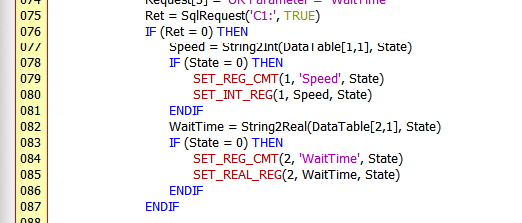
Mit den Hilfs-Funktionen aus der S4ARoutine (siehe weiter unten) werden die Daten aus der Tabelle in Variablen kopiert.
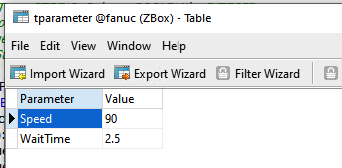
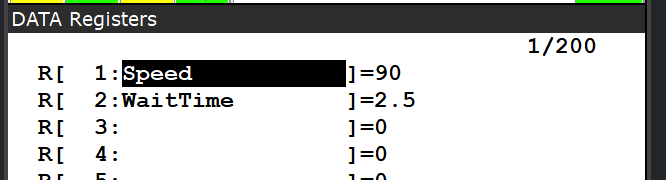
In diesem Beispiel werden die Werte der Parameter Speed und WaitTime aus der Tabelle tParameter abgefragt und anschließend in die Numerischen-Register 1 und 2 eingetragen.
S4ARoutine
Die S4ARoutine enthält nebst der eigentlichen SqlRequest Funktion für Abfragen der Datenbank auch eine Reihe von Hilfsfunktionen.
| Funktion | Parameter | Datentyp | Beschreibung |
|---|---|---|---|
| SqlRequets | ClientTag | String | Client-Tag der konfigurierten Verbindung |
| Debug | Boolean | mit True werden Information auf der User-Seite angezeigt | |
| Return | Integer | 0 Abfrage wurde erfolgreich ausgeführt -1 Timeout bei der Abfrage -2 UMS-File konnte nicht angelegt werden -3 Keine Verbindung zum Connector >0 Fehlermeldung des Connector |
Boolean-Variable in String umwandeln
| Funktion | Parameter | Datentyp | Beschreibung |
|---|---|---|---|
| Bool2String | Value | Boolean | Wert der Boolean-Variable |
| State | Integer | Status der Funktion 0 Erfolgreich | |
| Return | String | Value-Wert als String |
String-Variable in Boolean umwandeln
| Funktion | Parameter | Datentyp | Beschreibung |
|---|---|---|---|
| String2Bool | Value | String | Wert der String-Variable |
| State | Integer | Status der Funktion 0 Erfolgreich -1 String kann nicht gewandelt werden | |
| Return | Boolean | Value-Wert als Boolean (False bei Fehler) |
Integer-Variable in String umwandeln
| Funktion | Parameter | Datentyp | Beschreibung |
|---|---|---|---|
| Int2String | Value | Integer | Wert der Integer-Variable |
| State | Integer | Status der Funktion 0 Erfolgreich | |
| Return | String | Value-Wert als String |
String-Variable in Integer umwandeln
| Funktion | Parameter | Datentyp | Beschreibung |
|---|---|---|---|
| String2Int | Value | String | Wert der String-Variable |
| State | Integer | Status der Funktion 0 Erfolgreich -1 String kann nicht gewandelt werden | |
| Return | Integer | Value-Wert als Integer (0 bei Fehler) |
Integer-Variable in BCD-String umwandeln
| Funktion | Parameter | Datentyp | Beschreibung |
|---|---|---|---|
| Int2StrBCD | Value | Integer | Wert der Integer-Variable |
| State | Integer | Status der Funktion 0 Erfolgreich | |
| Return | String | Value-Wert als String im BCD-Format (10101010) |
BCD-String-Variable in Integer umwandeln
| Funktion | Parameter | Datentyp | Beschreibung |
|---|---|---|---|
| StrBCD2Int | Value | String | Wert der String-Variable im BCD-Format (01010101) |
| State | Integer | Status der Funktion 0 Erfolgreich | |
| Return | Integer | Value-Wert als Integer |
Integer-Variable in HEX-String umwandeln
| Funktion | Parameter | Datentyp | Beschreibung |
|---|---|---|---|
| Int2StrHEX | Value | Integer | Wert der Integer-Variable |
| State | Integer | Status der Funktion 0 Erfolgreich | |
| Return | String | Value-Wert als String im HEX-Format (0x00FF00FF) |
Real-Variable in String umwandeln
| Funktion | Parameter | Datentyp | Beschreibung |
|---|---|---|---|
| Real2String | Value | Real | Wert der Real-Variable |
| State | Integer | Status der Funktion 0 Erfolgreich | |
| Return | String | Value-Wert als String |
String-Variable in Real umwandeln
| Funktion | Parameter | Datentyp | Beschreibung |
|---|---|---|---|
| String2Real | Value | String | Wert der String-Variable |
| State | Integer | Status der Funktion 0 Erfolgreich -1 String kann nicht gewandelt werden | |
| Return | Real | Value-Wert als Real (0.0 bei Fehler) |
TP-CALL Parameter als Integer auslesen
| Funktion | Parameter | Datentyp | Beschreibung |
|---|---|---|---|
| GetTpParInt | ParNb | Integer | Parameter Nummer |
| State | Integer | Status der Funktion 0 Erfolgreich -1 Type ist Integer -2 Type ist Real -3 Type ist String -4 Type ist unbekannt -5 Funktionsfehler | |
| Return | Integer | Parameter-Wert als Integer (0 bei Fehler) |
TP-CALL Parameter als Real auslesen
| Funktion | Parameter | Datentyp | Beschreibung |
|---|---|---|---|
| GetTpParReal | ParNb | Integer | Parameter Nummer |
| State | Integer | Status der Funktion 0 Erfolgreich -1 Type ist Integer -2 Type ist Real -3 Type ist String -4 Type ist unbekannt -5 Funktionsfehler | |
| Return | Real | Parameter-Wert als Real (0.0 bei Fehler) |
Datum und Zeit formatiert auslesen
| Funktion | Parameter | Datentyp | Beschreibung |
|---|---|---|---|
| GetTimeStr | Format | Integer | Ausgabeformat 0 Datum und Zeit (31.12.2020 23:59:59) 1 nur Datum (31.12.2020) 2 nur Zeit (23:59:59) 3 File (20201231_235959) |
| Return | String | Value-Wert als String |