CODESYS V2.3 / SQL4CODESYS
Target: "Standard"
Voraussetzungen
Die SQL4CoDeSys.lib Bibliothek verwendet die Sockets-Funktionen der CoDeSys Bibliothek SysLibSockets.lib welche im Projekt in der Bibliotheksverwaltung ebenfalls angeschlossen werden muss.
Das Beispielprojekt kann auf der Soft-SPS CoDeSys SP PLCWinNT oder einer Hardware SPS ausgeführt werden. Voraussetzung ist, dass die Steuerung einen TCP/IP Anschluss hat und die SysLibSockets.lib unterstützt.
Funktionsbaustein
Globale Konstanten
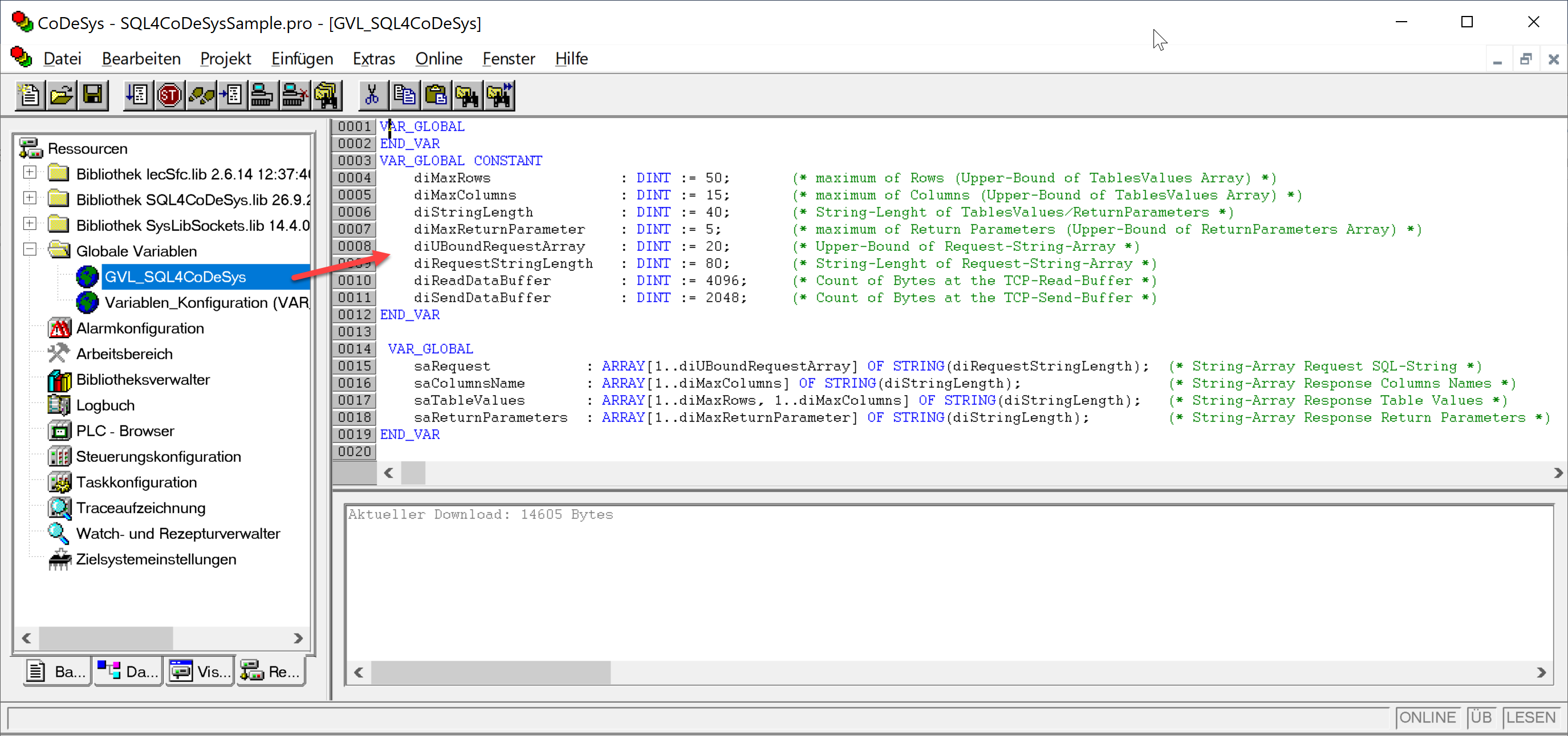
Einige globale Konstanten können projektspezifisch angepasst werden. Je nach Grösse der zu lesenden oder schreibenden Datenmengen werden hier die Arraygrössen bestimmt. Diese globalen Parameter sind in Ihrem Projekt deklariert (GVL_SQL4CoDeSys). Nach Änderungen müssen Sie das komplette Projekt neu übersetzen.
VAR_GLOBAL CONSTANT
        diMaxRows                    : DINT := 50;        (* max. Anzahl Datensätze, aus Table-Array *)
        diMaxColumns                 : DINT := 15;        (* max. Anzahl Spalten, aus Table-Array *)
        diStringLength               : DINT := 40;        (* Stringlänge in der Table-Array*)
        diMaxReturnParameter         : DINT := 5;         (* max. Anzahl Return Parameter, aus Return Parameter-Array *)
        diUBoundRequest Array        : DINT := 20;        (* Obergrenze Request-String-Array *)
        diRequestStringLength        : DINT := 80;        (* Stringlänge Request-String-Array *)
        diReadDataBuffer             : DINT := 4096;      (* max. Anzahl Bytes des Lese-Puffers *)
        diSendDataBuffer             : DINT := 2048;      (* max. Anzahl Bytes des Sende-Puffers *)
END_VAR
Globale Variablen
VAR_GLOBAL
        saRequest          : ARRAY[1..diUBoundRequestArray] OF STRING(diRequestStringLength);      (* Request-Array *)
        saColumnsName      : ARRAY[1..diMaxColumns] OF STRING(diStringLength);                     (* Spaltennamen-Array *)
        saTableValues      : ARRAY[1..diMaxRows, 1..diMaxColumns] OF STRING(diStringLength);       (* Werte-Array *)
        saReturnParameters : ARRAY[1..diMaxReturnParameter] OF STRING(diStringLength);             (* Return Parameter-
                                                                                                   Array *)
END_VAR
Instanz / Interface
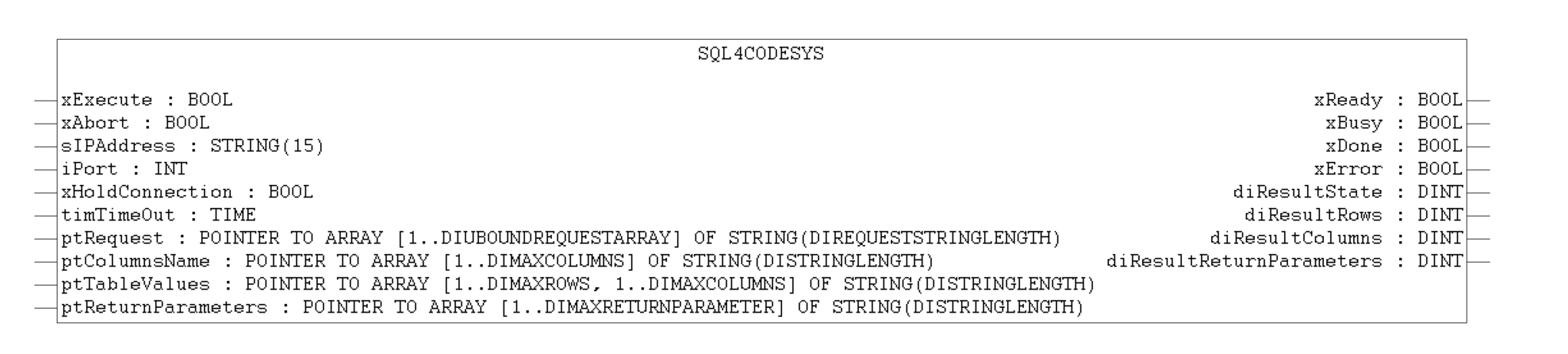
Instanz der SQL4CoDeSys-Target-Library und lokale Variablen anlegen.
DB_Connection                 : SQL4CoDeSys;        (* Instanz von SQL4CoDeSys Funktionsblock *)

xExecute                      : BOOL;               (* Datenbankabfrage starten *)
xAbort                        : BOOL;               (* Reset *)
sIPAddress                    : STRING(15) ;        (* Eingestellte IP-Adresse des SQL4automation-Connectors *)
iPort                         : UINT;               (* Eingestellte Port-Nummer des SQL4automation-Connectors *)
xHoldConnection               : BOOL;               (* Behält nach einer Datenbankabfrage die Socketverbindung offen *)
timTimeOut                    : TIME;               (* Timeout *)
xReady                        : BOOL;               (* Bereit für eine Datenbankabfrage *)
xBusy                         : BOOL;               (* Datenbankabfrage läuft *)
xDone                         : BOOL;               (* Datenbankabfrage abgeschlossen *)
xError                        : BOOL;               (* Datenbankabfrage endete mit einem Fehler *)
diResultState                 : DINT;               (* Status Datenbankabfrage / Fehlernummer *)
diResultReturnParameters      : DINT;               (* Anz. erhaltene Return und Output Parameter aus der DB-Abfrage *)
diResultRows                  : DINT;               (* Anz. erhaltene Zeilen aus der Datenbankabfrage *)
diResultColumns               : DINT;               (* Anz. erhaltene Spalten aus der Datenbankabfrage *)
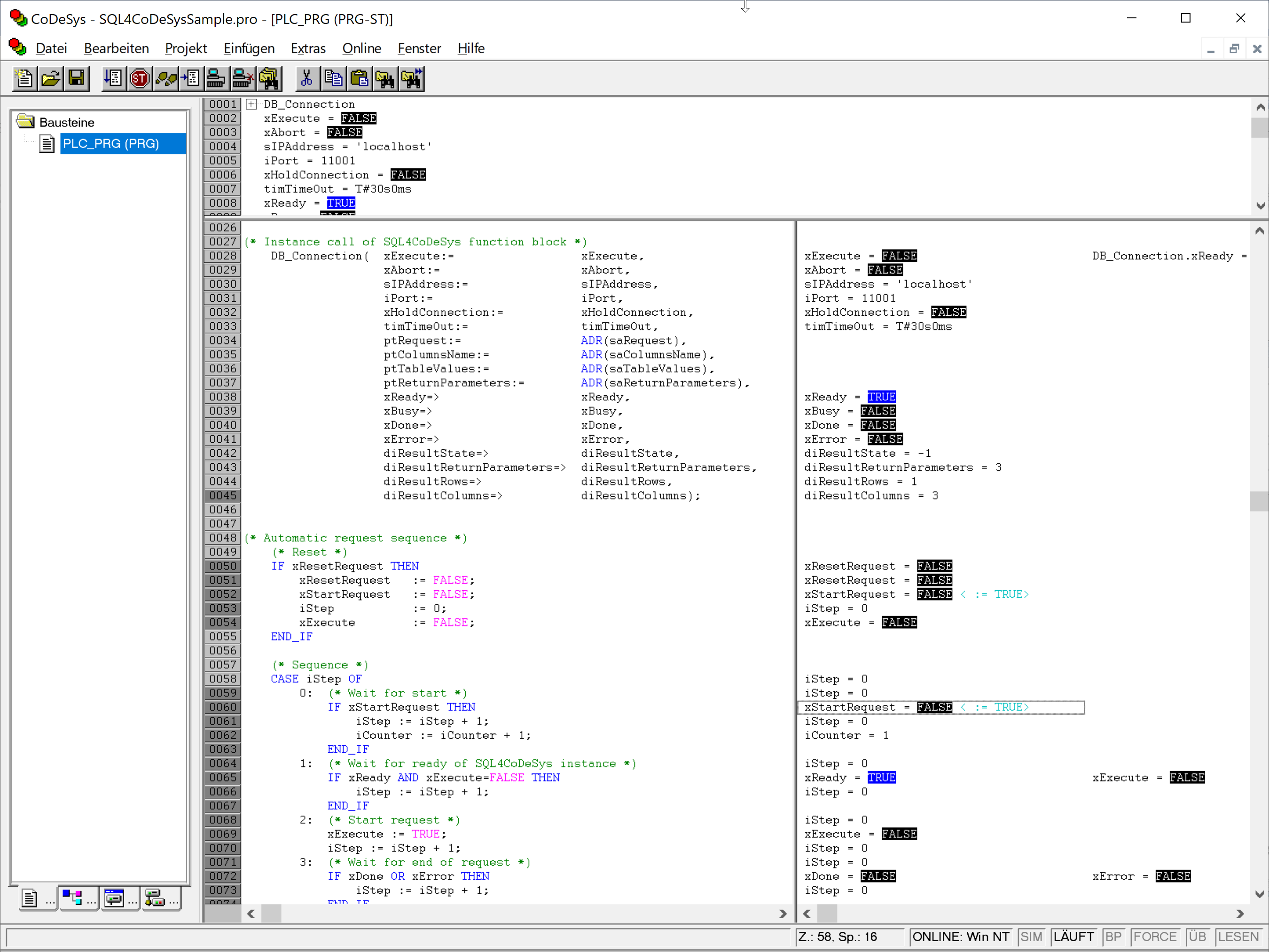
Instanz im Programm aufrufen und lokale Variablen zuweisen.
sIPAddress            := '192.168.1.20';              (* IP Adresse welche im Connector gesetzt ist *)
iPort                 := 11001;
DB_Connection(        xExecute:=                      xExecute,
                      xAbort:=                        xAbort,
                      sIPAddress:=                    sIPAddress,
                      iPort:=                         iPort,
                      xHoldConnection:=               xHoldConnection,
                      tTimeOut:=                      timTimeOut,
                      pRequest:=                      ADR(saRequest),
                      pColumnName:=                   ADR(saColumnsName),
                      pTableValue:=                   ADR(saTableValues),
                      ptReturnParameters:=            ADR(saReturnParameters),
                      xReady=>                        xReady,
                      xBusy=>                         xBusy,
                      xDone=>                         xDone,
                      xError=>                        xError,
                      diResultState=>                 diResultState,
                      diResultReturnParameters=>      diResultReturnParameters,
                      diResultRows=>                  diResultRows,
                      diResultColumns=>               diResultColumns);
Handshake
Das Handshake verhält sich nach dem Handshake des Standardprotokolls. Das Standardprotokoll wird unter Standard Protokoll beschrieben.
Fehlercodes Return-Value
Die Variable “diResultState” beschreibt den Fehler.
| Fehler-Nummer | Fehler-Beschreibung |
|---|---|
| 1 | Unbekannter SQL Befehl |
| 2 | Abfrage ergibt mehr Datensätze als mit diMaxRows definiert, Abfrage anpassen oder diMaxRows vergrößern |
| 3 | Abfrage ergibt mehr Spalten als mit diMaxColumns definiert, Abfrage anpassen oder diMaxColumns vergrößern |
| 5 | Abfrage gibt min. ein Wert zurück, der größer ist als mit MaxStringLength definiert, Abfrage anpassen oder MaxStringLength vergrößern |
| 10 | Interner Connector Fehler |
| 11 | Interner Connector Fehler, Datenbank kann nicht geöffnet werden |
| 21 | Keine IP-Adresse definiert / sIPAddress=’’ |
| 22 | Keine Portnummer definiert / uiPort=0 |
| 23 | Request-String ist leer / pRequest^[1]=’’ |
| 24 | Anzahl MaxRows nicht definiert / diMaxRows=0 |
| 25 | Anzahl MaxColumns nicht definiert / diMaxColumns=0 |
| 26 | Pointer auf TableValues-Array ist nicht definiert |
| 27 | Pointer auf ColumnsName-Array ist nicht definiert |
| 28 | Pointer auf Request-Array ist nicht definiert |
| 29 | Größe MaxStringLength nicht definiert / diStringLength=0 |
| 30 | Pointer auf ReturnParameter-Array ist nicht definiert |
| 41 | Keine Verbindung zum SQL4automation-Connector hergestellt. Firewall ausschalten. |
| 50 | Es konnte nicht der gesamte Request-String gesendet werden. Bitte prüfen Sie die Verbindung oder den TCP Puffer Ihres Systems. |
| 51 | Request-string ist größer als der Sendepuffer. (diSendDataBuffer) |
| 71 | Verbindung zum SQL4automation-Connector kann nicht geschlossen werden |
| 99 | Timeout |
| >100 | Fehlernummern der ODBC Datenbankanbindung (anbei ein paar bekannte Fehlernummern) |
| 40002 | Allgemeiner Fehler bei der SQL Abfrage, Request-String ist ungültig |
Beispielprojekt SQL4CoDeSysSample
Im Beispielprojekt SQL4CoDeSysSample.pro wurde die SQL4CodeSys Bibliothek bereits eingefügt.
Das Projekt kann zum Beispiel auf der CODESYS Soft-SPS „CoDeSys SP PLCWinNT“ getestet werden. Der Connector muss gestartet und die Verbindung zur Beispiel-Datenbank „S4A_Test_DB.mdb“ konfiguriert sein.
Wie die Verbindung zur Testdatenbank konfiguriert wird, ist unter Einrichten der Verbindung an die Testdatenbank beschrieben.
Durch Forcen von xExecute kann das Programm getestet werden. Im Falle eines Fehlers kann die Verbindung durch Forcen von xAbort zurückgesetzt werden.
Durch Forcen der Variable xStartRequest kann ein automatischer Ablauf einer Datenbankabfrage gemacht werden.
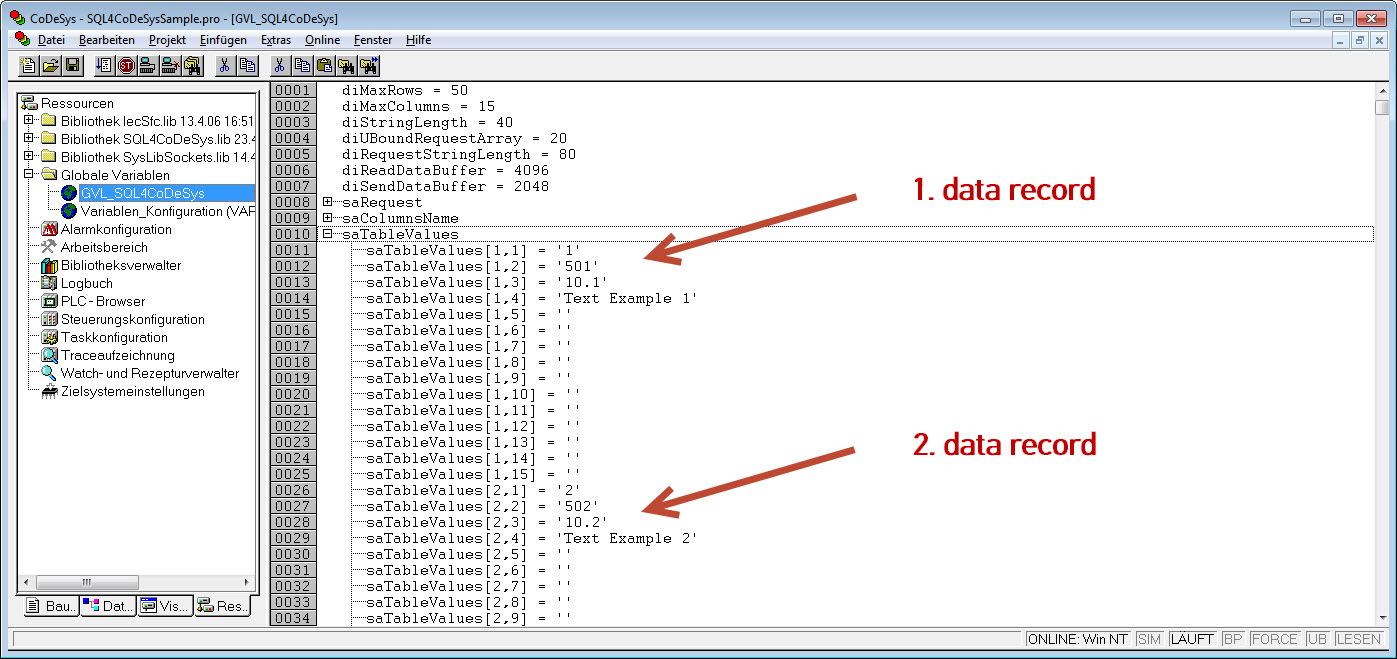
Sobald die Abfrage erfolgreich durchgelaufen ist, befinden sich in den globalen Variablen die empfangenen Datensätze.