B&R / SQL4BR
Target: "Standard"
Voraussetzungen
-
B&R Automation Studio V3.0.80.25 oder höher
-
Automation Runtime V3.00 oder höher
Implementierung der Bibliothek ins B&R Automation Studio
Um die Bibliothek in das B6R Automation Studio zu implementieren muss die Bibliothek in das Library Verzeichnis des Automation Studios kopiert werden. Standardmäßig befindet sich dieses Verzeichnis unter: «C:\Programme\BrAutomation\AS\Library»
Einbindung der SQL4BR Bibliothek in das Anwenderprogramm
Nachdem ein neues Projekt erzeugt wurde muss die SQL4BR Bibliothek dem Projekt hinzugefügt werden. Die Bibliotheken AsTCP, asstring und standard werden automatisch eingefügt.
Globale Variablen
VAR CONSTANT
        diUBoundRequestArray :           DINT := 5; (* Obergrenze Request-String-Array, muss den selben Wert zugewiesen werden
                                         wie diUBoundRequestArray der Bibliothek*)
           diRequestStringLength :       DINT := 256; (* Stringlänge Request-String-Array, muss den selben Wert zugewiesen werden
                                         wie diRequestStringLength der Bibliothek *)
END_VAR
VAR
           saRequest : ARRAY[1..diUBoundRequestArray] OF STRING[diRequestStringLength]; (* Request String Array *)
END_VAR
Instanz / Interface
Folgende Variablen können in der Datei SQL4BR.var eingestellt werden:
VAR CONSTANT
        diMaxRows : DINT := 50;                               (* max Anzahl Datensätze, aus Table-Array *)
        diMaxColumns : DINT := 15;                            (* max Anzahl Spalten, aus Table-Array *)
        diStringLength : DINT := 256;                         (* Stringlänge in der Table-Array *)
        diUBoundRequestArray : DINT := 5;                     (* Obergrenze Request-String-Array *)
        diRequestStringLength : DINT := 256;                  (* Stringlänge Request-String-Array *)
        diReadDataBuffer : DINT := 1024;                      (* Datenpuffer Lesen der Daten *)
        diWriteDataBuffer : DINT := 1024;                     (* Datenpuffer Schreiben der Daten *)
END_VAR
Die SQL4BR enthält folgende Ein- Ausgangsvariablen:
VAR_INPUT
        xExecute : BOOL;                                  (* Ausführen der SQL Anfrage *)
        xAbort : BOOL;                                    (* Reset *)
        sIPAddressPLC : STRING[15];                       (* IP-Adresse der SPS *)
        sIPAddressCon : STRING[15];                       (* IP-Adresse des Connectors*)
        iPort : INT;                                      (* Port-Nummer des SQL4automation-Connectors*)
        xHoldConnection :BOOL;                            (* Verbindung an den Connector beibehalten *)
        timTimeOut :TIME;                                 (* Timeout in Seconds, Default 30s *)
        saRequest : ARRAY[1..diUBoundRequestArray] OF STRING[diRequestStringLength]; (* SQL Abfrage String-Array *)
END_VAR

VAR_OUTPUT
        xReady : BOOL;                                   (* Bereit für eine SQL-Abfrage*)
        xBusy : BOOL;                                    (* SQL-Abfrage läuft *)
        xDone : BOOL;                                    (* SQL-Abfrage beendet*)
        xError : BOOL;                                   (* SQL-Abfrage mit einem Fehler beendet*)
        diResultState : DINT;                            (* Antwortstatus / Fehlernummer *)
        diResultRows : DINT;                             (* Anzahl Antwort-Datensätze *)
        diResultColumns :DINT;                           (* Anzahl Antwort-Spalten *)
        saColumnsName : ARRAY[1..diMaxColumns] OF STRING[diStringLength]; (* Spaltennamen*)
        saTableValues : ARRAY[1..diMaxRows,1..diMaxColumns] OF STRING[diStringLength]; (* Datenarray*)
        diCycle : DINT;                                  (* Zyklus-Zeit *)
END_VAR
Instanz anlegen
Eine Instanz der SQL4BR Bibliothek und lokale Variablen anlegen.
VAR
           SQL4automation : SQL4BR;
           xExecute: BOOL;
           xAbort: BOOL;
           sIPAddressPLC: STRING[15]:='127.0.0.1';
           sIPAddressCON: STRING[15]:='127.0.0.1';
           iPort: INT := 11001;
           xHoldConnection: BOOL := FALSE;
           timTimeOut: TIME := T#30s;
           xReady: BOOL;
           xBusy: BOOL;
           xDone: BOOL;
           xError: BOOL;
           diResultState: DINT;
           diResultRows: DINT;
           diResultColumns: DINT;
           diCycle : DINT;
           sAnswerSample : STRING[diRequestStringLength];
END_VAR
Fehlercodes Return-Value
Die Variable “diResultState” beschreibt den Fehler.
| Fehler-Nummer | Fehler-Beschreibung |
|---|---|
| 1 | Unbekannter SQL Befehl |
| 2 | Abfrage ergibt mehr Datensätze als mit MaxRows definiert, Abfrage anpassen oder MaxRows vergrößern |
| 3 | Abfrage ergibt mehr Spalten als mit MaxColumns definiert, Abfrage anpassen oder MaxColumns vergrößern |
| 5 | Abfrage gibt min. ein Wert zurück, der größer ist als mit MaxStringLength definiert, Abfrage anpassen oder MaxStringLength vergrößern |
| 10 | Interner Connector Fehler |
| 11 | Interner Connector Fehler, Datenbank kann nicht geöffnet werden |
| 21 | Keine IP-Adresse SPS und/oder Connector definiert |
| 22 | Keine Portnummer definiert |
| 23 | Request-String ist leer |
| 24 | Anzahl MaxRows nicht definiert |
| 25 | Anzahl MaxColumns nicht definiert |
| 29 | Größe MaxStringLength nicht definiert |
| 41 | Fehler beim Öffnen des Ports auf Seite der Steuerung |
| 42 | Keine Verbindung zum SQL4automation-Connector hergestellt. Firewall ausschalten. |
| 51 | Fehler beim Senden der Anfrage |
| 71 | Verbindung zum SQL4automation-Connector kann nicht geschlossen werden |
| 99 | Timeout |
| >100 | Fehlernummern der ODBC Datenbankanbindung (anbei ein paar bekannte Fehlernummern) |
| 40002 | Allgemeiner Fehler bei der SQL Abfrage, Request-String ist ungültig |
Beispielprojekt SQL4BRSample
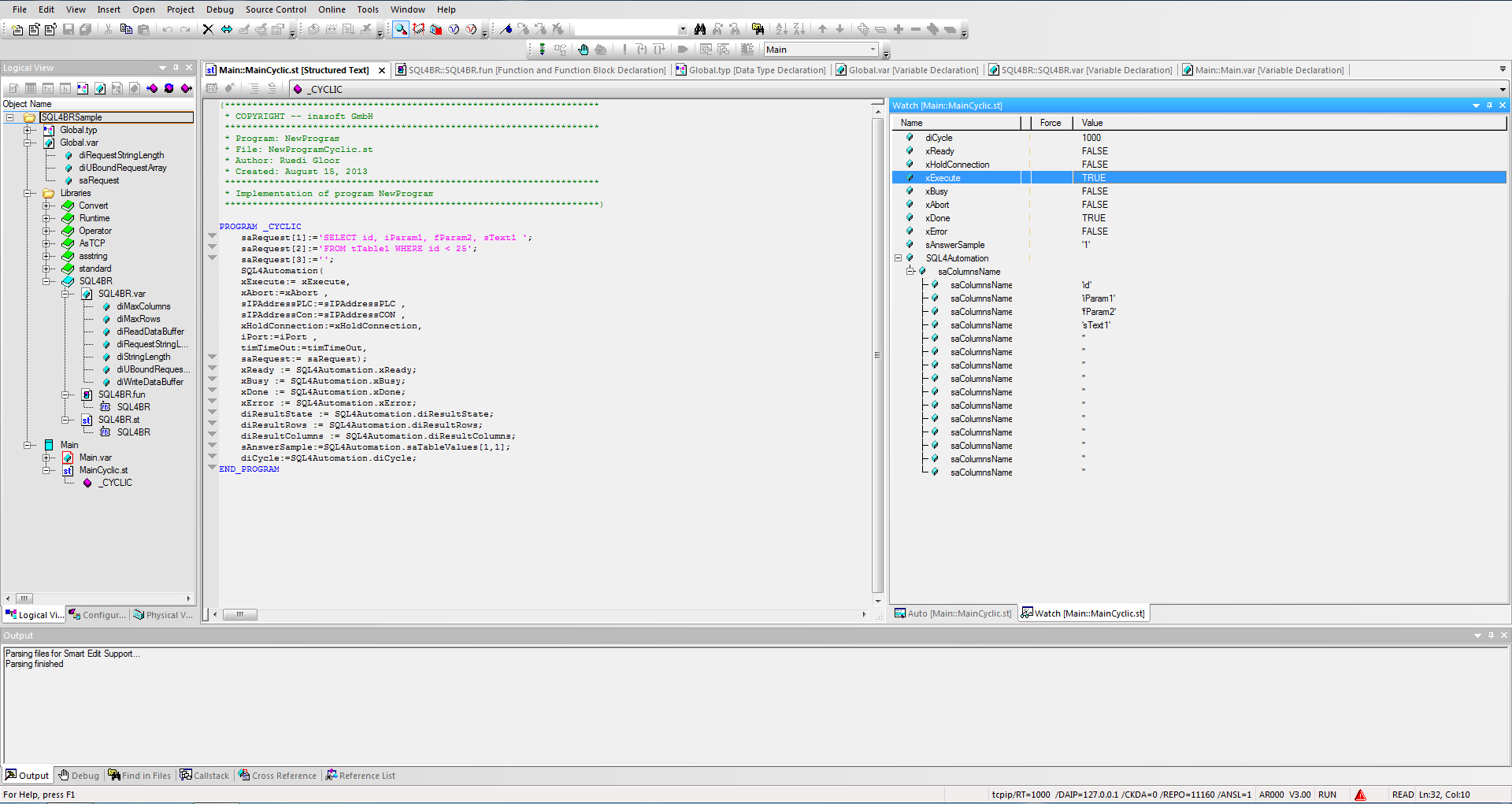
Im Beispielprojekt SQL4BRSample wurde die SQL4BR Bibliothek bereits eingefügt. Das Projekt kann auf der im B&R Automation Studio enthaltenen Soft-SPS AR000 getestet werden. Der Connector muss gestartet und die Verbindung zur S4A_Test_DB.mdb Datenbank muss konfiguriert sein.
Wie die Verbindung zur Testdatenbank konfiguriert wird, ist unter Einrichten der Verbindung an die Testdatenbank beschrieben.
Durch Forcen von xExecute kann das Programm getestet werden. Im Falle eines Fehlers kann die Verbindung durch Forcen von xAbort zurückgesetzt werden.