Allen Bradley / Rockwell / SQL4RSLogix
Target: "Standard"
Voraussetzungen
Das Add-On „SQL4automation“ verwendet eine Ethernet/IP Socket Verbindung zum Connector. Daher muss die Steuerung Ethernet/IP Sockets unterstützen. Folgende Ethernet Kommunikation Module unterstützen Ethernet/IP Sockets: 1756-EWEB, 1756-EN2Txx, 1768-EWEB (CompactLogix). Ebenfalls können Steuerungen verwendet werden, welche direkt auf der CPU eine Ethernet/IP Schnittstelle haben.
Die Beispielprojekte sind für die Controller 1756-L63 ControlLogix5563 und für einen 1769-L18ER-BB1B CompactLogix5318ERM-BB1B. Diese Beispielprojekte sind aber mit einem Controller-Wechsel einfach auf andere Controller-Typen anzupassen. Verwenden Sie für eine ControlLogix das ControlLogix-Beispiel, für eine CompactLogix das CompactLogix-Beispiel.
Falls Sie ein bestehendes Projekt haben, können Sie die in den folgenden Abschnitten beschriebenen Schritte durchführen. Ansonsten können Sie direkt ein fertiges Projekt öffnen (siehe Beispielprojekt).
Add-On und Tags importieren
Das Add-On „SQL4automation“ kann über die Importfunktion „Import Add-On Instruction…“ (rechte Maustaste: Controller Organizer - Add-On Instructions) importiert werden (AddOn_SQL4automation_v3.x.x.x.L5X). Als Zusatzfunktion gibt es eine REAL-TO-STRING Funktion.
Zusätzlich können die fehlenden Tags übers Menü „Tool – Import – Tags and Comments…“ hinzugefügt werden (Sample_S4A_CxxxxxxLogix_xxxxxxx-Controller-Tags und Sample_S4A_CxxxxxLogix_xxxxxxx-MainProgram-Tags).
Add-On (Funktionsblock)
This Add-On enables the connection of the SQL4Automation Connector to a database
Data Types
Einige Datentypen können projektspezifisch angepasst werden. Je nach Größe der zu lesenden oder schreibenden Datenmengen werden hier die Array- bzw. Datentypgrössen bestimmt.
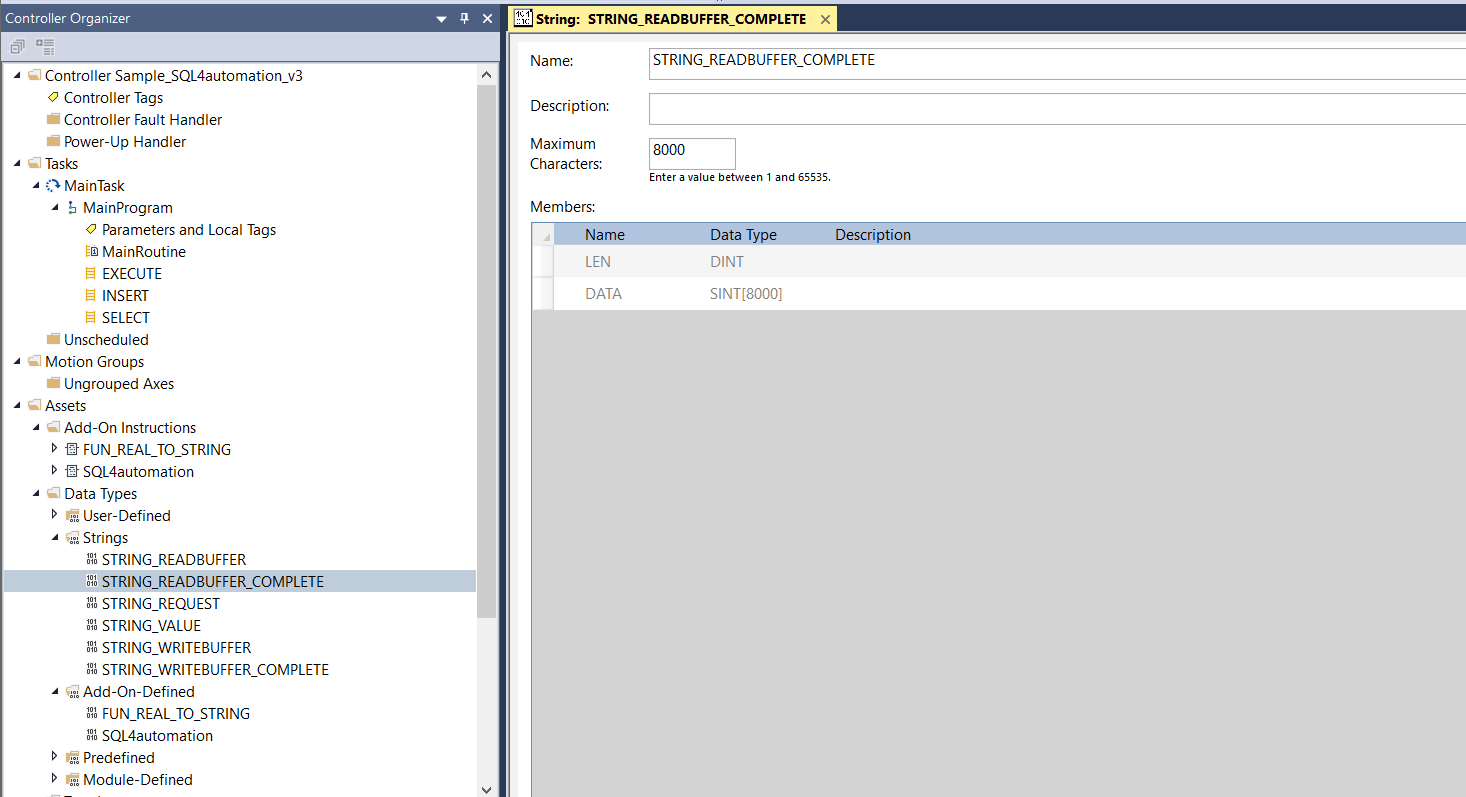
STRING – Data types
STRING_READBUFFER          Maximum Characters: 484  // Der maximale TCP Lesepuffer ist vom Steuerungstyp abhängig.
STRING_WRITEBUFFER         Maximum Characters: 462  // Der maximale TCP Schreibepuffer ist vom Steuerungstyp abhängig.
STRING_READBUFFER_COMPLETE Maximum Characters: 8000 // Die maximale Grösse der zu lesenden SQL-Daten.
STRING_WRITEBUFFER_COMPLETE Maximum Characters: 1000 // Die maximale Grösse des zu sendenden SQL-Befehls.
STRING_REQUEST               Maximum Characters: 100 // Die maximale Stringlänge im Request-Array (pro Index)
STRING_VALUE                 Maximum Characters: 20  // Die maximale Stringlänge im TableValue-Array (pro Wert)
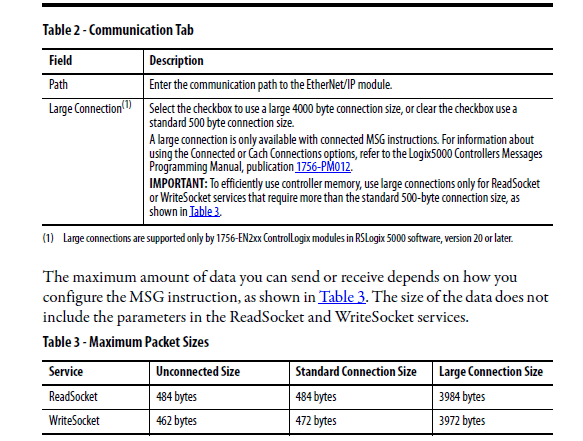
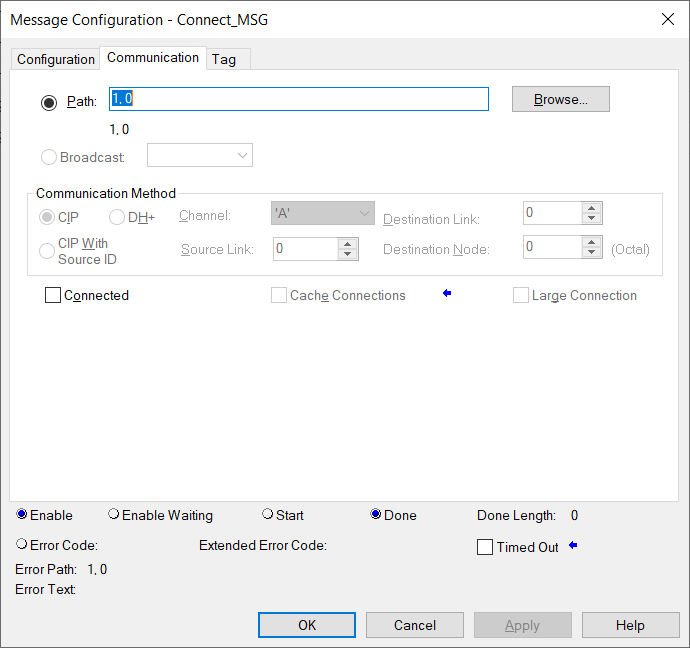
Hinweis: CompactLogix Steuerungen können nur mit Unconnected Verbindungen kommunizieren, wobei ControlLogix Steuerungen Connected Verbindungen, also Standard Verbindungen aufbauen können. Die Tabelle zeigt die Puffergrössen (STRING_READBUFFER, STRING_WRITEBUFFER) der verschiedenen Verbindungsarten.
Für die Large Connection Size benötigt es für eine 1756-L61 Steuerung eines der 1756-EN2XX Module, z.B. ein 1756-EN2T und ein Firmware Release 20 (Prozessor) und später. (1)
Ab Add-On Release V2 (AddOn_SQL4automation_v2.0.0.0.L5X) wird das partielle Lesen und Schreiben unterstützt. Dies ermöglicht auch die Übertragung grosser Datenmengen, auch wenn die TCP Puffer kleiner sind als die zu lesenden oder schreibenden Daten.
Die String-Datentypen sind im Controller Organizer unter Data Types – Strings anzupassen.
USER DEFINED – Data types
REQUEST   STRING_REQUEST[10] // Die Arraygrösse vom Request-Array (Index)
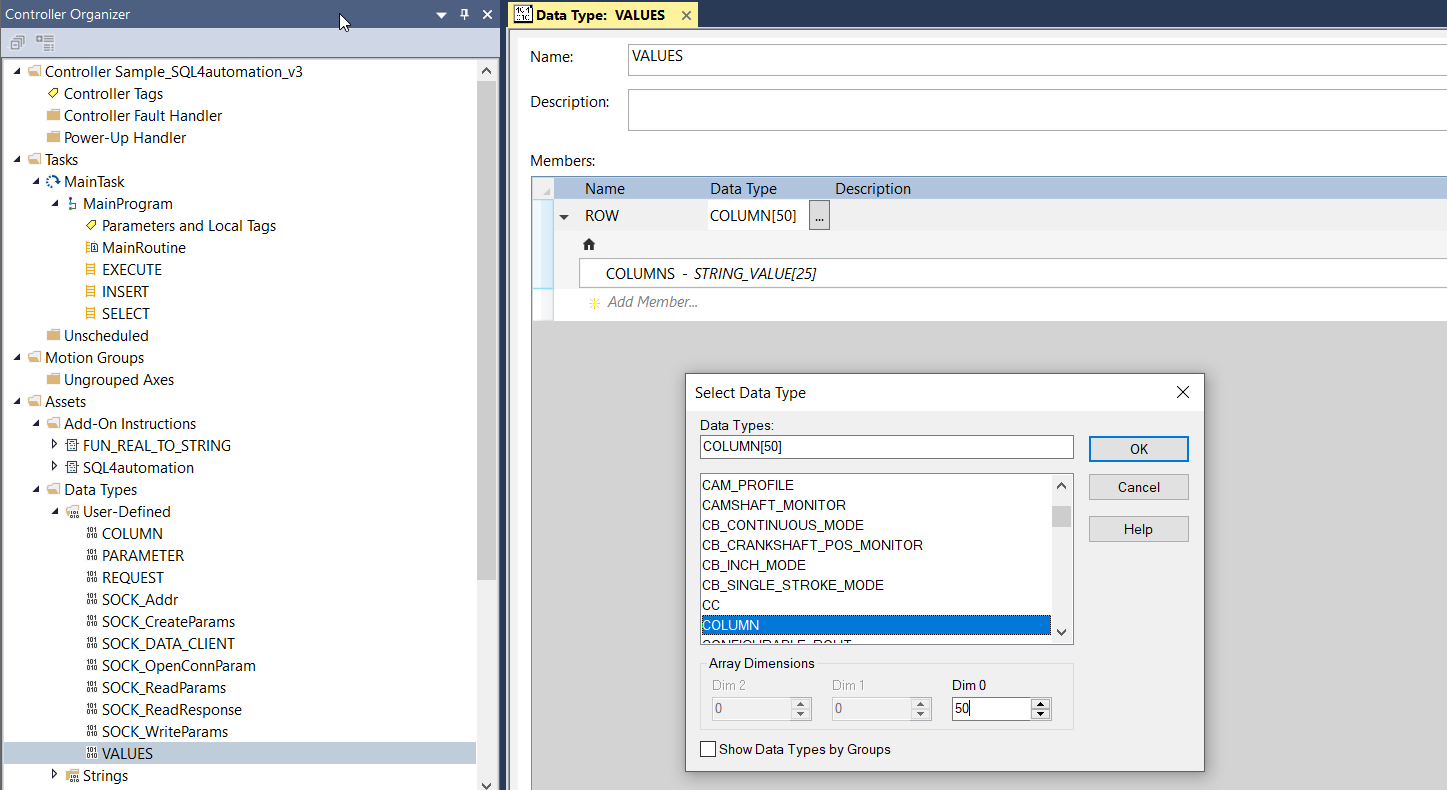
COLUMN    STRING_VALUE[25]   // Die Arraygrösse vom TableValue-Array (Anzahl Spalten)
VALUE     COLUMN[50]         // Die Arraygrösse vom TableValue-Array (Anzahl Zeilen)
PARAMETER STRING_VALUE[5]    // Die Arraygrösse vom ReturnParameter-Array (Anzahl Return Parameter)
Hinweis: Durch Anpassung der Dimension der Datentypen REQUEST, COLUMN, VALUE und PARAMETER kann die benötigte Speichermenge an die jeweilige Applikation angepasst werden.
Die User-Defined-Datentypen sind im Controller Organizer unter Data Types – User-Defined anzupassen.
Neben den Datentypen REQUEST, COLUMN, VALUE und PARAMETER benötigt es für die Socket Kommunikation noch folgende Datentapen: SOCK_Addr, SOCK:CreateParams, SOCK_DATA_CLIENT, SOCK_OpenConnParam, SOCK_ReadParams, SOCK_ReadResponse, SOCK_WriteParams. Diese müssen aber nicht angepasst werden.

Tags
Controller-Tags
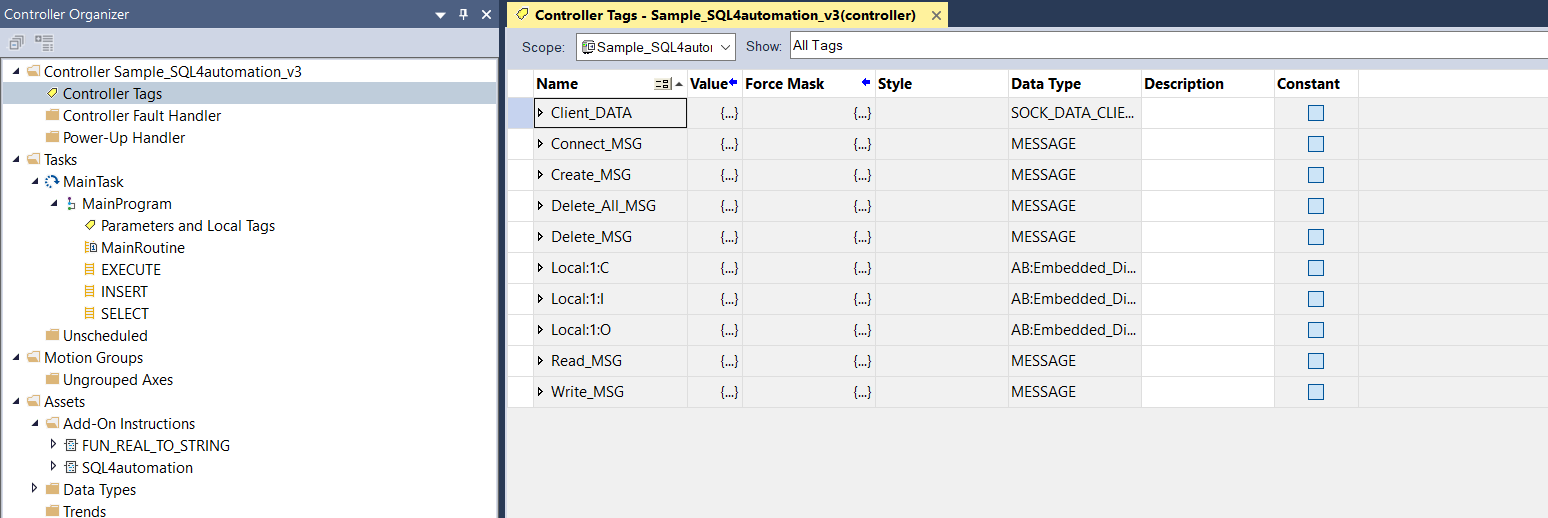
Für die Socket Kommunikation und den aufzurufenden Funktionsblock benötigt es folgende Controller-Tags.
Client_DATA     SOCK_DATA_CLIENT // Verwaltet die Socket-Daten
Connect_MSG     MESSAGE          // MESSAGE Funktion: Socket verbinden
Create_MSG      MESSAGE          // MESSAGE Funktion: Socket erstellen
Delete_All_MSG  MESSAGE          // MESSAGE Funktion: Alle Sockets löschen
Delete_MSG      MESSAGE          // MESSAGE Funktion: Socket löschen
Read_MSG        MESSAGE          // MESSAGE Funktion: Von Socket lesen
Write_MSG       MESSAGE          // MESSAGE Funktion: An Socket schreiben
Hinweis: Die MESSAGE Funktion dient für diverse Socket Funktionen. Anhand des verwendeten Hardwaretypen, müssen die Optionen Connected, Cache Connection oder Large Connection unterschiedlich gesetzt werden. Z.B. können CompactLogix Steuerungen nur mit Unconnected Verbindungen und ControlLogix Steuerungen nur mit Connected Verbindungen betrieben werden.
Program-Tags
Für den Funktionsblock-Aufruf benötigt es folgende Program-Tags.
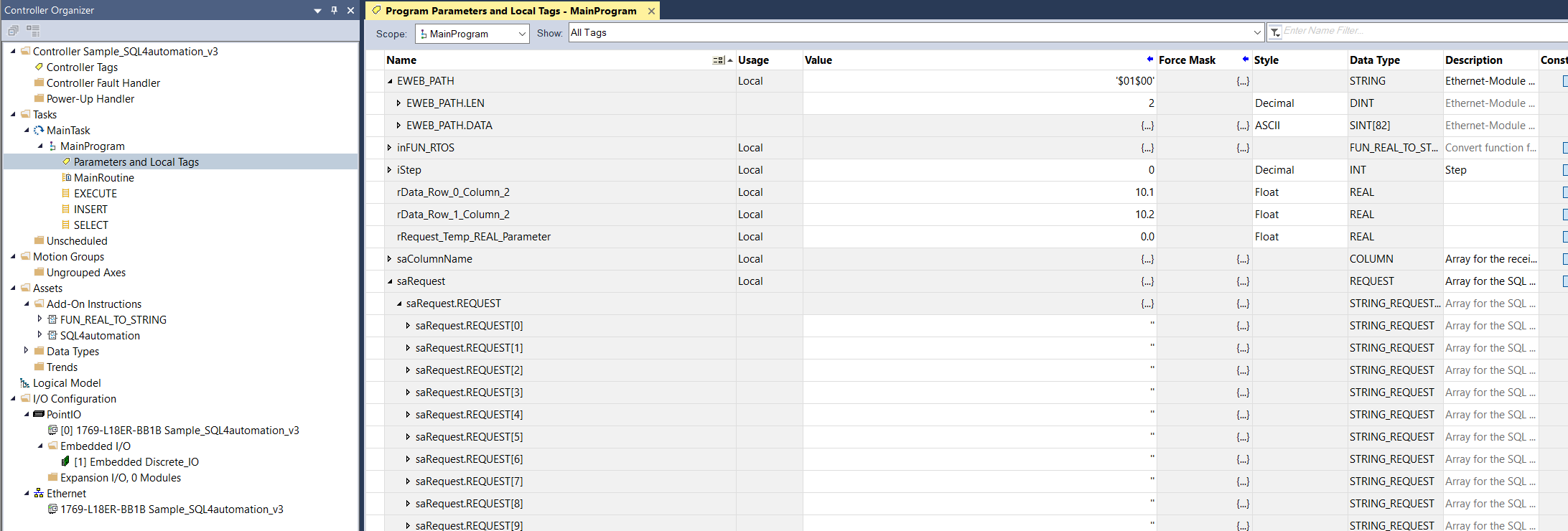
saRequest    REQUEST        // Request-Array
saTableValue VALUES         // TableValue-Array
EWEB_PATH    STRING         // Ethernet-Modul Slot. Z.B. Backplane 1, Slot 3 = '$01$03'
sDestination STRING         // Zielort des Connectors. Z.B. '192.168.1.202 ?port=11001'
SQL4RSLogix  SQL4automation // Instanz des Funktionsblocks
Parameter SQL4automation Funktionsblock
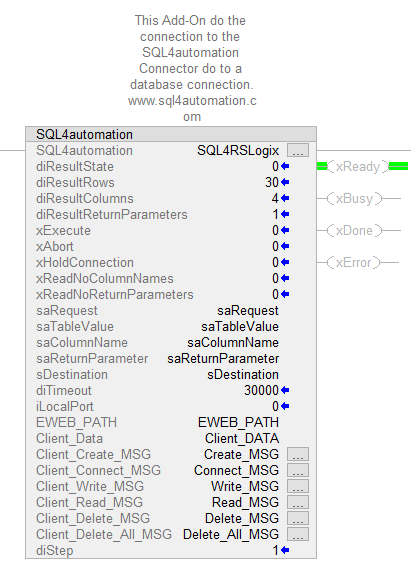
Die Instanz des SQL4automation Funktionsblocks hat folgende Ein- und Ausgangsparameter.
           SQL4RSLogix               SQL4automation               // Instanz von SQL4automation Funktionsblock

INOUT-Parameter

           saRequest                 REQUEST                      // Request-Array (SQL Befehl)
           saTableValue              VALUES                       // TableValue-Array (Daten)
           saColumnName              COLUMN                       // Spaltennamen
           saReturnParameter         PARAMETER                    // Return Parameter
           sDestination              STRING                       // Zielort des Connectors. Z.B. ‘192.168.1.202 ?port=11001’
           EWEB_PATH                 STRING                       // Ethernet-Modul Slot. Z.B. Backplane 1, Slot 3 = ‘$01$03‘
           Client_DATA               SOCK_DATA_CLIENT             // Verwaltet die Socket-Daten
           Connect_MSG               MESSAGE                      // MESSAGE Funktion: Socket verbinden
           Create_MSG                MESSAGE                      // MESSAGE Funktion: Socket erstellen
           Delete_All_MSG            MESSAGE                      // MESSAGE Funktion: Alle Sockets löschen
           Delete_MSG                MESSAGE                      // MESSAGE Funktion: Socket löschen
           Read_MSG                  MESSAGE                      // MESSAGE Funktion: Von Socket lesen
           Write_MSG                 MESSAGE                      // MESSAGE Funktion: An Socket schreiben

INPUT-Parameter

           xExecute                  BOOL;                        // Datenbankabfrage starten
           xAbort                    BOOL;                        // Reset
           xHoldConnection           BOOL;                        // Behält nach einer Datenbankabfrage die
                                                                     Socketverbindung offen
           xReadNoColumnNames        BOOL;                        // Liest die Spaltennamen nicht ein
           xReadNoReturnParameters   BOOL;                        // Liest keine Return Parameter
                                                                     (SQL4automation Connector < V4 -> TRUE)
           iLocalPort                INT                          // Port-Nummer der Steuerung. 0=default
           diTimeout                 DINT                         // Timeout einer Abfrage [ms]

OUTPUT-Parameter

           xReady            BOOL             // Bereit für eine Datenbankabfrage
           xBusy             BOOL             // Datenbankabfrage läuft
           xDone             BOOL             // Datenbankabfrage abgeschlossen
           xError            BOOL             // Datenbankabfrage endete mit einem Fehler
           diResultState     DINT             // Status Datenbankabfrage / Fehlernummer
           diResultRows      DINT             // Anz. erhaltene Zeilen aus der Datenbankabfrage
           diResultColumns   DINT             // Anz. erhaltene Spalten aus der Datenbankabfrage
           diStep            DINT             // Interner Schritt
Handshake
Das Handshake verhält sich nach dem Handshake des Standardprotokolls. Das Standardprotokoll wird unter Standard Protokoll beschrieben.
Fehlercodes Return-Value
Die Variable “diResultState” beschreibt den Fehler.
| Fehler-Nummer | Fehler-Beschreibung |
|---|---|
| 1 | Unbekannter SQL Befehl |
| 2 | Abfrage ergibt mehr Datensätze als mit gc_diMaxRows definiert, Abfrage anpassen oder gc_diMaxRows vergrößern |
| 3 | Abfrage ergibt mehr Spalten als mit gc_diMaxColumns definiert, Abfrage anpassen oder gc_diMaxColumns vergrößern |
| 4 | Abfrage ergibt mehr Daten zurück als die definierte Puffergröße. Abfrage anpassen oder Lesepuffer STRING_READBUFFER_COMPLETE erhöhen. |
| 5 | Abfrage gibt min. ein Wert zurück, der größer ist als mit gc_diMaxStringLength definiert, Abfrage anpassen oder gc_diMaxStringLength vergrößern |
| 10 | Interner Connector Fehler |
| 11 | Interner Connector Fehler, Datenbank kann nicht geöffnet werden |
| 22 | Keine Zieladresse des Connector definiert / sDestination=’’ |
| 28 | Request-String ist leer / saRequest.REQUEST[0]=’’ |
| 40 | Fehler beim Erstellen der Socket. Keine Verbindung zum SQL4automation-Connector hergestellt. Firewall ausschalten. |
| 41 | Fehler beim Verbinden zum SQL4automation-Connector. Firewall ausschalten. |
| 50 | Es konnte nicht der gesamte Request-String gesendet werden. Bitte prüfen Sie die Verbindung oder den TCP Puffer Ihres Systems. |
| 51 | Request-string ist größer als der Sendepuffer. Sendepuffer STRING_WRITEBUFFER_COMPLETE erhöhen. |
| 61 | Fehler beim Lesen der Daten vom SQL4automation-Connector. Evtl. keine Daten empfangen. |
| 62 | Fehler beim Lesen der Daten vom SQL4automation-Connector. Lesepuffer STRING_READBUFFER_COMPLETE erhöhen. Bitte SQL4automation Connector updaten (ab V3.4.1.0 wird Fehler 4 ausgegeben.) |
| 71 | Fehler beim Schließen der Verbindung zum SQL4automation-Connector |
| 99 | Timeout |
| >100 | Fehlernummern der ODBC Datenbankanbindung (anbei ein paar bekannte Fehlernummern) / Syntax Fehler |
| 40002 | Allgemeiner Fehler bei der SQL Abfrage, Request-String ist ungültig |
Beispielprojekt
Als Beispielprojekt wurde ein komplett lauffähiges Projekt erstellt. Es gibt vier Varianten. Ein Beispiel ist für eine ControlLogix, das andere für eine CompactLogix Steuerung. Beide Versionen sind in der Programmiersprache Ladder und Structured Text vorhanden.
Die Beispielprojekte sind für die Controller 1756-L63 ControlLogix5563 und für einen 1769-L18ER-BB1B CompactLogix5318ERM-BB1B. Diese Beispielprojekte sind aber mit einem Controller-Wechsel einfach auf andere Controller-Typen anzupassen. Verwenden Sie für eine ControlLogix das ControlLogix-Beispiel, für eine CompactLogix das CompactLogix-Beispiel.
Die vier Beispielprojekte heißen:
Sample_S4A_CompactLogix_Ladder.ACD Sample_S4A_CompactLogix_ST.ACD
Sample_S4A_ControlLogix_Ladder.ACD Sample_S4A_ControlLogix_ST.ACD
Hinweis: Beim Ausführen der Datenbank-Abfrage muss die Testlizenz des Connectors mittels „S4A Config“-Tool aktiviert sein und ein Link (mit Portnummer z.B. 11001) zur Testdatenbank „S4A_Test_DB.mdb“ oder „SQLite_Test_DB.db“ aus dem Verzeichnis «Sample_Database» konfiguriert sein.
Falls eine Stored Procedure ausgeführt werden soll, muss eine MS SQL Server Datenbank vorhanden sein. Mit dem SQL-Skript „MSSQL_TestDB_script.sql“ kann die Tabelle inkl. Daten und Stored Procedure erstellt werden.
Wie die Verbindung zur Testdatenbank konfiguriert wird, ist unter Einrichten der Verbindung an die Testdatenbank beschrieben.
Es gibt ein Beispiel für eine SELECT, INSERT und eine EXECUTE (Stored Procedure) Abfrage.
Der Aufruf des entsprechenden Unterprogramms wird über xQuery_SELECT, xQuery_INSERT und xQuery_EXECUTE gesteuert.
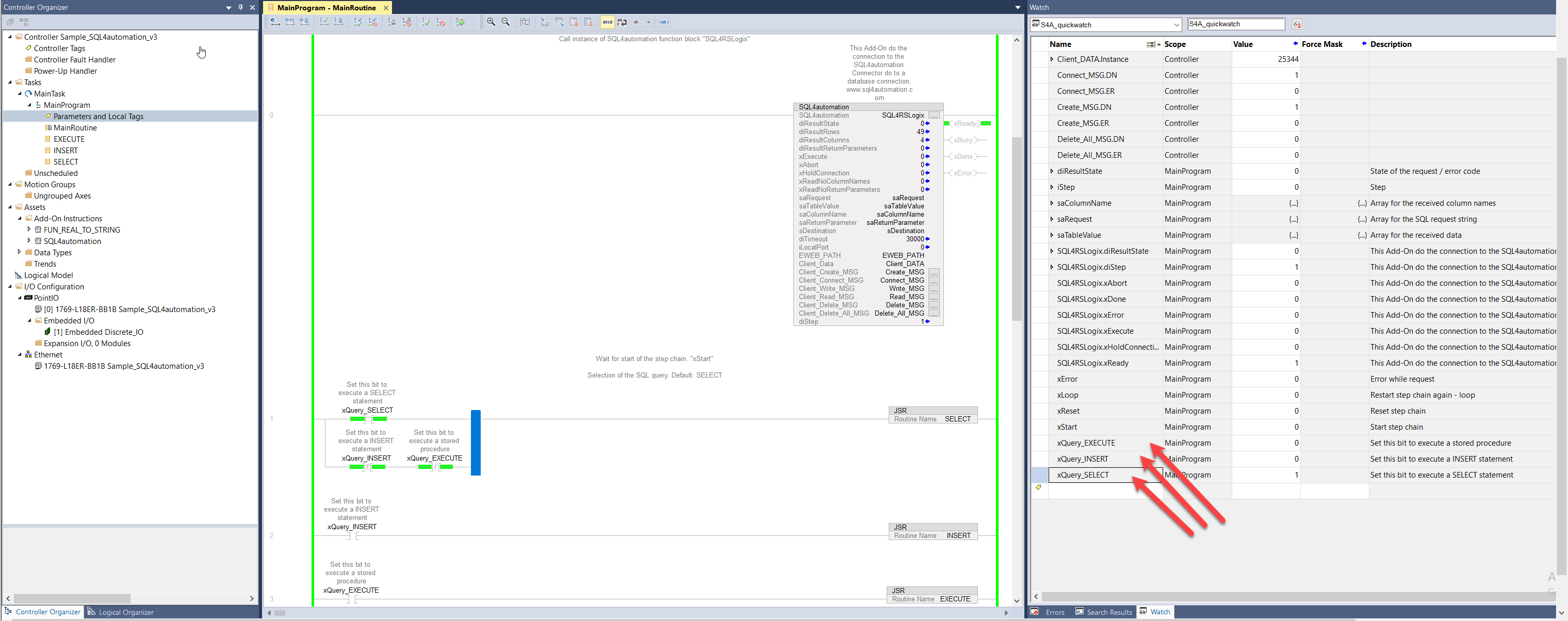
Im jeweiligen Unterprogramm ist eine Schrittkette programmiert. Dort wird auch der SQL Befehl zusammengebaut. Der SQL Befehl wird als STRING dem Funktionsbaustein übergeben. Deshalb müssen z.B. INTEGER oder REAL Variablen in STRING Variablen konvertiert werden, wenn diese im SQL Befehl eingebunden werden sollen. Für die REAL-STRING Konvertierung gibt es eine spezielle Funktion die verwendet werden kann. Diese heißt FUN_REAL_TO_STRING und ist unter den Add-On’s zu finden.
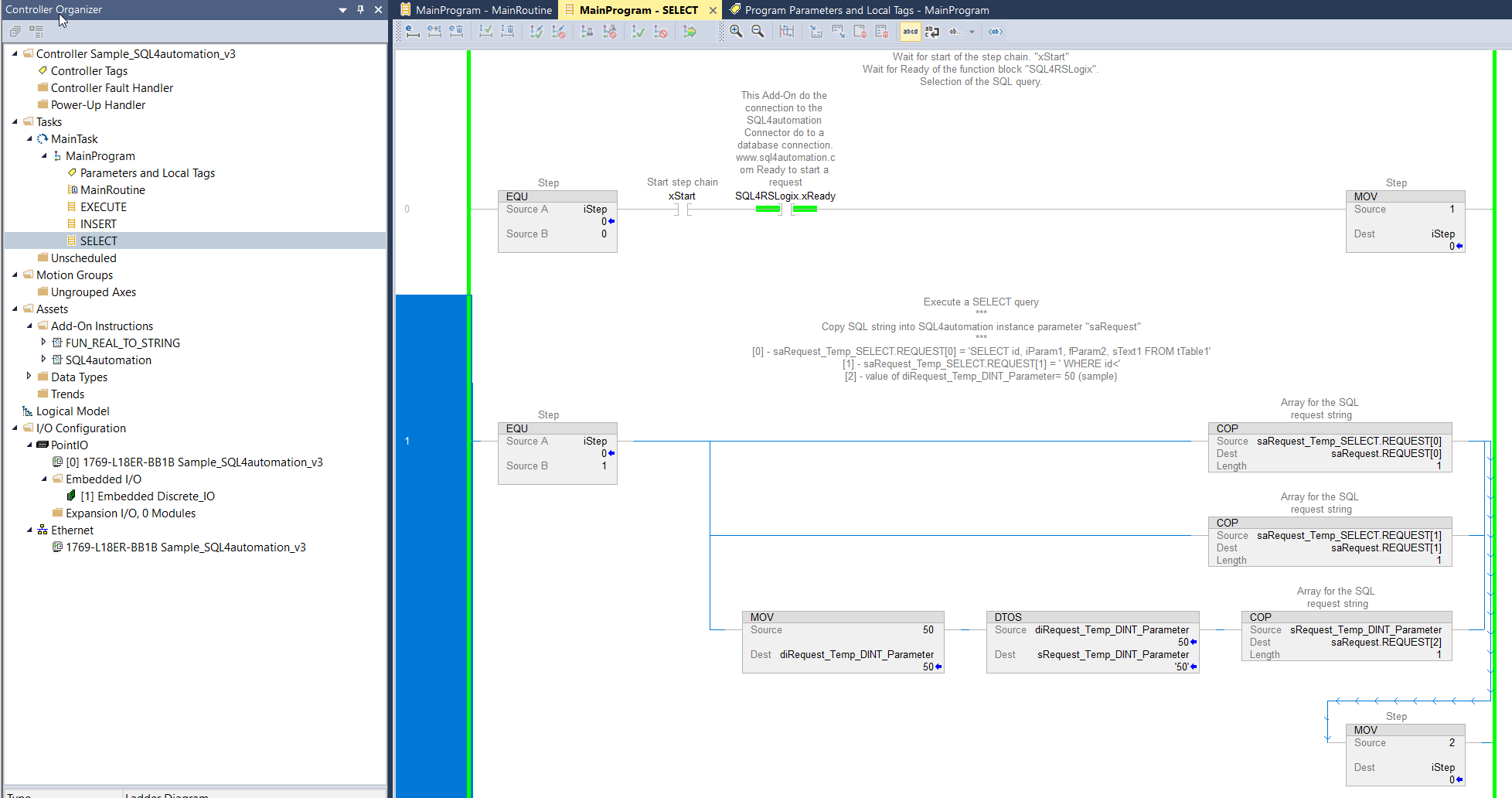
Durch Setzen der Variable xStart auf 1, kann ein automatischer Ablauf einer Datenbankabfrage gemacht werden. Anschließend muss xStart wieder auf 0 gesetzt werden.
Wird zusätzlich die Variable xLoop auf 1 gesetzt, wird die Datenbankabfrage kontinuierlich ausgeführt.
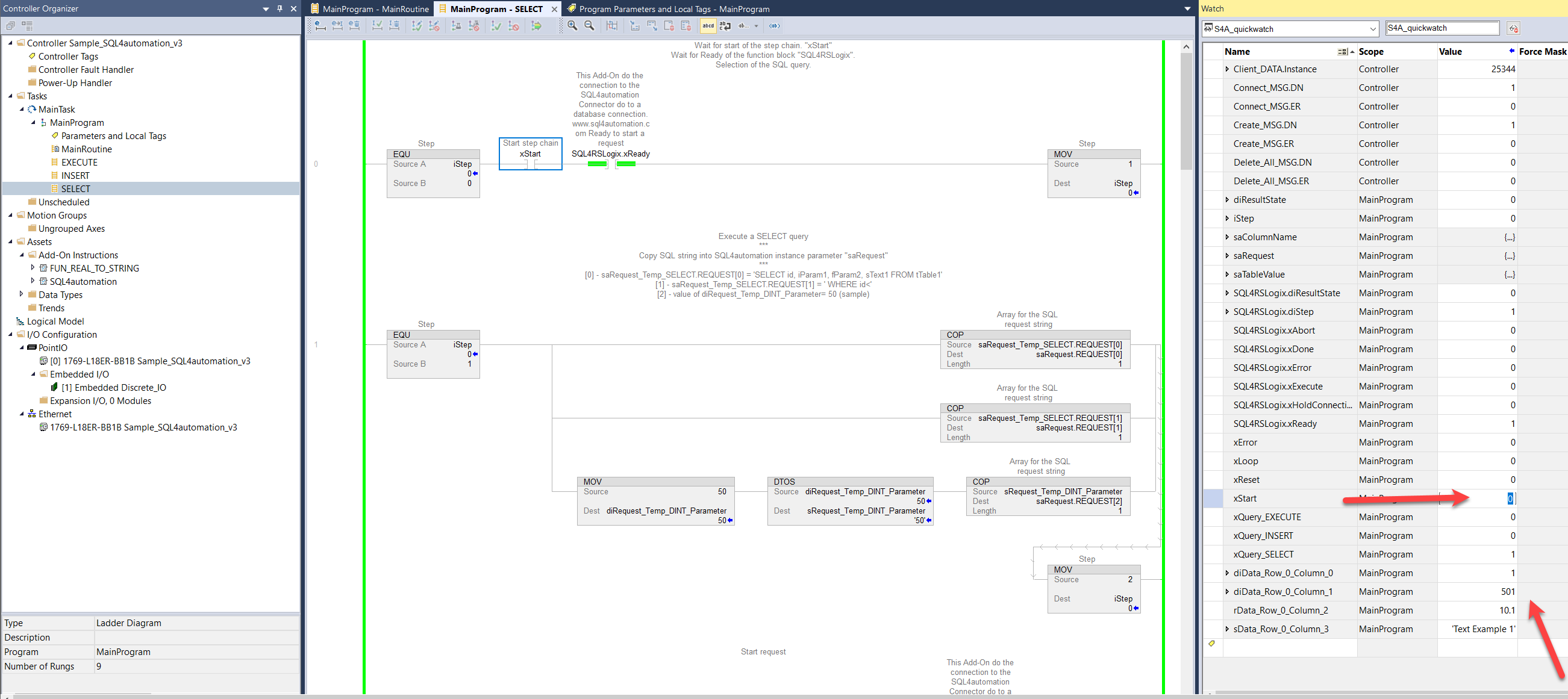
Bei erfolgreicher Abfrage werden die gelesenen Daten angezeigt.
Im „S4A Debugger“-Tool werden alle Abfragen geloggt.