TLP — Target-Link-Protokoll — Standard Protokoll
Falls für Ihre Steuerung noch keine Bibliothek zur Verfügung steht, können Sie das Protokoll zwischen Steuerung und Connector anhand der folgenden Dokumentation nachbilden. Kontaktieren Sie uns vorher, da wir stetig Bibliotheken für weitere Steuerungen entwickeln.
Standard Protokoll
Mit jeder SQL-Anfrage an die Datenbank werden dem Connector vorab Informationen mitgesendet.
Anfrage an Connector
| Attribut | Datentyp | Beschreibung | Default |
|---|---|---|---|
| MRP | Nullterminierter String | Max Return Parameter | |
| <MRP Value> | Nullterminierter String | Minimum 1 | Nicht optional |
| MR | Nullterminierter String | Max Rows | |
| <MR Value> | Nullterminierter String | Minimum 1 | Nicht optional |
| MC | Nullterminierter String | Max Columns | |
| <MC Value> | Nullterminierter String | Minimum 1 | Nicht optional |
| MS | Nullterminierter String | Max String | |
| <MS Value> | Nullterminierter String | Minimum 1 | Nicht optional |
| MB | Nullterminierter String | Max Buffer | |
| <MB Value> | Nullterminierter String | Maximale Datenmenge in Byte, welche die Steuerung einlesen kann | Nicht aktiv |
| CT | Nullterminierter String | Connector Timeout | |
| <CT Value> | Nullterminierter String | 0 = kein Timeout, Verbindung bleibt offen, >0 = Timeout in Sekunden | Nicht aktiv |
| CN | Nullterminierter String | Column Names | |
| <CN Value> | Nullterminierter String | 0 = keine Spaltennamen, 1 = Spaltennamen (default 1) | 1 |
| CS | Nullterminierter String | Cut String | |
| <CS Value> | Nullterminierter String | String jedes einzelnen Wertes wird auf die Länge CS gekürzt | Nicht aktiv |
| S | Nullterminierter String | String (SQL Request) | |
| <S Value> | Nullterminierter String | Minimum 1 Zeichen | Nicht optional |
| T | Nullterminierter String | Transmit Request |
<MRP><NUL><MRP Value><NUL> | Maximale Anzahl der Return-Parameter, welche in der Steuerung gespeichert werden können |
<MR><NUL><MR Value><NUL> | Maximale Anzahl der Datensätze, welche in der Steuerung gespeichert werden können |
<MC><NUL><MC Value><NUL> | Maximale Anzahl der Spalten, welche in der Steuerung gespeichert werden können |
<MS><NUL><MS Value><NUL> | Länge der Stringvariable in der Steuerung |
<MB><NUL><MB Value><NUL> | Maximale Datenmenge in Byte, welche die Steuerung einlesen kann (optional) |
<CT><NUL><CT Value><NUL> | Timeout Connector (optional) |
<CN><NUL><CN Value><NUL> | Eine Datenbankabfrage liefert neben den Daten auch die Spaltennamen mit oder nicht. (optional) |
<CS><NUL><CS Value><NUL> | Eine Datenbankabfrage liefert auch Daten, wenn die Größe eines Datenbankwerts die vorgegebene maximale Stringlänge (MS) überschreitet. Der Wert wird nach CS-Zeichen abgeschnitten und der Fehler wird ignoriert. (optional) |
<S><NUL><S Value><NUL> | SQL-Anfrage-String |
<S><NUL><S Value><NUL> | Falls der SQL-Anfrage-String für die Steuerung zu groß ist, kann er zerlegt an den Connector gesendet werden. (optional) |
<T><NUL> | Startbefehl, um den SQL-Anfrage-String an die Datenbank zu senden |
Beispiele:
MRPNUL15NULMRNUL80NULMCNUL40NULMSNUL255NULSNULSELECT id, iParam1, fParam2, sText1 FROM tTable1NULTNUL
MRPNUL15NULMRNUL80NULMCNUL40NULMSNUL255NULCS NUL80NULCNNUL0NUL
SNULSELECT id, iParam1, fParam2, sText1 FROM tTable1NUL
SNULWHERE id < 4NUL
TNUL
Antwort vom Connector
| Attribut | Datentyp | Beschreibung |
|---|---|---|
| RS | Nullterminierter String | Return State |
| <RS Value> | Nullterminierter String | |
| RP | Nullterminierter String | Return Parameter |
| <RP Value> | Nullterminierter String | |
| RR | Nullterminierter String | Result Rows |
| < RR Value> | Nullterminierter String | |
| RC | Nullterminierter String | Result Columns |
| < RC Value> | Nullterminierter String | |
| RN | Nullterminierter String | Result Column-Names |
| < RN Values> | Nullterminierter String | |
| RD | Nullterminierter String | Result Data |
| < RD Values> | Nullterminierter String |
<RS><NUL><RS Value><NUL> | RS Value = 0: Okay, Daten folgen. RS Value > 0: Fehlercode, es folgen keine Daten. |
Bei RS Value = 0:
<RP><NUL><RP Value><NUL> | RP Value = Anzahl Return-Parameter |
<RR><NUL><RR Value><NUL> | RR Value = Anzahl Datensätze |
<RC><NUL><RC Value><NUL> | RC Value = Anzahl Spalten |
Nur bei RP Value > 0 folgen Return-Parameter-Daten (RPD)
RPDNUL
123NUL321NULabcNUL
Bei RC Value > 0 folgen Daten, ansonsten enthält RR Value die Anzahl der verarbeiteten Datensätze (Update, Delete…)
<RN><NUL> | Gefolgt von allen Spaltennamen |
<RD><NUL> | Gefolgt von allen Daten |
Spaltennamen (RN) werden wie folgt aufgezählt:
For iC = 1 to RC
    <RN Value[iC]><NUL>
Next iC
Datenwerte (RD) werden wie folgt aufgezählt:
For iR = 1 to RR
    For iC = 1 to RC
        <RD Value[iR, iC]><NUL>
    Next iC
Next iR
Beispiel:
RSNUL0NULRPNUL3NULRRNUL3NULRCNUL4NUL
RPDNUL
123NUL321NULabcNUL
RNNUL
idNULiParam1NULfParam2NULsText1NUL
RDNUL
1NUL501NUL10.1NULText Example 1NUL
2NUL502NUL10.2NULText Example 2NUL
3NUL503NUL10.3NULText Example 3NUL
Fehlercodes Return-Value
| Fehler-Nummer | Fehler-Beschreibung |
|---|---|
| 0 | Kein Fehler, es folgen Daten der Abfrage |
| 1 | Unbekannter SQL-Befehl |
| 2 | Abfrage ergibt mehr Datensätze als mit MaxRows definiert, Abfrage anpassen oder MaxRows vergrößern |
| 3 | Abfrage ergibt mehr Spalten als mit MaxColumns definiert, Abfrage anpassen oder MaxColumns vergrößern |
| 4 | Abfrage gibt mehr Daten zurück als die definierte Puffergröße (nur bei Target-Typ Siemens) Abfrage anpassen oder Buf. Size im Connector und in der Steuerung vergrößern. |
| 5 | Abfrage gibt mindestens einen Wert zurück, der größer ist als mit MaxStringLength definiert, Abfrage anpassen oder MaxStringLength vergrößern |
| 10 | Interner Connector-Fehler |
| 11 | Interner Connector-Fehler, Datenbank kann nicht geöffnet werden |
| 23 | Request-String ist leer |
| 24 | Anzahl MaxRows nicht definiert |
| 25 | Anzahl MaxColumns nicht definiert |
| 29 | Größe MaxStringLength nicht definiert |
| >100 | Fehlernummern der ODBC-Datenbankanbindung (einige bekannte Fehlernummern sind angehängt) |
| 40002 | Allgemeiner Fehler bei der SQL-Anfrage, Request-String ist ungültig |
Handshake
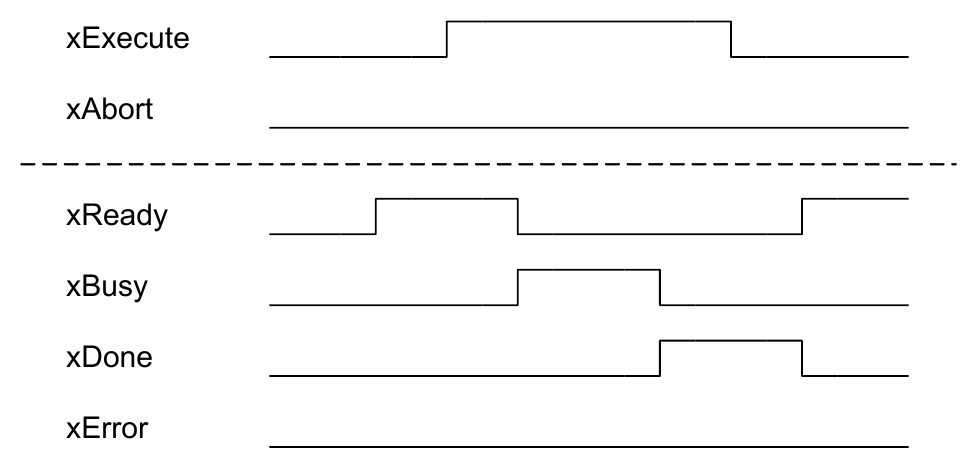
Fehlerfreie Abfrage
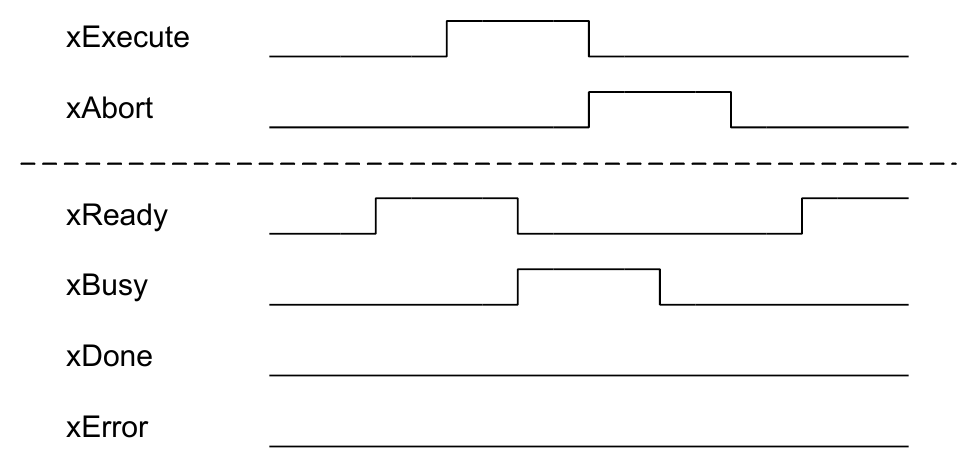
Abbruch während der Abfrage
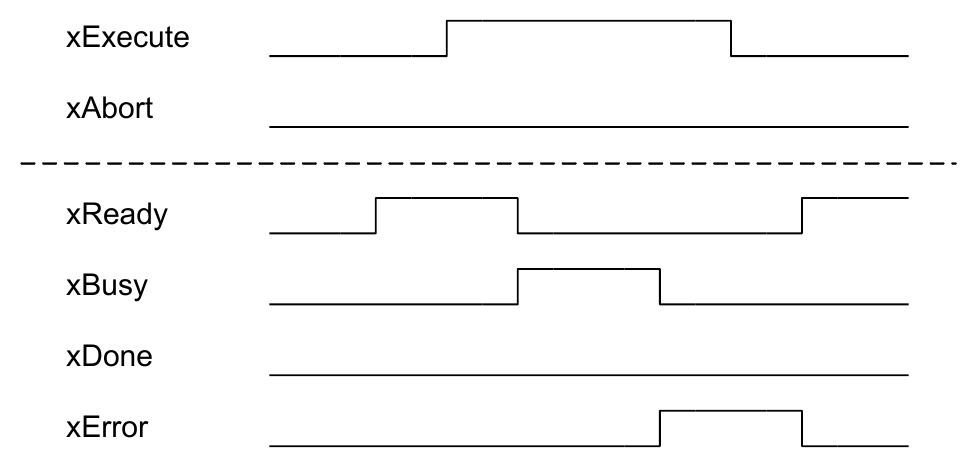
Fehler bei Abfrage