Konfiguration
Das Config Tool wird durch Klicken auf den Button „Set“ des jeweiligen Links geöffnet.
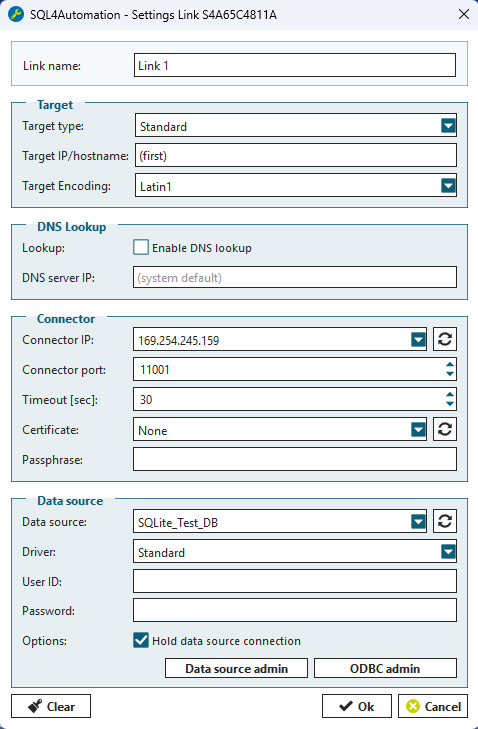
Zu jedem Link werden folgende Einstellungen gespeichert:
Link name
Bezeichnung des Links
Target
Target type — Art der Steuerung. Für die meisten Steuerungen wird die Einstellung „Standard“ verwendet. Für Stäubli, Siemens, KUKA und UTF-16 Steuerungen sind die jeweiligen Einstellungen zu verwenden.
Target IP — Auf einen Link darf sich nur die berechtigte Steuerung verbinden. Die Steuerung wird über ihre IP-Adresse identifiziert. Wird das Feld leer gelassen, speichert der Connector die IP derjenigen Steuerung, die sich als Erstes auf den Link verbindet. Anschließend kann nur noch diese Steuerung über diesen Link kommunizieren.
Bei einer Ultimate-Lizenz wird zusätzlich zur Target-IP auch der Hostname geprüft. Dadurch kann die IP der SPS dynamisch vergeben werden. Ändert sich die IP, fragt der Connector beim DNS-Server die aktuelle IP des Hostnamens ab. Stimmt diese mit der Absender-IP der Anfrage überein, wird die Anfrage zugelassen, andernfalls blockiert.
Target Encoding — Zeichenkodierung der Steuerung. Normalerweise Latin1.
DNS Lookup
Bei der Ultimate-Lizenz kann der DNS-Lookup aktiviert werden. Dadurch wird zusätzlich zur Target-IP auch der Hostname geprüft. So kann die IP der SPS dynamisch vergeben werden, ohne dass beim Connector eine Anpassung erforderlich ist.
Lookup — Aktiviert und deaktiviert den DNS-Lookup
DNS server ip — Definiert die IP-Adresse des DNS-Servers. Bleibt dieses Feld leer, wird der erstbeste verfügbare DNS-Server verwendet.
Connector
Connector IP — IP-Adresse oder Hostname, unter welchem der Link erreichbar ist
Connector Port — Port-Nummer zum Link
Timeout — Timeout in Sekunden. Wenn eine Anfrage nicht während dieser Zeit komplett ausgeführt und die Verbindung von der Steuerung nicht geschlossen wird, wird die Abfrage zurückgesetzt, die Verbindung zur Steuerung abgebrochen und der Port automatisch wieder freigegeben.
Certificate — Zertifikate für sichere TLS-Verbindungen. None bedeutet eine unverschlüsselte Verbindung.
Passphrase — Passwort für verschlüsselte Private Keys
Database
Datasource — Data-Source-Name (Datenquellenname) aus dem ODBC-Datenquellen-Administrator
Driver — Standard- oder SQLAPI++-Treiber. Normalerweise kann der Standard-Treiber verwendet werden. Um SQLCLR Stored Procedures auszuführen, verwenden Sie den SQLAPI++-Treiber.
User Id — Username für den Verbindungsaufbau zum SQL-Server
Password — Passwort zum Username
Wie eine DSN erstellt wird, ist im Kapitel Datenquellen beschrieben.
UID und PWD werden im SQL-Server zugewiesen und verwaltet.
[ODBC Admin…] startet den ODBC-Datenquellen-Administrator
Mit [OK] werden alle Änderungen übernommen und der Link wird neu gestartet.
(Zusätzliche Informationen zur ODBC-Konfiguration finden Sie weiter unten im Abschnitt ODBC-Datenquellen)